

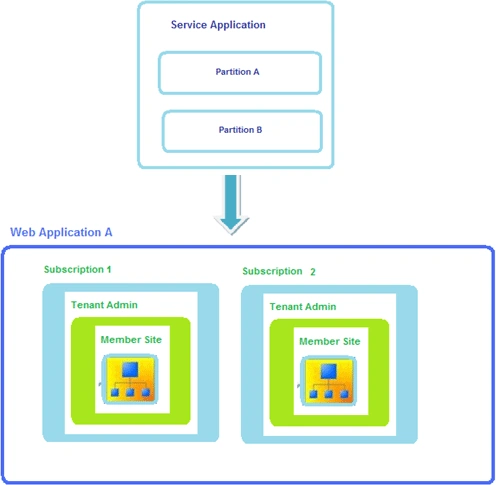
I have a partitioned User Profile service application and proxy. And I have one web application in which I have 2 subscriptions. In this I am going to assign the subscriptions to the partitioned user profile service application proxy.
Get the User Profile Service Application Proxy
$getUserProfileServiceApplicationProxy= Get-SPServiceApplicationProxy | ? {$_.DisplayName.Contains("Partitioned User Profile Service Application Proxy ")}
Get the SPSiteSubscription
Get-SPSiteSubscription => You will be getting all the subscriptions as shown in the following.

I am going to assign a single subscription to the user profile service application proxy so I am going to get that subscription id.
$subscription=Get-SPSiteSubscription -Identity "5ccd890c-6fad-411e-bbd0-e3699a612057"
To Check:
$subscription

Adding the subscription to the user profile service application proxy
Add-SPSiteSubscriptionProfileConfig -Identity $subscription -ProfileServiceApplicationProxy $getUserProfileServiceApplicationProxy
Same way I have added another subscription to the user profile service application proxy.
Go to Central Administration => Application Management => Manage service applications => Partitioned User Profile Service Application.

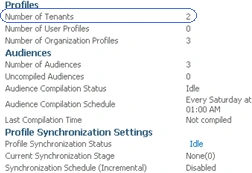
Click on the "Partitioned User Profile Service Application" to see the Manage User Profiles page, you could see Number of tenants equal to 2.
Join the conversation! Your thoughts help the community grow.