Introduction
When developing solutions using Microsoft SharePoint, Power Apps, and Power Automate, naming conventions play an important role in maintaining a clean and reliable application.
One small practice that can make development easier is avoiding spaces in SharePoint List and Document Library names.
For example, instead of creating a SharePoint list named Approval Tasks List, use ApprovalTasksList or Approval_Tasks_List.
Although SharePoint supports spaces in list and library names, avoiding them can make URLs cleaner and reduce unnecessary complexity when working with integrations, formulas, and automated workflows.
Let's understand why this is a good practice with a practical example.
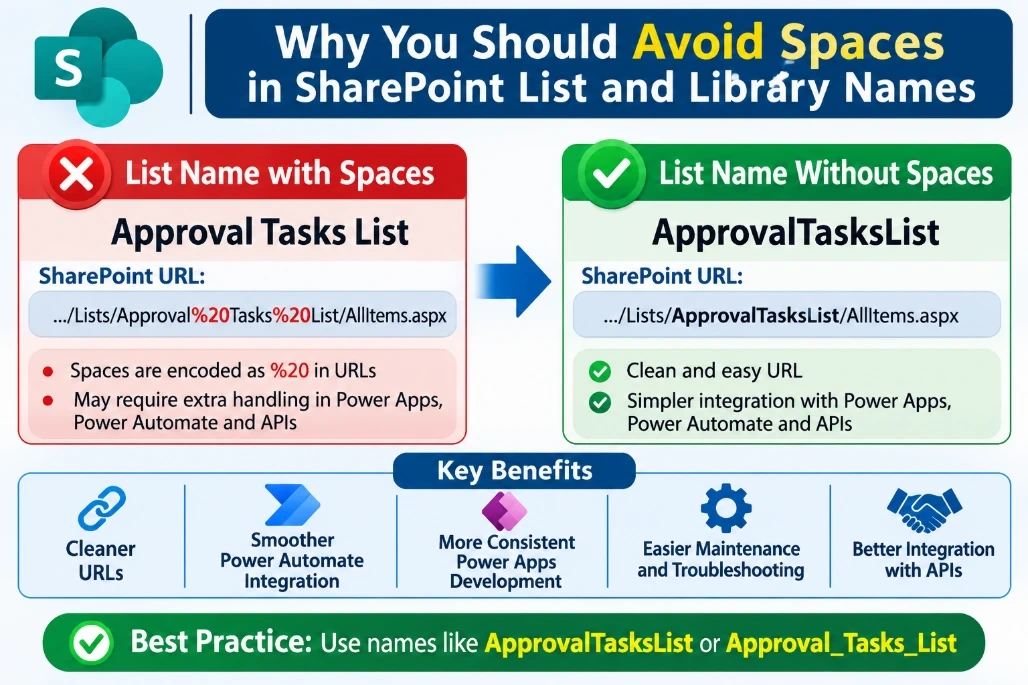
1. Cleaner SharePoint URLs
When you create a SharePoint list with spaces in its name, SharePoint URLs may represent those spaces using %20.
Example:
List name with spaces:
Approval Tasks List
URL:
.../Lists/Approval%20Tasks%20List/AllItems.aspx
List name without spaces:
ApprovalTasksList
URL:
.../Lists/ApprovalTasksList/AllItems.aspx
Using names without spaces makes URLs cleaner and easier to read, copy, and maintain.
2. Smoother Power Automate Integration
Power Automate frequently interacts with SharePoint lists through actions such as:
Get items
Create item
Update item
Delete item
When working with SharePoint list names containing spaces, URLs and certain expressions may require encoded values or careful handling of list references.
For example:
With spaces:
Approval Tasks List
Without spaces:
ApprovalTasksList
Using consistent names without spaces makes it easier for developers to identify and maintain SharePoint references in their flows.
3. More Consistent Power Apps Development
Power Apps connects directly to SharePoint lists and uses their names as data sources.
For example, when working with a list named Approval Tasks List, Power Apps may display the data source using a name containing spaces.
A list named ApprovalTasksList provides a simpler and more consistent naming convention.
Example:
Filter(
    ApprovalTasksList,
    Status.Value = "Pending"
)
This makes formulas easier to read and helps maintain consistency across applications.
4. Better Integration with APIs and Other Systems
SharePoint lists are frequently accessed through REST APIs, Power Automate, and external integrations.
For example, a SharePoint REST API request may look like this:
_api/web/lists/GetByTitle('ApprovalTasksList')/items
Using names without spaces can simplify URL handling and reduce the need to encode spaces when constructing URLs.
This is particularly helpful when integrating SharePoint with other services and systems.
5. Easier Maintenance and Troubleshooting
In enterprise applications, developers often work with multiple SharePoint lists and libraries.
Using a consistent naming convention helps developers:
Identify lists and libraries quickly.
Maintain Power Automate flows more easily.
Understand Power Apps formulas.
Reduce naming inconsistencies.
Simplify troubleshooting and documentation.
A good naming convention becomes especially valuable when applications grow and multiple developers work on the same project.
Practical Example
Imagine you are developing an Invoice Approval application using Power Apps, Power Automate, and SharePoint.
You need to create the following SharePoint lists:
List name with spaces | Recommended list name |
|---|
Approval Tasks List | ApprovalTasksList |
Invoice Details | InvoiceDetails |
GL Coding Details | GLCodingDetails |
Vendor Details | VendorDetails |
Invoice Documents | InvoiceDocuments |
By following this naming convention, you can maintain consistent references across SharePoint, Power Apps, and Power Automate.
My Recommendation
Whenever you create a new SharePoint List or Document Library, follow a consistent naming convention.
Recommended approaches:
ApprovalTasksList
InvoiceDetails
VendorDocuments
Approval_Tasks_List
Invoice_Details
Choose either PascalCase or underscores and follow the same approach throughout your project.
Important: Avoid changing existing SharePoint list or library names without checking their dependencies. Existing applications and flows may rely on their current names or internal references. Also, spaces are supported in SharePoint; avoiding them is a development best practice, not a technical requirement.
Conclusion
Small development practices can make a big difference in application maintenance.
Avoiding spaces in SharePoint List and Library names helps keep URLs readable, improves naming consistency, and makes development and troubleshooting easier across Power Apps and Power Automate.
Whenever you start a new SharePoint-based project, consider following a consistent naming convention from the beginning.
Keep your SharePoint structure simple, consistent, and easy to maintain!


Join the conversation! Your thoughts help the community grow.