Let me try to explain how to avoid session hijacking in ASP.Net web applications. First of all this is not a complete solution to stop session hijacking but this will help to stop the theft of session information to an extent. I welcome more suggestions and input on this topic so that we can discuss it here and share the knowledge and ideas to make it more useful. This solution might just help you to get an idea and to how to test your web application against session hijacking and avoid exploitation.
This article describes hijacking (theft) of a user Cookie from a browser. I am sure that after reading this article, everyone will test their applications at least once.
What is Session Hijacking?
"In computer science, session hijacking is the exploitation of a valid computer session, sometimes also called a session key, to gain unauthorized access to information or services in a computer system. In particular, it is used to refer to the theft of a magic cookie used to authenticate a user to a remote server. It has particular relevance to web developers, as the HTTP cookies used to maintain a Session on many web sites can be easily stolen by an attacker using an intermediary computer or with access to the saved cookies on the victim's computer".
Wikipedia.
OWASP.
Step into Session Hijacking
We all know that an ASP.NET session state is a technology that lets us to store server-side, user-specific data. A session state of a user is identified by a Session ID, which is called by:
ASP.NET_SessionId (SessionStateSection.CookieName, DefaultValue = "ASP.NET_SessionId").When the user requests a web page for the first time, the server will create a unique read-only string token (24 character string) as Session id and append it the request/response header. This will be used by the server each time to identify the user sending the request. This Session ID will expire when the user closes the browser. If the Session ID is embedded in the URL then this technique is also known as a cookie-less session.

Consider when a user named "User 1" sends a request to server, the first time a new ASP.NET Session Cookie will be generated by the server and sent back to "User 1" through the Response Header. The same Cookie will then be updated in the Request Header and sent back to the server for each and every request. Based on this Session Cookie, the server can identify each and every request sent by "User 1".
If the user is accessing the same web page or application from two different browsers or separate instances of the same browser then the session cookies generated will be different for each one. If you are using a single browser with multiple tabs then all the tabs share the same Session Cookie. Now a hacker or attacker gets in and steals the Cookie of "Browser 1" and updates the "Browser 2" Cookie. All the Session information of "Browser 1" will be copied to "Browser 2". This can easily be done by freely available tools or browser plugins like Modify Headers, Burp or Fiddler etcetera.
Will encrypting the session value help prevent hijacking?
I will say No, it will have less effect or have no effect at all. The reason why I said "No" is that, we are only encrypting the value not the browser session cookie. When a browser session cookie is stolen then whatever session information is linked to that cookie is not safe at all, even though it is in an encrypted form.
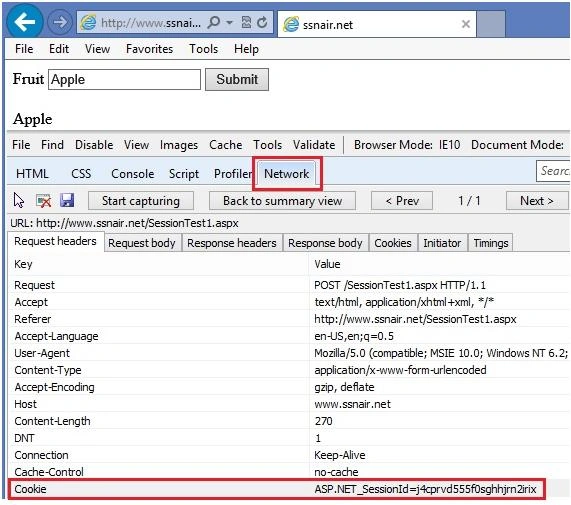
Let's start with an example. Here I have the following prerequisite. A Visual Studio version, IE with Developer Tools, Firefox with few add-ons like Live HTTP Headers, Modify Headers or Fiddler etcetera. Also I am using two different browsers like IE and Mozilla Firefox to show how the data is changed after hijacking a Session Cookie. Ensure you have IE developers or Fiddler or any other IE supportive tool installed that help us to look into the HTTP headers information. Enable the IE Developer tools, click on the "Network" button and followed by "Start Capturing" button.
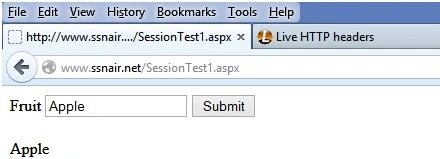
Now consider I have a web page that accepts a fruit name. I entered the fruit name as "Apple" and hit the submit button. The IE Developer tool will begin capturing the HTTP activities. Now if you observe, there are various tabs available like, Request Headers, Response Headers, Cookies, etcetera. Inside the Response Headers and Cookies we can see the generated ASP.NET_SessionId but that is not available in Request Headers. This means that this is the first request sent to the server by the user. Now again click on the "Submit" button and wait for the tool to complete the process. Yes, now the session information is shown in the Request Headers.
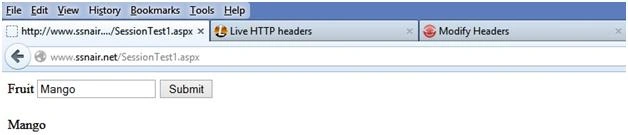
Now open a Firebox browser. Download and enable these freely available add-ons or extensions. Live HTTP Headers and Modify Headers. Using Live HTTP Headers we can view HTTP Response Headers related information of a URL. Install it and configure it to open in a separate tab. Modify Headers allows the user to add, modify or filter out HTTP request headers. Run the sample web page in a browser and enter a fruit name such as "Mango". Check the Live HTTP Headers tab where we will see that the HTTP headers information with a different session got generated. So for different browsers the Session Cookie will be different.
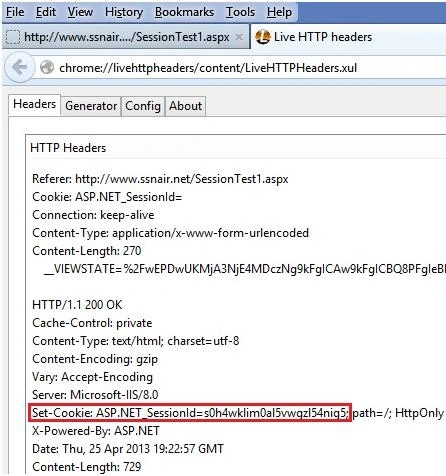
Let's change the Session Cookies
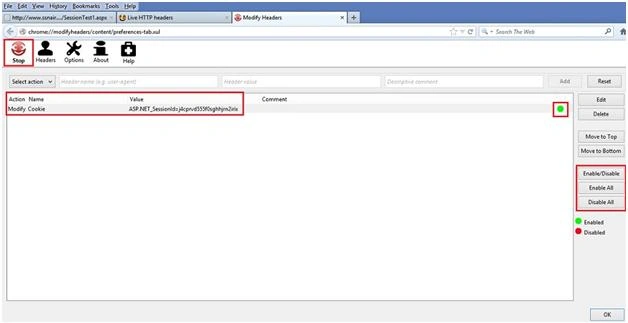
Now we will steal and override the Firebox Session Cookie with IE Session Cookie. Open the Response tab of IE Developer tool; copy the Session Cookie information into a notepad. Now go to Firefox and open the Modify Headers add-on. Enable the drop down and select "Modify", put in the next text box "Cookie" and in the value field copy and paste the ASP.NET_SessionId information. Click on "Enable", a green icon occurs for the modified entry. Then click on "Start", this will enable the process of overwriting the Cookie information the next time we rerun the web page.
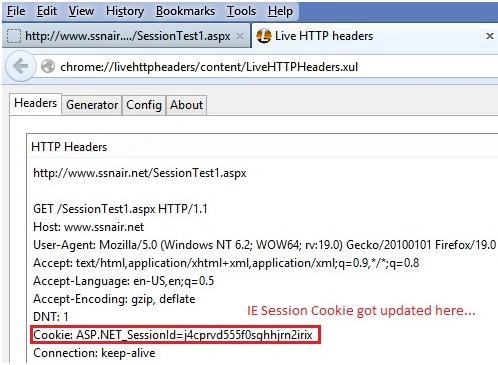
Rerun the web page and we will see the value got changed from "Mango" to "Apple". Now check the Live HTTP Headers information, we will see the Cookie got changed to a new Session Cookie. So in this way if someone has access to the Session Cookie it can be easily misused. We can generate the same steps using Fiddler, Burp etcetera.
Yes, by implementing SSL.
Also, in addition to that we can use the following method to make it more secure.
We can't stop the theft of session cookies through any these tools. But we can handle this situation at the code level in the application. How about an event that handles each and every request handled by an ASP.Net application, that always fires whenever a request is made. If a page uses scripts or an image or HTML or any files, this event is likely to send more requests to the server, consequently this event fires more than any other events in Global.asax. The event is called Application_AcquireRequestState. Application_AcquireRequestState and is called once for each HTTP Get or Post request. This event occurs when ASP.NET acquires the current state (for example, session state) that is associated with the current request.

On this event we can validate the hacker or attacker system IP address for each Session request. In order to do that we need to hold the user IP addresses (during login) in the Session and compare it against the actual hacker system IP address. If the session IP address and system IP address are different then we can direct the user to logout or show an unauthorized access page because each system needs a unique IP address to work properly on a network or World Wide Web.
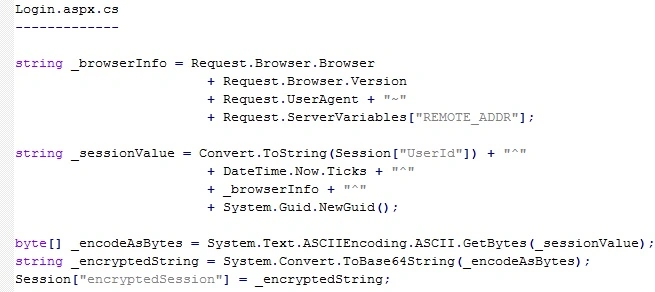
Here I am creating an encrypted session value that consists of Browser and User information that we can validate against the hacker information. At Global.asax we can validate this information on the Application_AcquireRequestState event. The code is given below.
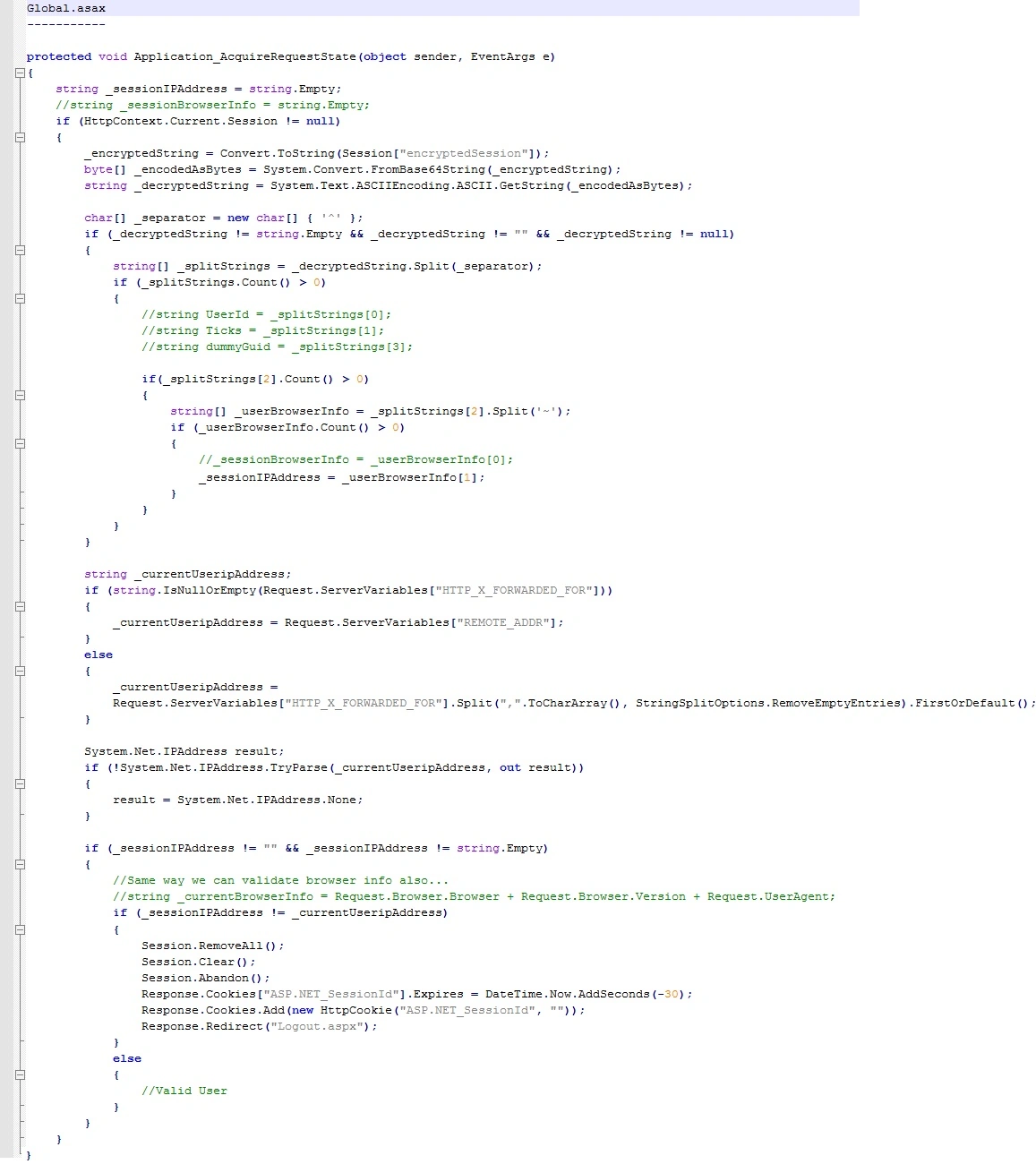
If the user is behind a firewall then using HTTP_X_FORWARDED_FOR we can get the actual system IP address. The X-Forwarded-For (XFF) HTTP header field is a de facto standard for identifying the originating IP address of a client connecting to a web server through an HTTP proxy or load balancer. This field holds the value in a comma separated list of IP addresses and the left-most is the original client address. Against this we are comparing the IP address in the session.
We also need to secure the Session Cookie.
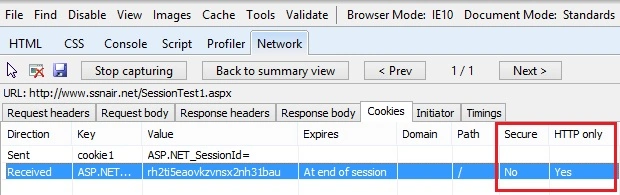
After the SSL configuration is done the following updates the entries into the web.config and Global.asax files to make the cookie more secure and have a secure HTTP connection.
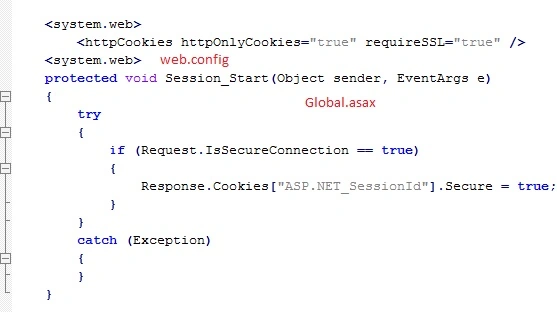
That's it; in this way we can avoid session hijacking to an extent. Please post your comments.
Thank You!


Dipen KotadiaPosted Jan 7, 2025, 5:04 AM
I use this code which is defined solution but its not working. is there any other solution for asp.net mvc
asmita kamblePosted Jun 23, 2021, 5:31 AM
Hi...Thank you for this article...I have used this code...but this is working only for HTTP web application Not for HTTPS application.._sessionIPAddress and _currentUseripAddress these values are getting same in https application...therefore it is not remove/kill/abandon the session......Can you please help me for https.
tushar PandaPosted Aug 29, 2018, 5:00 AM
How to declare _encryptedString in global.asax.
piya parekhPosted May 23, 2018, 3:09 AM
Hi i implement this and work great but after that i could not login because randonstr is change and that because of SSL true in web config
vishal singhPosted Apr 7, 2018, 6:31 AM
In Application_AcquireRequestState method you have used variable _encryptedString without declaring it.
Suvendu Shekhar GiriPosted Feb 5, 2017, 10:57 PM
Good article! But I have a question. You have mentioned "So for different browsers the Session Cookie will be different." I think it would be more correct if we say, "for different session , the session cookie will be different". Am I wrong here?
Sertunc SELENPosted Dec 16, 2016, 7:49 AM
I could not work this example :(
Sr KarthigaPosted Jul 7, 2016, 6:50 AM
Nice explanation
Sr KarthigaPosted Jul 7, 2016, 6:50 AM
Good one
Rajeesh MenothPosted Aug 10, 2015, 10:58 AM
Thank for the information Suthish Nair sir
Suthish NairPosted Aug 10, 2015, 10:51 AM
Rajeesh Menoth click on + next to g+ above below article title, you will get lot of options..
Rajeesh MenothPosted Aug 4, 2015, 7:24 AM
Great One Suthish Nair sir, Hai Mahesh Chand sir ,How ? we can bookmark this type of good articles.
Norbert APosted Nov 7, 2014, 6:20 AM
Thank you sir, Really good info... but if anyone try within same system means, the ip address wont change know, then how it will work...
Sandeep VemulaPosted Sep 24, 2014, 12:55 AM
good information..
vishal hatiskarPosted Jul 8, 2014, 6:18 AM
My site is with SSL implmented but still this type of CSRF attack identify.As there is no relation between SSL and CSRF.We are getting user session value with the help of one tool in that case SSL didnt work.Your solution work where no dynamic IP config at user Organization.But what about if IP changing for every request.
vishal hatiskarPosted May 7, 2014, 6:30 AM
Thanks for sharing good concept and i tried the same But if the IP address is changing in case of dynamic IPaddress on every request the solution is fail .can you suggest alternate solution for the same.
sahil kakkarPosted Jan 29, 2014, 11:41 PM
And user's Ipaddress are liable to change frequently
sahil kakkarPosted Jan 29, 2014, 5:39 AM
Awsome sir,but is their any other way without using session
Suthish NairPosted Apr 30, 2013, 8:16 AM
When a Senior Tech Architect says its good, then am so happy :) .. Thanks man..
Vidya Vrat AgarwalPosted Apr 29, 2013, 1:11 PM
Good one.
Suthish NairPosted Apr 29, 2013, 6:02 AM
Thanks IE, test it and lemme know your observations...
Ibrahim ErsoyPosted Apr 29, 2013, 5:39 AM
Awesome! Keep it up,Suthish! I learnt many things today.