Nowadays there is tons of information out there and finding the correct one is not an easy task. When you start your journey in programming and want to have a comprehensive guide it is always better to look for a guideline that will walk you through the full process.
This article will help you have a roadmap that will teach you what is important and what to learn.
PS: you can download a roadmap from the GitHub repository TuralSuleymani/DecodeBytes at tutorial/dotnet-roadmap (github.com)
Everything starts from Software fundamentals
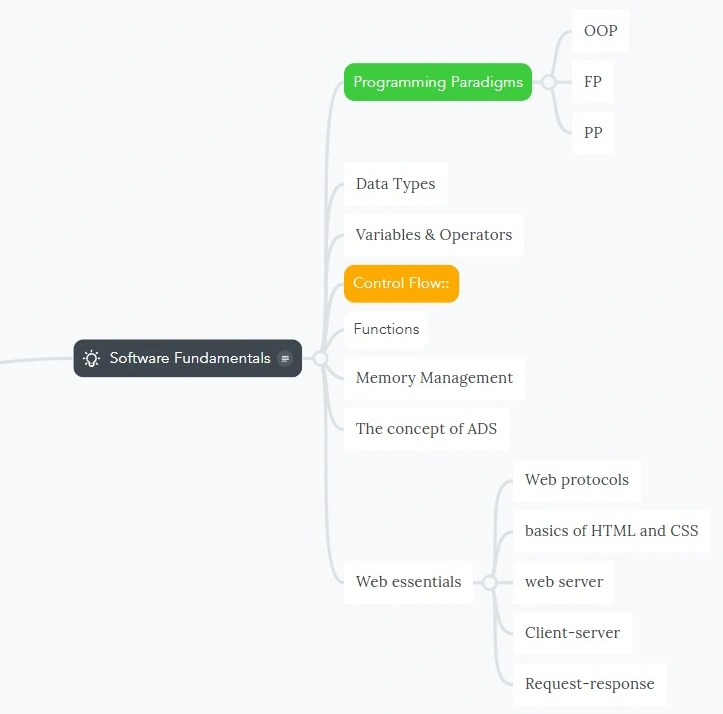
Software fundamentals are the building blocks that all software is made from. They provide a foundation for understanding how computers work, how programs are written, and how to solve problems with code. Just like learning the alphabet is essential before you can write a novel, understanding software fundamentals is essential before you can become a proficient programmer.
Software fundamentals cover some basic aspects of programming knowledge.
- Algorithms: An algorithm is a set of step-by-step instructions that tell a computer how to solve a problem. Learning about algorithms helps you break down complex problems into smaller, manageable steps that can be translated into code.
- Data Structures: Data structures are specialized formats for organizing and storing data in a computer's memory. Understanding different data structures (like arrays, lists, and trees) helps you choose the right way to store and access information in your programs.
- Programming Paradigms: Having a basic understanding of Object-oriented programming, Procedural Programming, and Functional programming will help you in the future when you dive into the details of these paradigms.
Software fundamentals cover concepts like data types, control flows, variables, and operators. These are essential building blocks for any programming language.
- Data Types: Data types define the kind of data a variable can hold and the operations that can be performed on it. Common data types include.
- integers (whole numbers)
- Floats (numbers with decimal points)
- Characters (single letters or symbols)
- Booleans (logical values of true or false)
- Strings (sequences of characters)
- Variables: Variables are named containers that store data in a computer's memory. You can think of them as labeled boxes where you can keep different types of information.
- Operators: Operators are symbols that perform operations on data. There are different categories of operators, including.
- Arithmetic operators (+, -, *, /) for performing mathematical calculations.
- Comparison operators (==, !=, <, >, <=, >=) for comparing values.
- Logical operators (&&, ||, !) for performing logical operations on Boolean values.
- Assignment operators (=, +=, -=, *=, /=) for assigning values to variables and performing calculations at the same time.
- Control Flow: Control flow statements dictate the order in which program instructions are executed. They allow programs to make decisions and repeat tasks based on certain conditions. Common control flow statements include.
- Conditional statements (if, else, elif): These statements allow you to execute different code blocks based on whether a condition is true or false.
- Loops (for, while): Loops allow you to repeat a block of code a certain number of times or until a condition is met.
- Software fundamentals encompass a broader range than just the core programming concepts. When it comes to web development, understanding these web essentials is crucial.
- Web Protocols: These are the rules that govern how data is transmitted over the web. A key protocol you'll encounter is:
- HTTP (Hypertext Transfer Protocol): This is the foundation of communication between web browsers and servers. It defines how requests are made, how data is formatted, and how responses are sent back.
Basics of HTML and CSS
- HTML (HyperText Markup Language): HTML is the language used to structure the content of a web page. It defines the document layout using tags that tell the browser what kind of content is being displayed (headings, paragraphs, images, etc.).
- CSS (Cascading Style Sheets): CSS controls the visual presentation of a web page. It allows you to style elements like fonts, colors, backgrounds, and layouts.
Web Server and Client-Server Model
- Web Server: A web server is a computer program that stores web pages and delivers them to web browsers when requested. Think of it as a library that holds all the information for your website.
- Client-Server Model: This model describes the interaction between a web browser (client) and a web server. The client (your browser) sends a request (e.g., visiting a website) to the server, and the server processes the request and sends back a response (the web page you see).
Request-Response Process
This process outlines how communication happens between a browser and a server
- Request: The user enters a URL in the browser or clicks on a link. The browser translates this into an HTTP request containing information like the requested URL and any additional data (e.g., form submissions).
- Server: The browser sends the request to the web server specified in the URL.
- Processing: The server receives the request, processes it (retrieving the requested webpage or performing an action), and generates a response.
- Response: The server sends an HTTP response back to the browser. This response includes the requested data (the HTML content) and additional information like status codes.
- Rendering: The browser receives the response, interprets the HTML code, and displays the web page according to the included styling (CSS).
Understanding these web essentials alongside software fundamentals provides a solid foundation for building web applications. With this knowledge, you can move on to learning more advanced web development concepts and programming languages.
Having a solid grasp of software fundamentals will give you a strong foundation for learning any programming language. It will help you write cleaner, more efficient code, solve problems more effectively, and ultimately become a better programmer.
Learning .NET essentials
Before diving into details of C#, it would be better to understand the framework and the runtime itself.

Understanding the underlying concepts of the .NET runtime can definitely be beneficial before diving into C#. Here's a core concept.
- CLR (Common Language Runtime): The CLR is the heart of the .NET framework. It's the virtual environment that manages the execution of .NET code. It handles tasks like memory management, security, and garbage collection.
- Manifest: The manifest is a file within a .NET assembly (like a .dll file) that contains metadata about the assembly itself. It includes information like the assembly name, version, dependencies on other assemblies, and security information.
- Metadata: Metadata is essentially data about your program. In the .NET world, it describes the types, methods, and resources defined in your code. The CLR uses this metadata to understand the structure of your program and execute it correctly.
- IL Code (Intermediate Language): C# code doesn't directly run on the computer's hardware. Instead, the C# compiler translates your code into a special set of instructions called IL (Intermediate Language). This IL code is designed to be portable and run on any system with a compatible CLR.
- JIT (Just-In-Time compilation): The JIT compiler is a component of the CLR that translates IL code into machine code (native code) specific to the processor architecture it's running on. This translation happens at runtime, which is why it's called Just-In-Time compilation.
- FCL/BCL (Framework Class Library/Base Class Library): These terms are often used interchangeably. It's a collection of pre-written classes and functionalities that provide common operations like file access, database interaction, networking, and more. These libraries save you time by providing pre-built solutions for common programming tasks.
- CLI (Common Language Infrastructure): This is a broader specification that defines the standards for creating and running programs on the .NET platform. It includes the CLR, libraries, and tools for building and deploying .NET applications.
Understanding these concepts will give you a deeper appreciation of how C# code works behind the scenes.
You can start by learning the basic concepts of C# syntax, variables, data types, and control flow. This will give you a foundation for understanding how to write code. Then, you can delve deeper into the .NET runtime concepts to solidify your knowledge of the platform.
Learning C#
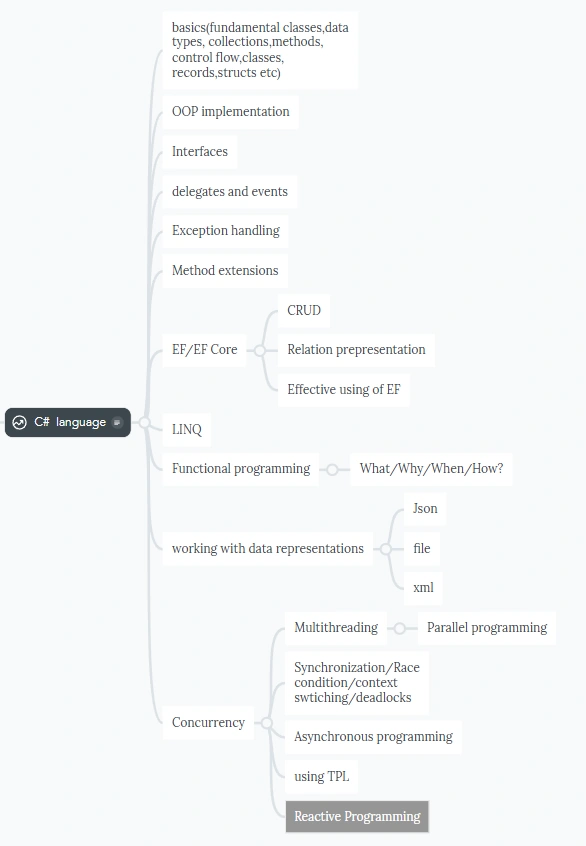
- C# Fundamentals: This is the foundation. Make sure you grasp core concepts like variables, data types (int, string, bool, etc.), operators (+, -, *, /), control flow statements (if/else, for, while), and basic building blocks like classes, records, and structs.
- OOP Implementation: Object-oriented programming(OOP) is a key paradigm in .NET. Here, you'll learn about encapsulation (data hiding), inheritance (creating child classes from parent classes), polymorphism (objects responding differently to the same message), and abstraction (focusing on what an object does rather than how).
- Interfaces: Interfaces define contracts that classes must adhere to. They are crucial for loose coupling (relying on functionality rather than specific implementations) and promoting code flexibility.
- Delegates and Events: Delegates are function pointers that allow you to pass methods as arguments. Events are a communication mechanism between objects, notifying interested parties when something happens.
- Generics: Generics lets you create code that can work with various data types without sacrificing type safety. This promotes code reusability and maintainability.
- Exception Handling: Exceptions are errors that occur during program execution. Learn how to handle them gracefully using try/catch blocks to prevent application crashes and provide informative error messages.
- Method Extensions: Method extensions allow you to add functionality to existing classes without modifying the original code. This is a powerful technique for improving code readability and maintainability.
- Entity Framework Core (EF Core): EF Core is an Object-Relational Mapper (ORM) that simplifies data access in .NET applications. It allows you to work with databases using C# objects, reducing the need for raw SQL queries.
- LINQ: Language Integrated Query (LINQ) is a powerful syntax for querying data in various sources (databases, collections, XML) using C# syntax. This makes data manipulation more concise and readable.
- Functional Programming: Functional programming emphasizes immutability (data doesn't change) and pure functions (always return the same output for the same input). While not core to .NET, understanding these concepts can improve code clarity and maintainability.
- Data Representations: Learn how to work with data in different formats like XML (Extensible Markup Language), JSON (JavaScript Object Notation), and files. This is essential for data exchange and persistence.
- Concurrency: Concurrency deals with handling multiple tasks or operations happening simultaneously. It includes asynchronous programming (performing tasks without blocking the main thread), parallel programming (executing multiple tasks concurrently), and multithreading (using multiple threads for improved performance).
- Synchronization and Thread Safety: When working with multiple threads, it's crucial to synchronize access to shared resources to avoid race conditions (unexpected outcomes due to uncoordinated access) and deadlocks (threads waiting for each other indefinitely). Learn about concepts like context switching, synchronization primitives (locks, mutexes), and how to achieve thread-safe code.
- Task Parallel Library (TPL): TPL is a set of classes and tools in .NET that simplify parallel programming tasks. It provides a higher-level abstraction compared to directly managing threads.
This roadmap covers a solid foundation for becoming a .NET developer. Remember to practice and build projects to solidify your understanding. There are many online resources and tutorials available to help you on your journey!
.NET Technologies
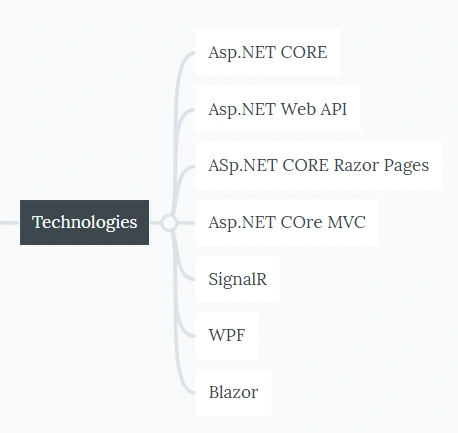
- ASP.NET Core: This is the core framework for building modern web applications in. NET. It's open-source, cross-platform (runs on Windows, macOS, and Linux), and high-performance. It provides a foundation for building various web applications using different UI paradigms.
- ASP.NET Core Web API: This is a sub-framework within ASP.NET Core specifically designed for building web APIs. It excels at creating RESTful APIs that provide data and functionality to other applications (mobile apps, single-page applications, etc.) in a structured way.
- ASP.NET Core Razor Pages: Razor Pages are a lightweight model for building web applications within ASP.NET Core. They combine HTML with C# code (using Razor syntax) to create dynamic web pages that handle user interactions and data access. It's a good option for simpler web applications or quick prototypes.
- ASP.NET Core MVC: Model-View-Controller (MVC) is a classic architectural pattern for building web applications. ASP.NET Core MVC provides a structured way to separate concerns between models (data), views (presentation), and controllers (handling user requests). This offers more control and flexibility compared to Razor Pages for complex applications.
- SignalR: SignalR is a real-time communication library for ASP.NET Core. It enables bi-directional communication between a server and clients (web browsers, mobile apps), allowing for features like live updates, chat applications, and collaborative editing.
- WPF (Windows Presentation Foundation): WPF is a UI framework for building desktop applications with rich visuals and user experiences. It's specifically designed for the Windows platform and allows for creating visually stunning applications with custom controls and animations.
- Blazor: Blazor is a relatively new UI framework that allows you to build web UI with C# instead of JavaScript. It offers two main models: Blazor WebAssembly for single-page applications with a focus on web performance and Blazor Server for server-side rendering with real-time updates.
Choosing the right technology
The best technology for your project depends on your specific needs. Here's a quick guide.
- For web APIs: Use ASP.NET Core Web API.
- For simple web applications or prototypes: Consider Razor Pages.
- For complex web applications with a clear separation of concerns: Choose ASP.NET Core MVC.
- For real-time communication features: Integrate SignalR.
- For desktop applications on Windows: Use WPF.
- For web UI with C# instead of JavaScript: Explore Blazor (consider WebAssembly or Server, depending on your needs).
Database skills for .NET developers
Database skills vary depending on your projects. I have worked on different projects, and some of them had really deep-dive requirements related to databases.
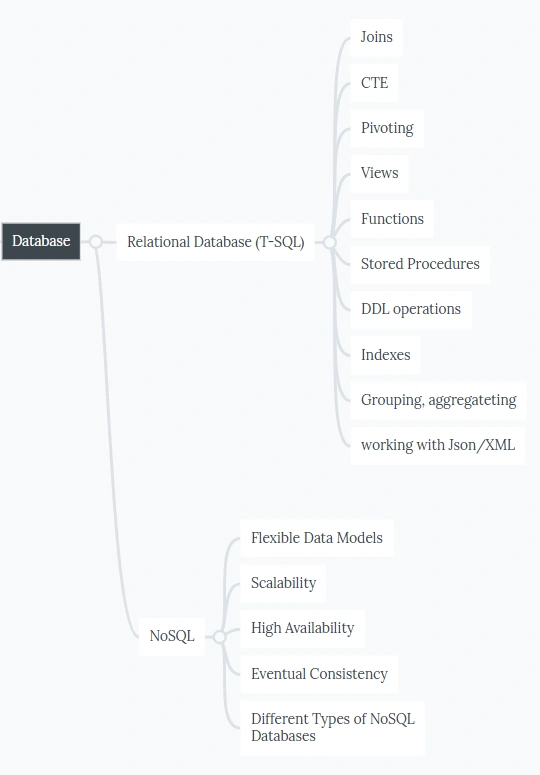
1. Relational Database Topics
- Joins: This is a fundamental concept for retrieving data from multiple related tables in a relational database. Different join types (inner join, left join, etc.) allow you to specify how rows from different tables should be matched and retrieved based on relationships.
- Common Table Expressions (CTEs): These are temporary named result sets defined within a SQL query. They can be used to simplify complex queries and improve readability by breaking down the logic into smaller, reusable steps.
- Pivoting: This technique transforms data from rows to columns, often used for data summarization and reporting. It allows you to present data in a different format for easier analysis.
- Views: Views are virtual tables based on underlying tables or other views. They provide a customized way to expose data to users without granting direct access to the base tables.
- Functions: These are reusable blocks of SQL code that perform specific operations. They can take parameters and return a value, improving code reusability and modularity.
- Stored Procedures: Stored procedures are precompiled SQL code stored on the database server. They can accept parameters, execute complex logic, and improve performance for frequently used operations.
- DDL (Data Definition Language) Operations: These are SQL statements used to define the structure of the database, like creating tables, columns, indexes, and constraints.
- Indexes: Indexes are special data structures that speed up data retrieval by organizing data in a specific order. Choosing the right indexes can significantly improve query performance.
- Grouping and Aggregation: Grouping allows you to categorize data based on a specific column and then use aggregate functions (SUM, COUNT, AVG, etc.) to summarize data within those groups.
- Working with XML/JSON: Relational databases can store and manipulate XML and JSON data. This allows for data exchange with other systems and working with semi-structured data within the relational model.
2. NoSQL Topics
- Flexible Data Models: Unlike relational databases with a fixed schema, NoSQL databases offer flexible data models that can accommodate data with varying structures. This is useful for storing data that doesn't fit neatly into a relational structure.
- Scalability: NoSQL databases are often designed to scale horizontally, meaning you can add more servers to handle increased data volume and user requests. This is in contrast to vertical scaling (upgrading hardware) common in relational databases.
- High Availability: NoSQL databases often prioritize high availability, ensuring minimal downtime and continuous operation even during server failures. They achieve this through techniques like replication (copying data across multiple servers).
- Eventual Consistency: Unlike relational databases that guarantee data consistency across all replicas immediately (ACID properties), NoSQL databases may exhibit eventual consistency. This means data changes may take some time to propagate across all replicas, but eventually, all copies will be consistent.
- Different Types of NoSQL Databases: There are various NoSQL database types, each with its strengths:
- Document Databases: Store data as JSON-like documents and are good for managing hierarchical data. (e.g., MongoDB)
- Key-Value Stores: Offer very fast lookups based on a unique key and are ideal for simple data like user profiles or shopping cart items. (e.g., Redis)
- Column Family Stores: Organize data by columns instead of rows and are efficient for handling large datasets with frequently accessed columns. (e. Cassandra)
- Graph Databases: Store data as nodes (entities) and relationships between them, ideal for representing social networks or recommendation systems. (e.g., Neo4j)
Understanding both relational and NoSQL databases equips you as a .NET developer to choose the right tool for the job based on your project's specific needs.
Messaging and Streaming Tools for .NET Developers
These tools facilitate asynchronous communication between different parts of an application or between microservices. They enable applications to send and receive messages reliably and efficiently, decoupling message senders from receivers. This improves scalability, fault tolerance, and loose coupling in distributed systems.
- Azure Service Bus (ASB): A cloud-based messaging solution from Microsoft that offers queues, topics, event hubs, and relay services. It integrates well with other Azure services and provides a reliable and scalable messaging platform for .NET applications.
- RabbitMQ: A popular open-source message broker that implements the Advanced Message Queuing Protocol (AMQP). It's known for its flexibility, reliability, and ease of use. There are client libraries available for .NET development.
- MassTransit: A powerful open-source service bus specifically designed for .NET development. It simplifies building applications that leverage message queues and integrates well with various message brokers like RabbitMQ and Azure Service Bus.
- Apache Kafka: A distributed streaming platform originally developed by LinkedIn. It excels at handling high-volume, real-time data streams and offers features like message persistence, partitioning, and replication. There are .NET client libraries available for interacting with Kafka clusters.

- AWS Kinesis: A managed service by Amazon Web Services for handling real-time data streams. It offers various components like Kinesis Data Streams for ingesting data, Kinesis Firehose for delivering data to other destinations (e.g., S3), and Kinesis Data Analytics for real-time data processing. There are .NET SDKs available for working with AWS Kinesis.
Choosing the Right Tool
The best tool depends on your specific needs. Here's a basic guide.
- For cloud-based messaging with tight integration to Azure services: Consider Azure Service Bus.
- For open-source flexibility and AMQP support: Explore RabbitMQ with a .NET client library like MassTransit.
- For high-volume, real-time data streams with. NET-centric development: Look into MassTransit or Apache Kafka with a .NET client library.
- For real-time data streaming within the AWS cloud: Utilize AWS Kinesis and its .NET SDK.
Containerization and orchestration
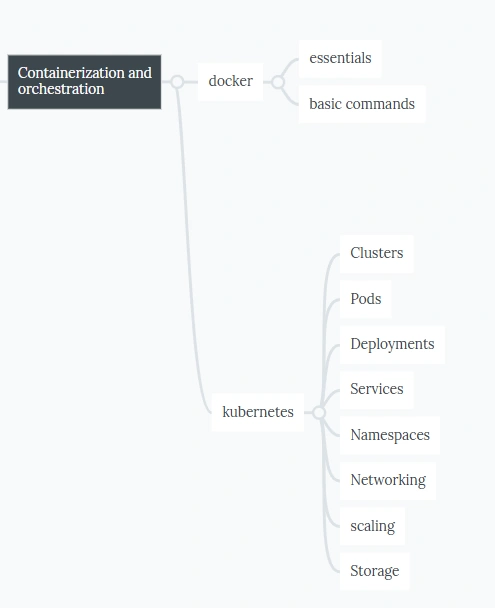
Docker and Kubernetes play a significant role in the lives of modern .NET developers, especially those working on cloud-based deployments or microservices architectures. Here's how these tools impact .NET development.
Containerization with Docker
- Packaging and Deployment: Docker allows you to package your .NET application (code, dependencies, libraries) into a lightweight, portable unit called a container. This containerized application can then be deployed consistently across different environments (development, testing, production) regardless of the underlying operating system. This simplifies deployment and streamlines the development workflow.
- Isolation and Consistency: Each Docker container runs in isolation from other containers, ensuring that applications don't interfere with each other's resources or dependencies. This promotes consistency and predictability in application behavior across environments.
- Version Control and CI/CD: Docker images can be version controlled using Docker Hub or private registries. This allows for easy rollbacks to previous versions if needed and integrates well with Continuous Integration/Continuous Delivery (CI/CD) pipelines for automated builds and deployments.
Orchestration with Kubernetes
- Managing Multiple Containers: While Docker excels at building individual containers, Kubernetes shines in managing and orchestrating deployments of multiple containers that work together as a system (often called microservices). It automates tasks like container scaling, load balancing, and health checks, ensuring a highly available and scalable application.
- Declarative Configuration: Kubernetes uses a declarative approach, where you define the desired state of your application (number of replicas, resource allocation) and Kubernetes takes care of achieving and maintaining that state. This simplifies deployment management and reduces configuration errors.
- Cloud Agnostic: Kubernetes is designed to be cloud-agnostic, meaning you can deploy your containerized .NET application on various cloud platforms (Azure Kubernetes Service, Amazon Elastic Kubernetes Service, Google Kubernetes Engine) or even on-premises deployments with tools like Rancher.
Benefits for .NET Developers
- Faster Development Cycles: Containerization and orchestration streamline development workflows by simplifying deployment and management. Developers can focus on writing code and less on infrastructure configuration.
- Improved Scalability: Scaling your .NET application becomes easier with Kubernetes. You can define how many instances of your containerized application to run based on demand, allowing for efficient resource utilization.
- Increased Reliability: Kubernetes offers features like self-healing and automatic rollbacks, improving the overall reliability and resilience of your .NET application.
Learning Curve
While Docker and Kubernetes offer significant benefits, there's a learning curve involved in understanding and effectively using them. However, many resources and tutorials are available to help .NET developers get started with containerization and orchestration.
Docker and Kubernetes are powerful tools that can significantly enhance the development and deployment experience for .NET developers. By leveraging containerization and orchestration, you can build and deploy modern, scalable, and reliable .NET applications.
Version control and testing
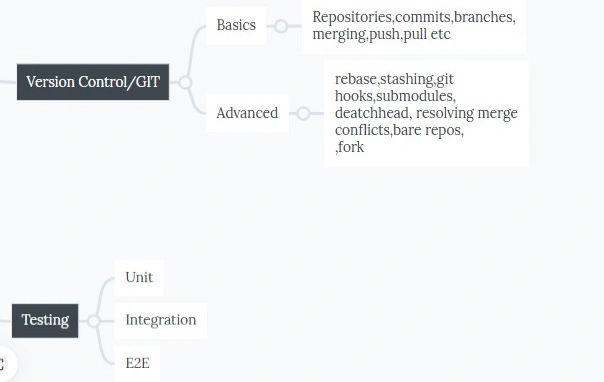
- Version Control: Git is a distributed version control system (DVCS) that allows you to track changes to your codebase over time. It creates a history of all changes made, enabling you to revert to previous versions if necessary, collaborate with other developers effectively, and maintain a clear record of project evolution.
- Collaboration: Git facilitates seamless collaboration between developers working on the same project. Multiple developers can work on different parts of the codebase simultaneously, merge their changes without conflicts, and manage different branches for new features or bug fixes.
- Branching and Merging: Git's branching feature allows you to create isolated copies of the codebase (branches) to experiment with new features or bug fixes without affecting the main codebase (master branch). When ready, you can merge changes from the feature branch into the master branch.
- Code Sharing: Platforms like GitHub or Azure Repos built on top of Git enable code sharing among developers and communities. You can share your code publicly or privately, collaborate on open-source projects, and access a vast repository of existing code and libraries.
Testing (Unit, e2e, and Integration)
- Quality Assurance: Testing is an essential practice for ensuring the quality, reliability, and functionality of your .NET application. It helps identify bugs, regressions, and potential problems early in the development process, saving time and effort in the long run.
Types of Testing
- Unit Testing: Unit tests focus on isolated units of code (methods, classes) within an application. They verify the expected behavior of these individual units with specific inputs and outputs. Unit tests are typically written by developers using frameworks like NUnit, xUnit, or MSTest.
- Integration Testing: Integration tests assess how different modules or components of an application interact with each other. They ensure proper data flow and communication between these components. Integration tests can involve more complex setups than unit tests.
- End-to-End Testing (e2e Testing): E2e tests simulate real-world user interactions with the entire application, verifying its overall functionality from beginning to end. They often involve testing user interfaces, database interactions, and external APIs. Tools like Selenium or Cypress are popular for e2e testing.
Conclusion
Being a .NET developer is not just learning C# language syntax. It requires more and more tools and techniques. You should understand the development ecosystem rather than sticking to a concrete language. It requires a lot of time and passion.
So, keep learning!


Mohammed SalahiPosted Jul 14, 2024, 5:58 AM
Thank you very much for the effort you put into this article