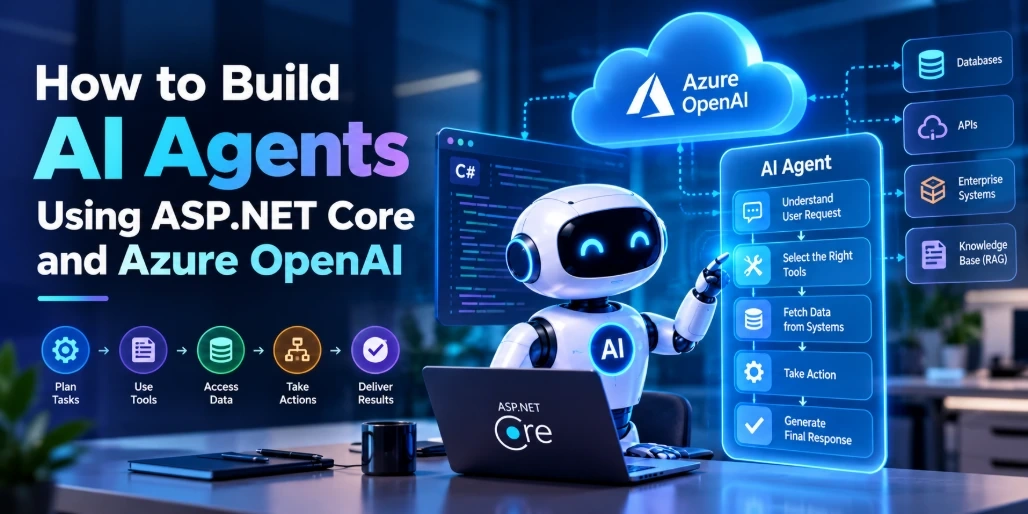
Artificial Intelligence is moving beyond traditional chatbots toward autonomous systems that can understand instructions, make decisions, interact with external tools, and execute multi-step tasks. These systems, commonly known as AI agents, are becoming an important part of modern enterprise application development.
For .NET developers, combining ASP.NET Core with Azure OpenAI provides a practical foundation for building intelligent applications that can integrate with existing business systems, databases, APIs, and cloud services.
Unlike a conventional chatbot that primarily generates text, an AI agent can interpret a user's objective, determine which tools are required, retrieve relevant information, and perform specific operations within predefined permissions.
For example, an AI-powered sales assistant could retrieve customer information from a CRM, summarize previous interactions, identify pending opportunities, and prepare a follow-up recommendation.
In this article, we will explore how to build an AI agent using ASP.NET Core and Azure OpenAI, understand its architecture, configure the development environment, implement a basic agent API, and prepare the application for enterprise deployment.
What Is an AI Agent?
An AI agent is a software system powered by a large language model (LLM) that can interpret user instructions, reason about a task, select appropriate tools, and execute actions to achieve a defined objective.
A traditional chatbot generally follows a request-and-response pattern. An AI agent can perform multiple operations before returning a final response.
Consider a customer asking:
"Find the latest order for customer John Smith and tell me whether it has been shipped."
A traditional chatbot may only explain how to check an order.
An AI agent could:
Understand the customer's request.
Identify the required customer information.
Call a customer lookup function.
Retrieve the latest order.
Check the shipment status through an external API.
Summarize the results in natural language.
The agent does not independently gain unrestricted access to business systems. Developers define the available tools, permissions, execution rules, and validation logic.
Why Use ASP.NET Core and Azure OpenAI for AI Agent Development?
ASP.NET Core is a cross-platform framework for building web applications, REST APIs, and enterprise backend services. Azure OpenAI provides access to supported AI models through Microsoft's cloud infrastructure.
Combining these technologies allows development teams to integrate AI capabilities into existing .NET applications without rebuilding their entire software architecture.
Some important advantages include:
1. Integration with Existing .NET Applications
ASP.NET Core can connect AI agents with existing business applications, databases, authentication systems, and third-party APIs.
2. Enterprise-Ready Infrastructure
Developers can use Azure services for identity management, monitoring, networking, secrets management, and application hosting.
3. Secure Authentication
Microsoft Entra ID and managed identities can help applications authenticate with Azure services without storing long-lived API keys in application code.
4. Flexible AI Model Selection
Azure OpenAI deployments allow developers to select supported models according to their application's reasoning, latency, and cost requirements.
5. Scalable Backend Architecture
ASP.NET Core supports dependency injection, middleware, asynchronous processing, and cloud deployment patterns that help applications handle growing workloads.
Understanding the Architecture of an AI Agent
Before writing code, it is important to understand how the different components interact.
A typical AI agent architecture built with ASP.NET Core and Azure OpenAI includes five major components:
User Interface: Accepts requests from users through a web application, mobile application, or API client.
ASP.NET Core API: Receives requests, validates input, manages authentication, and coordinates agent execution.
AI Agent: Interprets the request, determines the next action, and decides whether a tool is required.
Azure OpenAI: Processes instructions and generates responses or tool-call decisions.
External Tools and Data Sources: Connect to CRM platforms, databases, internal APIs, document repositories, and enterprise systems.
AI Agent Architecture Workflow
User Request → ASP.NET Core API → AI Agent → Azure OpenAI → Tool Selection → Business API or Database → Final Response
For example, when a user requests customer information, the agent may invoke a customer lookup tool. ASP.NET Core executes the approved operation and returns its result to the agent.
The model then uses that result to generate a response.
This separation is important because the language model handles reasoning while the application controls business operations, authorization, and data access.
Step 1: Set Up the Development Environment
To build the application, you need the following:
.NET 10 SDK or a compatible supported .NET version.
Visual Studio or Visual Studio Code.
An active Azure subscription.
An Azure AI Foundry project with an available model deployment.
Azure CLI for local authentication.
Basic knowledge of C# and ASP.NET Core.
You also need to create an Azure AI Foundry project and deploy a supported model.
After deployment, collect the following configuration details:
For local development, authenticate using Azure CLI:
az login
Create an ASP.NET Core Web API project:
dotnet new webapi -n EnterpriseAIAgent
cd EnterpriseAIAgent
Install the required NuGet packages:
dotnet add package Microsoft.Agents.AI.Foundry --prerelease
dotnet add package Azure.AI.Projects
dotnet add package Azure.Identity
The Microsoft Agent Framework provides abstractions for building AI agents and workflows in .NET. Its integration with Azure AI Foundry makes it possible to connect agents to supported Azure-hosted models.
Note: The Agent Framework packages and APIs are evolving. Review the current package versions and official documentation before using prerelease dependencies in production.
Step 2: Configure Azure OpenAI Connectivity
The first requirement is connecting the application to the deployed AI model.
Create environment variables for your Azure configuration:
FOUNDRY_PROJECT_ENDPOINT=
FOUNDRY_MODEL_DEPLOYMENT=
Avoid hardcoding credentials, endpoints, or secrets in source code. Use environment variables during local development and secure configuration providers in production.
Next, create a service responsible for initializing the AI agent.
AgentService.cs
using Azure.AI.Projects;
using Azure.Identity;
using Microsoft.Agents.AI;

public class AgentService
{
    public AIAgent CreateAgent(
        string endpoint,
        string deploymentName)
    {
        var projectClient = new AIProjectClient(
            new Uri(endpoint),
            new DefaultAzureCredential());

        var agent = projectClient.AsAIAgent(
            model: deploymentName,
            instructions: """
                You are an enterprise AI assistant.
                Provide accurate, concise and helpful answers.
                Do not invent customer information.
                If information is unavailable,
                clearly communicate the limitation.
                """
        );

        return agent;
    }
}
The AIProjectClient connects to the Azure AI Foundry project, while AsAIAgent() creates an agent configured with the selected model deployment and instructions.
The instructions establish the agent's role and expected behavior.
For local development, DefaultAzureCredential can use the developer's Azure CLI identity. For production deployments, prefer a specifically configured managed identity where appropriate.
Step 3: Integrate the AI Agent with ASP.NET Core
Once the agent has been initialized, the next step is exposing it through an ASP.NET Core API.
The API will accept a user message, pass it to the agent, and return the generated response.
Program.cs
using Microsoft.Agents.AI;

var builder = WebApplication.CreateBuilder(args);

builder.Services.AddSingleton(sp =>
{
    var configuration = sp.GetRequiredService
        <IConfiguration>();

    var endpoint = configuration[
        "FOUNDRY_PROJECT_ENDPOINT"]
        ?? throw new InvalidOperationException(
            "Foundry endpoint is missing.");

    var deployment = configuration[
        "FOUNDRY_MODEL_DEPLOYMENT"]
        ?? throw new InvalidOperationException(
            "Model deployment is missing.");

    var projectClient = new Azure.AI.Projects.AIProjectClient(
        new Uri(endpoint),
        new Azure.Identity.DefaultAzureCredential());

    return projectClient.AsAIAgent(
        model: deployment,
        instructions: """
            You are a helpful enterprise AI assistant.
            Answer clearly and accurately.
            Do not invent business data.
            """
    );
});

var app = builder.Build();

app.MapPost("/api/agent",
    async (AgentRequest request, AIAgent agent) =>
{
    if (string.IsNullOrWhiteSpace(request.Message))
    {
        return Results.BadRequest(
            new { error = "Message is required." });
    }

    var result = await agent.RunAsync(request.Message);

    return Results.Ok(new
    {
        response = result.ToString()
    });
});

app.Run();

public record AgentRequest(string Message);
This example creates a basic stateless agent endpoint.
The application registers the agent with dependency injection, making it available to the API endpoint. When a request arrives, the endpoint validates the input, executes the agent, and returns its response.
For a production application, add authentication, authorization, rate limiting, request-size limits, exception handling, and conversation-specific session management.
Step 4: Test the AI Agent API
After configuring the project, run the ASP.NET Core application:
dotnet run
You can test the endpoint using Postman or another API client.
HTTP Request
POST /api/agent
Content-Type: application/json
Request Body
{
  "message": "Explain how AI agents can improve customer support operations."
}
The agent sends the request to the configured model and returns a generated response.
Example Response
{
  "response": "AI agents can improve customer support by
  automating routine inquiries, retrieving customer
  information, assisting support teams, and coordinating
  approved actions across business systems."
}
The exact response will depend on the deployed model, instructions, and request context.
At this stage, you have a working foundation for an AI-powered API using ASP.NET Core and Azure AI Foundry.
Step 5: Add Tools and Function Calling to the Agent
An AI agent becomes significantly more useful when it can interact with external applications and business systems.
This capability is commonly implemented through tool calling or function calling.
A tool is a predefined operation that the model can request when it determines that the operation is relevant to the user's task.
For example, an enterprise sales agent could have access to:
Consider a customer lookup operation:
public class CustomerService
{
    public async Task<Customer?> GetCustomerAsync(
        int customerId)
    {
        // Retrieve customer information
        // from an authorized database.

        return await Task.FromResult<Customer?>(null);
    }
}

public record Customer(
    int Id,
    string Name,
    string Email);
This service represents the business operation that an agent could use.
To make it an actual agent tool, register or expose the operation through the tool or function integration supported by your selected Agent Framework version.
The tool definition should describe:
The operation's purpose.
Required parameters.
Expected output.
Validation rules.
Permission requirements.
The execution flow becomes:
The user asks for a customer's latest order.
The model identifies that customer lookup is necessary.
The agent requests the relevant tool.
ASP.NET Core executes the approved function.
The tool returns structured data.
The agent uses the result to generate a response.
Important: Do not allow the language model to execute arbitrary SQL, access unrestricted APIs, or directly modify production records. Keep business logic inside controlled application services.
Step 6: Implement Conversation Memory and Context Management
A basic AI agent may process individual requests without remembering previous interactions.
However, enterprise applications often require multi-turn conversations.
For example:
User: "Show me the latest order for customer 105."
Agent: "The latest order was placed on October 20."
User: "Has it been shipped?"
The agent needs the previous conversation context to understand what "it" refers to.
Conversation management can be implemented using agent sessions and persistent storage.
A practical architecture includes:
Conversation ID to identify each user session.
Agent session to maintain conversation state.
Database or distributed storage to persist session data.
User identity to associate conversations with authorized users.
Retention policies to manage stored conversation information.
For production applications, avoid relying on in-memory session storage because application restarts and multiple application instances can affect conversation continuity.
Use persistent storage with appropriate encryption, access controls, and retention policies.
Step 7: Connect the Agent with Enterprise Data Using RAG
AI agents frequently need access to company-specific information that is not included in the model's general training data.
Retrieval-Augmented Generation (RAG) provides a way to connect AI applications with external knowledge sources.
For example, an enterprise support agent may need to answer questions using:
Internal product documentation.
Technical manuals.
Customer support knowledge bases.
Company policies.
Product catalogs.
Historical project documents.
A typical RAG workflow includes:
Collect relevant business documents.
Extract and divide documents into smaller chunks.
Generate vector embeddings.
Store embeddings in a compatible vector database.
Convert user questions into search queries.
Retrieve relevant document sections.
Provide the retrieved context to the AI model.
Generate a response grounded in the retrieved information.
Azure AI Search can be used as a retrieval component in an Azure-based architecture.
Combining RAG with AI agents allows applications to retrieve relevant knowledge and use approved tools to perform additional operations.
For example, an AI support agent can retrieve a troubleshooting guide, identify the relevant solution, and create a support ticket through an authorized API.
Step 8: Secure the AI Agent for Enterprise Applications
Security should be considered from the beginning of AI agent development.
An agent that interacts with enterprise systems can introduce risks if its tools, permissions, and data access are not properly controlled.
Consider the following best practices:
1. Use Managed Identity
Prefer Microsoft Entra ID and managed identities for service-to-service authentication where supported. Avoid storing long-lived credentials in application code.
2. Implement Role-Based Access Control
Restrict tool access according to user roles. A sales representative should not automatically receive administrative permissions.
3. Validate Tool Inputs
Validate all parameters before executing a tool. Treat model-generated arguments as untrusted input.
4. Protect Sensitive Information
Apply data classification, encryption, access controls, and appropriate retention policies to conversation history and retrieved documents.
5. Implement Human Approval
Require human confirmation before sensitive actions such as issuing refunds, modifying financial records, deleting data, or sending external communications.
6. Protect Against Prompt Injection
Treat user instructions and retrieved documents as untrusted content. Define strict system instructions and ensure that retrieved content cannot override application security policies.
7. Monitor Agent Activity
Log tool calls, execution outcomes, errors, latency, and token consumption. Avoid logging sensitive information unnecessarily.
Step 9: Deploy the AI Agent Application on Azure
After development and testing, the ASP.NET Core application can be deployed to an appropriate Azure hosting environment.
Common deployment options include:
Azure App Service for managed web application hosting.
Azure Container Apps for containerized applications and flexible scaling.
Azure Kubernetes Service (AKS) for more complex container orchestration requirements.
Azure Functions for event-driven or background processing scenarios.
Supporting Azure services may include:
Azure Key Vault for secrets management.
Microsoft Entra ID for identity and access management.
Azure Monitor for application monitoring.
Application Insights for telemetry and diagnostics.
Azure AI Search for enterprise retrieval workflows.
The choice of hosting environment depends on workload characteristics, availability requirements, deployment complexity, and operational capacity.
For long-running agent operations, consider background processing, durable execution, retries, and asynchronous job handling rather than keeping HTTP requests open indefinitely.
Practical Use Cases of AI Agents Built with ASP.NET Core
AI agents can support different enterprise workflows when integrated with existing software systems.
1. AI-Powered CRM Assistants
An AI-powered CRM assistant can retrieve customer details, summarize sales interactions, identify follow-up opportunities, and help sales representatives prepare customer communications.
2. Intelligent Customer Support Agents
Customer support agents can retrieve knowledge-base information, categorize inquiries, suggest solutions, and create support tickets through authorized APIs.
3. Enterprise Workflow Automation
AI agents can coordinate multiple business operations, such as processing requests, validating information, and triggering approved workflow actions.
4. AI-Powered Business Intelligence
An AI assistant can help users explore business information, summarize reports, and retrieve relevant insights from approved data sources.
5. Internal Knowledge Management
Organizations can build AI assistants that retrieve information from internal documentation, technical manuals, and organizational knowledge bases.
AI Agents vs Traditional Chatbots
Feature | Traditional Chatbot | AI Agent |
|---|
Primary purpose | Answer user questions | Complete defined tasks |
Interaction | Request and response | Multi-step execution |
External tools | Usually limited | Can use approved tools |
Decision-making | Mostly predefined | Model-assisted planning |
Business integration | Basic integrations | Deeper application integration |
Memory | Often conversation-based | Can support persistent sessions |
Automation | Limited | Supports complex workflows |
An AI agent is not automatically better for every application. For predictable tasks with fixed execution steps, conventional application logic or a workflow engine may be simpler, more reliable, and less expensive.
Best Practices for Building Production-Ready AI Agents
Moving an AI agent from a prototype to production requires more than connecting an LLM to an API.
Development teams should consider the following practices:
Start with a specific business objective: Build an agent around a clearly defined problem rather than creating a general-purpose autonomous system.
Use narrowly scoped tools: Give agents only the functions they need.
Prefer deterministic business logic: Use conventional C# services for calculations, validation, and transactions.
Manage context efficiently: Avoid sending unnecessary conversation history to the model.
Implement retries and timeouts: Handle model and external API failures gracefully.
Evaluate agent performance: Test tool selection, response accuracy, task completion, and failure scenarios.
Track operational costs: Monitor token usage, model latency, and external service consumption.
Add observability: Use structured logging and distributed tracing to understand agent execution.
Apply human-in-the-loop controls: Require approval for high-impact business operations.
These practices help make AI agents more predictable, secure, maintainable, and suitable for enterprise environments.
Conclusion
Building AI agents using ASP.NET Core and Azure OpenAI gives .NET development teams an opportunity to introduce intelligent automation into existing enterprise applications.
ASP.NET Core provides the application infrastructure, authentication, API management, and business logic, while Azure OpenAI supplies the language-model capabilities required for interpreting requests and generating responses. Agent frameworks add capabilities for tool usage, session management, and workflow orchestration.
The most effective enterprise implementations combine AI reasoning with deterministic application services, controlled data access, and clear security boundaries.
As AI adoption grows, developers who understand how to integrate LLMs, enterprise APIs, RAG, and agent workflows will be better positioned to build practical AI-powered business applications.
For organizations planning to adopt AI agents, working with an experienced AI development team can help accelerate implementation while maintaining scalability, security, and integration quality.
WeblineIndia helps businesses explore AI-powered software development, intelligent automation, and custom enterprise application solutions.
Frequently Asked Questions
1. Can we build AI agents using ASP.NET Core?
Yes. ASP.NET Core can host AI agent applications and expose agent functionality through REST APIs. Developers can integrate Azure OpenAI and agent frameworks to build applications that interpret instructions, use tools, and execute business workflows.
2. What is the role of Azure OpenAI in AI agent development?
Azure OpenAI provides access to supported language models that process user instructions, generate responses, and support tool-calling workflows. It serves as the reasoning and language-generation component of an AI agent.
3. What is Microsoft Agent Framework?
Microsoft Agent Framework is an open-source framework for building, orchestrating, and deploying AI agents and multi-agent workflows. It supports .NET and Python and integrates with multiple model providers, including Azure OpenAI.
4. Can an ASP.NET Core AI agent connect to a SQL Server database?
Yes. Developers can expose approved database operations through application services and make those operations available as agent tools. Database access should use parameterized queries, authorization checks, and controlled business logic.
5. What is the difference between an AI agent and an LLM chatbot?
An LLM chatbot primarily generates responses to user messages. An AI agent can also select tools, retrieve information, and execute multiple steps to complete a defined task.
6. How can we give an AI agent access to company documents?
Developers can implement Retrieval-Augmented Generation (RAG) using document processing, embeddings, and a vector search service such as Azure AI Search. Retrieved information can then be supplied to the model as relevant context.
7. Can AI agents automate CRM operations?
Yes. AI agents can retrieve customer records, summarize interactions, identify opportunities, and initiate approved CRM operations through secure integrations with platforms such as Salesforce and Microsoft Dynamics 365.
8. How do we secure AI agents in enterprise applications?
Use identity-based authentication, role-based authorization, input validation, restricted tools, encryption, audit logging, prompt-injection defenses, and human approval for sensitive operations.
9. Can multiple AI agents work together in an ASP.NET Core application?
Yes. Developers can use multi-agent orchestration and workflow frameworks to coordinate specialized agents. For example, one agent can retrieve information, another can analyze it, and a third can prepare a final report.
10. Which Azure services are useful for deploying AI agents?
Depending on the architecture, useful services include Azure App Service, Azure Container Apps, Azure Kubernetes Service, Azure Key Vault, Azure Monitor, Application Insights, and Azure AI Search.
11. Do AI agents require fine-tuned language models?
No. Many AI agents can work effectively with existing deployed models, clear instructions, tool calling, and RAG. Fine-tuning is worth considering when a specific task requires consistent domain behavior that cannot be adequately achieved through prompting and retrieval.
12. What should developers consider before deploying an AI agent?
Developers should evaluate model accuracy, tool permissions, response latency, infrastructure costs, data privacy, scalability, monitoring, failure handling, and the need for human oversight.


Jasen FiciPosted Nov 4, 2026, 12:59 PM
We included this in the latest DotNetNews: https://dotnetnews.co/archive/the-net-news-daily-issue-577/