

Organizations generate massive amounts of business data every day. The real challenge is not data collection, it is transforming that data into actionable insights.
Traditionally, this required data analysts to write SQL queries, generate reports, and manually interpret trends. But with the rise of Large Language Models (LLMs), we can now build AI-powered data analysts that understand natural language and automate the entire analysis process.
By combining Semantic Kernel with .NET, developers can create intelligent systems that connect human language with enterprise data sources.
What Is an AI-Powered Data Analyst?
An AI-powered data analyst is an intelligent system that can:
Understand natural language queries
Retrieve data from databases
Run analytical workflows
Generate reports and summaries
Identify trends and anomalies
Recommend business actions
Instead of writing SQL queries, users can simply ask:
What were our top-selling products last month?
Which region showed the highest growth?
Why did customer churn increase this quarter?
Show revenue trends for the last six months
The AI agent converts these questions into structured operations and returns meaningful insights.
Why Use Semantic Kernel?
Semantic Kernel is a powerful orchestration framework that helps integrate LLMs with real-world applications.
Key capabilities include:
AI service integration (OpenAI / Azure OpenAI)
Function calling and plugins
Memory and context handling
Multi-step reasoning
Workflow orchestration
Agent-based architecture
These features allow developers to build structured AI systems instead of isolated prompts.
Solution Architecture
A typical AI-powered data analyst system includes:
User Interface (ASP.NET Core API)
Semantic Kernel as orchestration layer
Azure OpenAI / OpenAI models
Database layer (SQL / enterprise data sources)
Business intelligence services
Reporting engine
Workflow:
User submits a question
Semantic Kernel interprets intent
Relevant plugin is selected
Data is retrieved from the database
Results are processed
AI generates insights
Final response is returned
Setting Up Semantic Kernel in .NET
First, install the required package:

Then create a kernel instance:
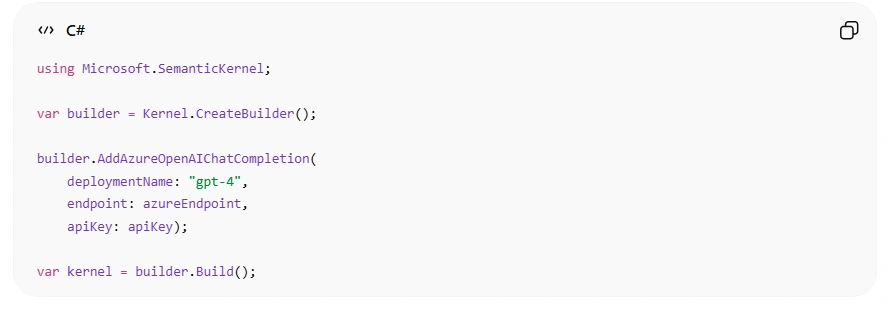
Here, the kernel acts as the central engine that powers your AI analyst.
Creating a Data Access Plugin
Semantic Kernel allows you to expose business logic through plugins.
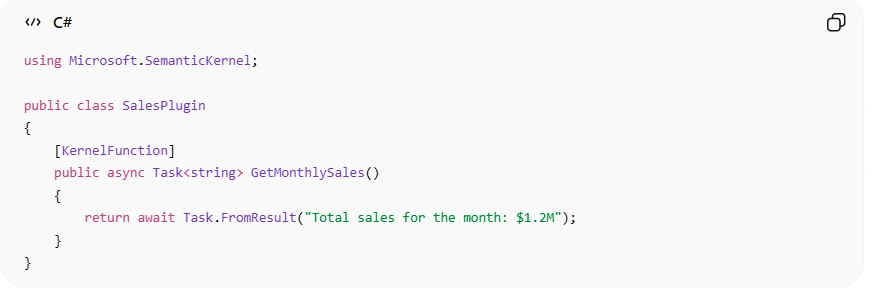
Register the plugin:

Now the AI agent can call this function automatically when needed.
Processing Natural Language Queries
Users interact with the system using natural language:

Semantic Kernel decides:
Whether a plugin is needed
Which function should be called
How to process the results
This creates a conversational analytics experience for users.
Building Analytical Workflows
Real-world business analysis is multi-step and complex. For example:
Fetch sales data
Calculate growth rate
Compare time periods
Detect anomalies
Generate recommendations
Semantic Kernel can handle this using structured reasoning.
Example:
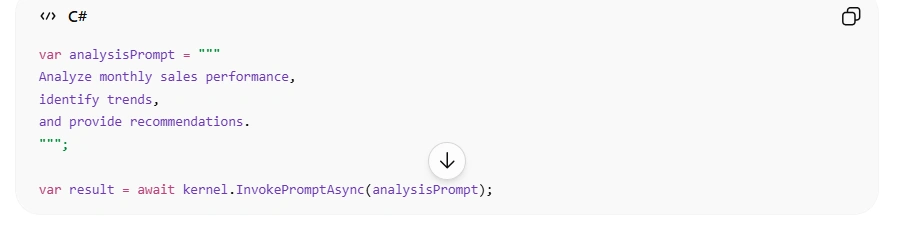
The AI returns meaningful business insights instead of raw numbers.
Example Business Scenario
Imagine a retail company facing declining revenue.
User query:
Why did revenue drop in the last quarter?
The AI system performs:
Sales data analysis
Product performance review
Customer churn evaluation
Regional comparison
Final response
Revenue dropped by 8%, mainly due to a 12% decline in electronics sales and increased customer churn in the western region.
This is far more valuable than raw data tables.
Best Practices
To build reliable AI-powered analytics systems, follow these guidelines:
1. Restrict Database Access
Avoid direct SQL generation. Use controlled functions and role-based permissions.
2. Validate AI Outputs
Always verify:
Calculations
Data accuracy
Business rules
3. Use Function Calling
Expose structured plugins instead of raw backend access.
4. Monitor System Usage
Track:
Token usage
Response time
Query volume
User satisfaction
5. Add Human Review
For critical decisions, require human approval before action.
Common Challenges
Hallucinated Insights
AI may generate incorrect assumptions if data is unclear.
Data Freshness Issues
Outdated data can lead to misleading conclusions.
Security Risks
Sensitive business data must be protected.
Cost Optimization
Complex AI workflows may increase token usage.
Proper system design helps reduce these risks.
Conclusion
By combining Semantic Kernel with .NET, developers can build scalable and intelligent systems that:
Understand business questions
Retrieve enterprise data
Perform analysis
Generate actionable insights
This approach does not replace traditional BI tools, it enhances them by making data more accessible to everyone in the organization.
Join the conversation! Your thoughts help the community grow.