

Microsoft Power Platform allows developers to build business applications with minimal code. Traditionally, creating a model-driven app involves designing Dataverse tables, defining columns and relationships, configuring forms and views, and assembling the application using Power Apps.
With AI-assisted development, some of these tasks can be performed more efficiently using natural-language instructions.
What you'll need
- A Power Platform environment where you can create flows
- VS Code with GitHub Copilot CLI installed
- Azure CLI, signed in to the tenant you want to work in
- Node.js 18 or later
Stepwise Implementation Guide
Step 1: Install the marketplace and plugin
Inside a GitHub Copilot CLI session, add Microsoft’s marketplace and install the Power Automate plugin:
/plugin marketplace add microsoft/power-platform-skills
/plugin install model-apps@power-platform-skills
Step 2: Install the Azure CLI and sign in
Install the Azure CLI and sign in with the account that has access to your Power Automate environment:
az login
az login will open a browser to login as normal, and then allow you to select a subscription in the terminal. Azure CLI is a Microsoft app that is already allowed in every tenant unless your IT blocked it on purpose. There’s no app to approve. The one thing that can catch you out: If you have a Power Platform license but no Azure subscription, the login might complain that no subscriptions were found. You don’t need one for Power Automate, just say this:
az login --allow-no-subscriptions --tenant <yourtenant>.onmicrosoft.com
Step 3: Build a model driven app from a precise specification
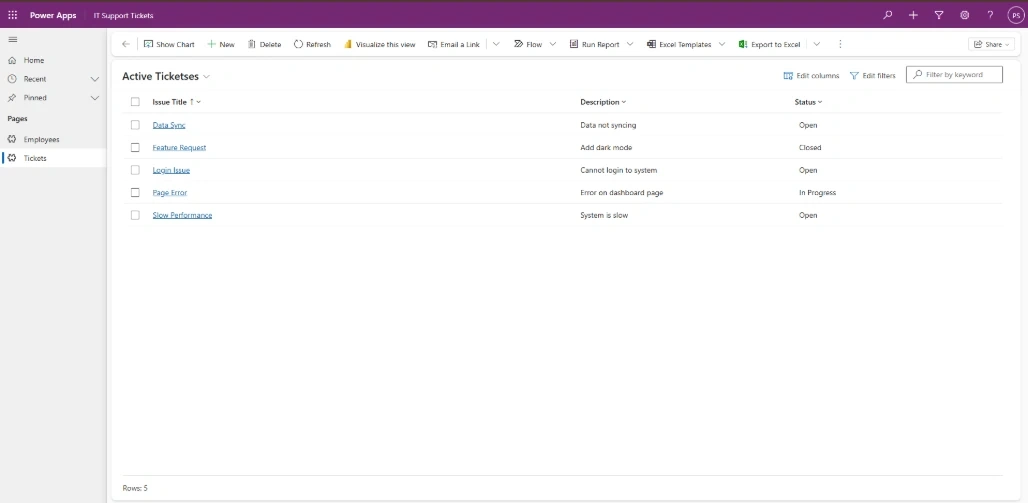
Here, i have written this prompt regarding create a model driven app with 2 tables.

Result
Conclusion
Here, we have learned how building a model-driven app using GitHub Copilot and an MCP Server demonstrates how AI can simplify and accelerate Power Platform development. By using GitHub Copilot with the configured MCP servers and Playwright for browser interaction and testing, developers can streamline application development, reduce manual effort, and improve productivity.
Join the conversation! Your thoughts help the community grow.