Introduction:
In order to reach international markets through the Internet, supporting different cultures through our applications is essential for being successful. The .NET Framework 2.0 as well as 1.x comes with an integrated infrastructure for creating international applications. Basically, the CLR supports a mechanism for packaging and deploying resources with any type of application. The CLR and the base class library of the .NET Framework come with several classes for managing and accessing resources in applications. These classes are located in the System.Resources and System.Globalization namespaces. Here we will explore the necessary details for working with resources in ASP.NET applications and for creating international ASP.NET applications based on embedded resources and the integrated localization support.
Assumptions:
This article assumes that you already know how to build web forms and to use controls and validation controls.
Localization and resource files:
Localization support in .Net Framework 2.0 in general and in ASP.Net 2.0 specifically become much more easier and brings fun during localization process. Usually resources are created for every culture the application should support. More specifically, each Web Form -Page- in your web site should have a resources for every culture -language- it should support. For example:
If you have a web form with name default.aspx and your web site support English, German and Arabic, then you should have 3 resource files for each culture. The CLR defines a behavior for finding culture-specific resources. With that said, every set of resources has to define a base name that is specified through the first part of the name of the resource file. The second part of the name defines the culture. If the culture portion in the name is not specified, the resources defined in the resource file are used as default resources. For example:
Your page name is default.aspx., you have 3 resource files as mentioned earlier, each one resource file should be named as:
default.aspx.en-US.resx, default.aspx.de-DE.resx and default.aspx.ar-EG.resx. Not here that we are using United States English, German's Gemran, and Egyptian's Arabic. You can use general English or general German or general Arabic like this:
default.aspx.en.resx, default.aspx.de.resx and default.aspx.ar.resx. Also you can use another specific culture like using Switzerland German culture this way: default.aspx.de-CH.resx. For list of supported cultures in .Net Framework return to MSDN.
How to build Multi-Language Web Sites with ASP.NET 2.0 and Visual Studio.Net 2005:
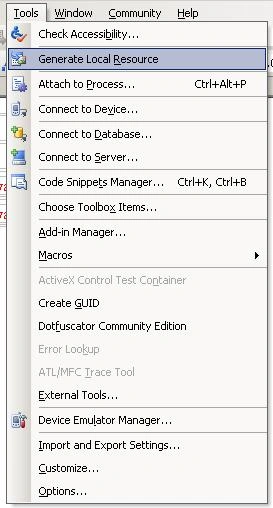
For localizing a page, just select Tools > Generate Local Resources. Visual Studio then generates a resource file in the App_LocalResources folder, which includes the values for every control of the page currently open in design view
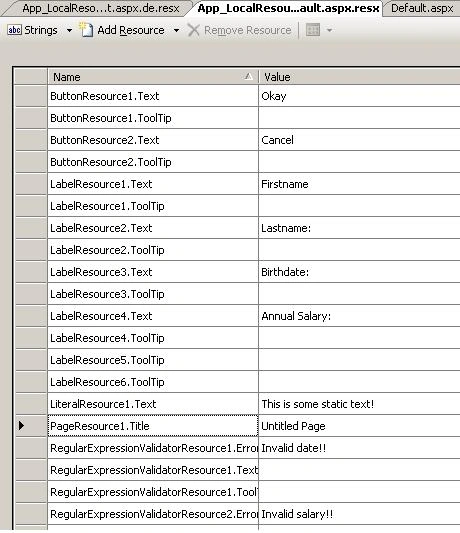
Visual Studio generates resources for several properties of each control. The resources are always prefixed with the name of the control and postfixed with the name of the property. Visual Studio automatically generates the default resources for the controls of the page only. You must add any further culture-specific resources manually by copying the generated resources and giving them the appropriate name (for example, default.aspx.ar-EG.resx) then translate the values.
The resource generation tool creates an entry for every property that is marked with the [Localizable] attribute in the control. Therefore, if you want to create a custom, localizable control, you have to mark all [Localizable] properties with this attribute.
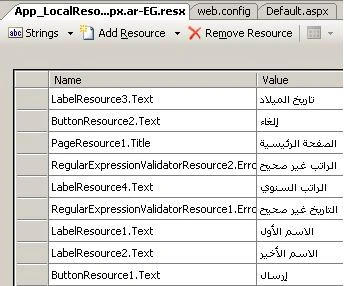
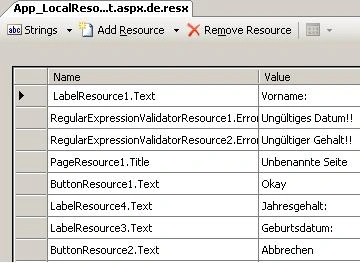
Copying the resources created previously and renaming this copy to default.aspx.de.resx and default.aspx.ar-EG.resx adds the culture-specific resources for the German and Arabic cultures to the application.
| Arabic Resources |
German Resources |
|
|
In addition to generating the resource file, Visual Studio has changed the page's source code. For every [Localizable] property of each control placed on the page, it has added a localization expression, as shown in the following code snippet:
<asp:Label ID="LegendFirstname" runat="server" Text="Firstname:" meta:resourcekey="LabelResource1"> </asp:Label>
Localization expressions are identified by the meta:resourceKey attribute of the tag.
The localization expression in the previous code is called implicit localization expression. Implicit localization expressions are something like shortcuts to resource keys included in the embedded resources for a page. They have to adhere to the naming conventions used by Visual Studio for generating the resources. Implicit localization expressions just specify the base resource key for the embedded resource without a property name. Property names are derived from the second part of the name. Note that you can use implicit localization expressions for [Localizable] properties only.
In the attached sample, there are RegularExpressionValidator controls. Although the RegularExpressionValidator control is included in the generated resources, the validation expression property is not included, because it is not marked with the [Localizable] attribute. But the validation of both the birth date and the annual salary has to happen based on the culture settings of the user browsing to the page, because US visitors want to add their birth date in the format they are used to (and the same goes for Germans and Arabs or any other visitors).
Therefore, you need to do some additional work before you are finished localizing the application. Basically, two ways for localizing the validation of those two text fields are available. The first one is to automatically generate the regular expression for the validation based on the CultureInfo object created for the user's culture. The second approach is to add an entry to the embedded resources for the validation expression. But we will go for the second approach to discuss how explicit localization expressions work. First, you have to add two new entries, containing the regular expression for validating the user's birth date and annual salary input, to the embedded resources. Afterward, you need to change the definition of those controls as follows (assuming that the resource entries are called RegularExpressionValidatorResource1.Validation and RegularExpressionValidator-Resource2.Validation):
<asp:RegularExpressionValidator ControlToValidate="BirthdateText" ErrorMessage="Invalid date!!" ID="RegularExpressionValidator1" runat="server" ValidationExpression= '<%$ Resources: RegularExpressionValidatorResource1.Validation %>' meta:resourcekey="RegularExpressionValidatorResource1" />
You can probably see that the previous validator still contains some static text-in this case ErrorMessage. Don't worry about that. Because the validation control has a meta:resourcekey, the control will ignore the static text, and the runtime will get its data from the generated resources. As soon as a control has such a meta:resourcekey attribute, it ignores static text and reads all information from embedded, localized resources. In the case of the ValidationExpression, you have to use explicit localization expressions, because automatic localization is not provided for this property. The general format for explicit localization expressions follows this syntax:
<%$ Resources: [ApplicationKey, ] ResourceKey %>
The application key identifies shared application resources and therefore can be omitted when accessing local resources.
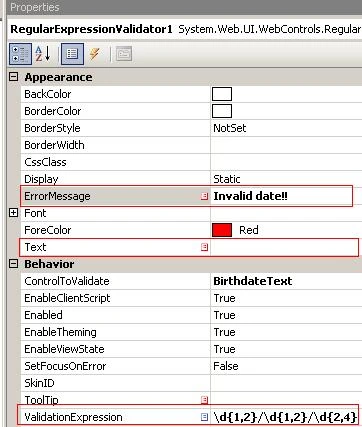
The following screen shot shows that localized properties are marked with special icons in the Properties window. The localization expressions themselves leverage the new expression engine included with ASP.NET 2.0.
Sharing Resources Between Pages:
Generating local resources for a single page might lead to a duplication of resource strings or other resource information. Therefore, it is definitely useful to share resources between pages through global resources. Global resources are placed in the App_GlobalResources folder. One good use for it for identifying system messages for each culture, or text direction setting, or common validation expressions for regular expression validators. For example, the validation expressions for date formats and number formats used earlier are definitely good candidates to be reused in several pages of the application, it is useful to put them into a global resource file. For this purpose you just need to add a new, global resource file and then add the values to those resources.
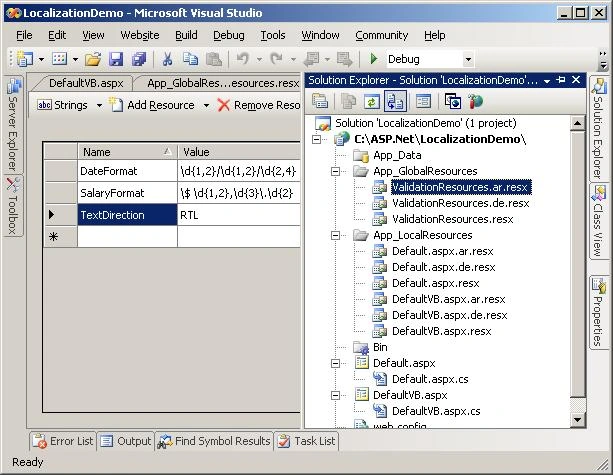
Now you have to adopt the explicit localization expression for the two validation controls. For this purpose you have to change the name and add the ApplicationKey parameter. Because we already named the global resource file ValidationResources.resx previously, this will be the value for the ApplicationKey property (without the .resx extension).
<asp:RegularExpressionValidator ControlToValidate="BirthdateText" ErrorMessage="Invalid date!!" ID="RegularExpressionValidator1" runat="server"
ValidationExpression='<%$ Resources:ValidationResources, DateFormat %>' meta:resourcekey="RegularExpressionValidatorResource1" />
Also you may need a way to specify the text direction in international applications, because some cultures read from left to right and others read from right to left. You can use a couple of controls in ASP.NET, such as the Panel control and the WebPart control, to deal with this. Therefore, it makes sense to define a property in either the global resources or the local resources for the text direction and to use explicit localization expressions for setting the direction property of these controls. For setting this property directly in the root element of your HTML file, you must use the runat="server" attribute to the <html> tag itself, and then you can apply explicit localization expressions to it, as shown in the following code excerpt:
<html runat="server" dir='<%$ Resources:ValidationResources, TextDirection %>' >
Setting Page Culture:
To set the page culture, you can set the Culture Property of the page and UICulture to use specific culture or set it to Auto to automatically Client Browser Language. Also you can make a default culture for your application by adding the following code to your web.config under system.web tag:
<globalization enableClientBasedCulture="true" culture="ar-EG" uiCulture="ar-EG"/>
Or switching the culture programmatically by overriding Page.InitializeCulture Method:
protected override void InitializeCulture()
{
string culture = Request.Form["cmbCulture"];
if (string.IsNullOrEmpty(culture)) culture = "Auto";
//Use this
this.UICulture = culture;
this.Culture = culture;
//OR This
if (culture != "Auto")
{
System.Globalization.CultureInfo ci = new System.Globalization.CultureInfo(culture);
System.Threading.Thread.CurrentThread.CurrentCulture = ci;
System.Threading.Thread.CurrentThread.CurrentUICulture = ci;
}
base.InitializeCulture();
}
Protected Overrides Sub InitializeCulture()
Dim _culture As String = Request.Form("cmbCulture")
'Use this
If (String.IsNullOrEmpty(Culture)) Then
culture = "Auto"
Me.UICulture = _culture
Me.Culture = _culture
End If
'OR This
If (_culture <> "Auto") Then
Dim ci As New System.Globalization.CultureInfo(Culture)
System.Threading.Thread.CurrentThread.CurrentCulture = ci
System.Threading.Thread.CurrentThread.CurrentUICulture = ci
End If
MyBase.InitializeCulture()
End Sub
The above code is using a DropDownList with ID cmbCulture.
One Important thing about the InitializeCulture method, it is called very early in the page life cycle, before controls are created or properties are set for the page. Therefore, to read values that are passed to the page from controls, you must get them directly from the request using the Form collection. Just as we did above.
This is all, test it and have fun with localization support of ASP.NET 2.0
Read VB.NET Version
References:
Pro ASP.NET 2.0 In C# 2005 book from APress.


Join the conversation! Your thoughts help the community grow.