

Building a cloud flow usually means working through the Power Automate designer: pick a trigger, add actions one by one, configure each connector, test, and repeat. It works, but it's slow when you know exactly what you want.
The Model Context Protocol (MCP) changes that. Instead of only suggesting text, an AI agent can use real tools to inspect your environment, create flows, check run history, and fix failures. In this article, I'll show how to connect GitHub Copilot CLI, running inside VS Code, to Power Automate through an MCP server, and build a working flow from a plain-language prompt.
What you'll need
- A Power Platform environment where you can create flows
- VS Code with GitHub Copilot CLI installed
- Azure CLI, signed in to the tenant you want to work in
- Node.js 18 or later
Stepwise Implementation Guide
Step 1: Install the marketplace and plugin
Inside a GitHub Copilot CLI session, add Microsoft’s marketplace and install the Power Automate plugin:
/plugin marketplace add microsoft/power-platform-skills
/plugin install power-automate@power-platform-skills
Step 2: Install the Azure CLI and sign in
Install the Azure CLI and sign in with the account that has access to your Power Automate environment:
az login
az login will open a browser to login as normal, and then allow you to select a subscription in the terminal. Azure CLI is a Microsoft app that is already allowed in every tenant unless your IT blocked it on purpose. There’s no app to approve. The one thing that can catch you out: If you have a Power Platform license but no Azure subscription, the login might complain that no subscriptions were found. You don’t need one for Power Automate, just say this:
az login --allow-no-subscriptions --tenant <yourtenant>.onmicrosoft.com
Step 3: Build a flow from a precise specification
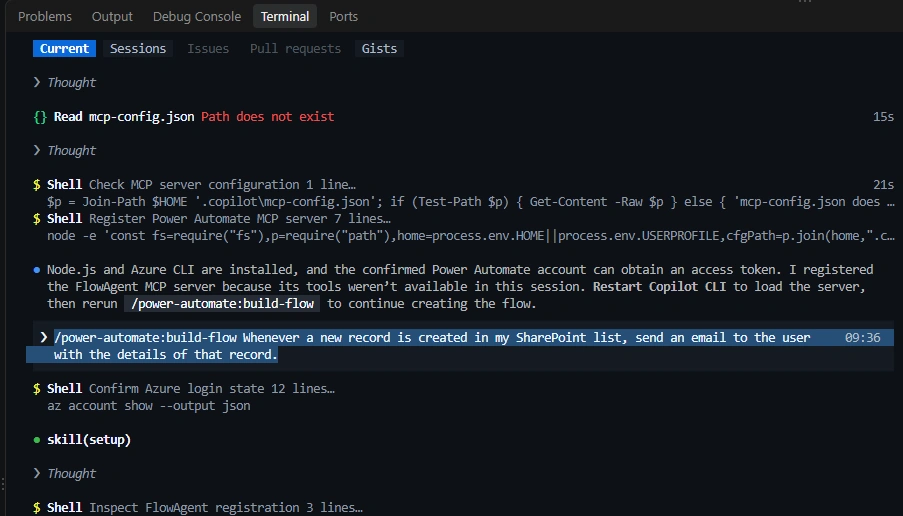
Here, i have written this prompt regarding when new item is created in SharePoint list, send email to user with details of that record.
/power-automate:build-flow Whenever a new record is created in my SharePoint list, send an email to the user with the details of that record.
More Commands with their Purpose
/power-automate:setup - Sets up Power Automate CLI prerequisites; use it first or when something isn't working
/power-automate:browse-flows - Browses environments and flows interactively
/power-automate:route-environments - Checks Power Platform environment routing status and the default environment
/power-automate:create-flow - Guided flow creation wizard
/power-automate:build-flow - Builds a complete flow autonomously from a description
/power-automate:debug-flow - Debugs a failed flow run interactively
/power-automate:diagnose-flow - Deep autonomous diagnosis of a failed run; give it the environment, flow, and run ID
/power-automate:manage-flows - Manages the flow lifecycle: publish, test, batch operations, inventory reports
/power-automate:manage-desktop-flows - Manages and runs desktop (RPA) flows and machine groups
/power-automate:report-issue - Reports a bug or files an issue about the plugin
Join the conversation! Your thoughts help the community grow.