
Introduction
This article explains how to dynamically change the locale of Android. Android Studio is used to create the sample.
We understand that applications support various languages in Android. So to perform language support operations for applications the user changes the language of the locale by clicking on the list of languages. Now the question is, how to change the language of your application dynamically without going to the custom locale of Android.
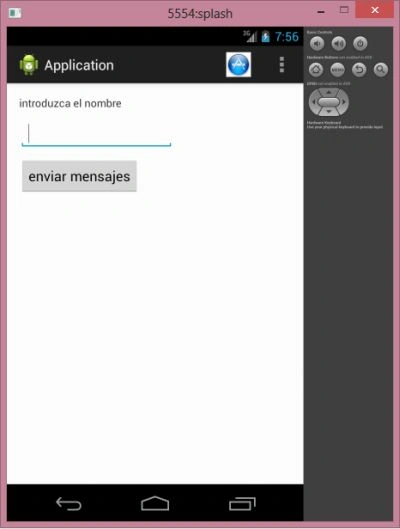
We need this when we want the application to run only in the Spanish language, not in the phone's default language. So we do this by writing the following code in the onCreate () method:
Local: a class to set the language of your application.
- String languageToLoad = "es"; // your language
- Locale locale = new Locale(languageToLoad);
- Locale.setDefault(locale);
- Configuration config = new Configuration();
- config.locale = locale;
- getBaseContext().getResources().updateConfiguration(config,
- getBaseContext().getResources().getDisplayMetrics());
- this.setContentView(R.layout.activity_main);
Configuration: a class describing all device configuration information that can impact resources the application retrieves.
First, we create a variable of String type named languageToLoad and "es" as a value to the variable. Now create a Locale object and call the static method setDefault(). the object in setDefault() as a parameter to set the language. Create the configuration object that returns the configuration of the device.
Step 1
Create an XML file and write this:
- <RelativeLayout xmlns:android="http://schemas.android.com/apk/res/android"
- xmlns:tools="http://schemas.android.com/tools"
- android:layout_width="match_parent"
- android:layout_height="match_parent"
- android:paddingLeft="@dimen/activity_horizontal_margin"
- android:paddingRight="@dimen/activity_horizontal_margin"
- android:paddingTop="@dimen/activity_vertical_margin"
- android:paddingBottom="@dimen/activity_vertical_margin"
- tools:context=".MainActivity">
- <TextView
- android:layout_width="wrap_content"
- android:layout_height="wrap_content"
- android:text="@string/hello_world"
- android:id="@+id/text"/>
- <EditText
- android:id="@+id/edit"
- android:layout_height="wrap_content"
- android:layout_width="200dp"
- android:layout_marginTop="30dp">
- </EditText>
- <Button
- android:id="@+id/button"
- android:layout_width="wrap_content"
- android:layout_height="wrap_content"
- android:layout_marginTop="80dp"
- android:text="@string/send_message"></Button>
- </RelativeLayout>
Step 2
Create another XML file with the following:
- <?xml version="1.0" encoding="utf-8"?>
- <LinearLayout xmlns:android="http://schemas.android.com/apk/res/android"
- android:orientation="vertical"
- android:layout_width="match_parent"
- android:layout_height="match_parent">
- <TextView
- android:id="@+id/textview"
- android:layout_height="wrap_content"
- android:textSize="40dp"
- android:textStyle="bold"
- android:layout_width="wrap_content">
- </TextView>
- </LinearLayout>
Step 3
Create a Java file with the following:
- package com.myapplication;
- import android.content.Context;
- import android.content.Intent;
- import android.content.res.Configuration;
- import android.content.res.Resources;
- import android.os.Bundle;
- import android.app.Activity;
- import android.support.v4.app.ActivityCompat;
- import android.util.DisplayMetrics;
- import android.view.Menu;
- import android.view.MenuItem;
- import android.view.View;
- import android.widget.Button;
- import android.widget.EditText;
- import android.widget.Switch;
- import android.widget.TextView;
- import android.widget.Toast;
- import java.util.Locale;
- public class MainActivity extends Activity
- {
- private Context context;
- private Character language_code;
- TextView textview;
- @Override
- protected void onCreate(Bundle savedInstanceState)
- {
- super.onCreate(savedInstanceState);
- setContentView(R.layout.activity_main);
- String languageToLoad = "es"; // your language
- Locale locale = new Locale(languageToLoad);
- Locale.setDefault(locale);
- Configuration config = new Configuration();
- config.locale = locale;
- getBaseContext().getResources().updateConfiguration(config,
- getBaseContext().getResources().getDisplayMetrics());
- this.setContentView(R.layout.activity_main);
- textview = (TextView) findViewById(R.id.text);
- EditText editText = (EditText) findViewById(R.id.edit);
- Button button = (Button) findViewById(R.id.button);
- button.setOnClickListener(new View.OnClickListener()
- {
- @Override
- public void onClick(View view)
- {
- Intent i = new Intent(MainActivity.this, Second.class);
- Bundle b = new Bundle();
- b.putString("1", "Value");
- i.putExtras(b);
- startActivity(i);
- }
- });
- }
- @Override
- public boolean onCreateOptionsMenu(Menu menu)
- {
- // Inflate the menu; this adds items to the action bar if it is present.
- getMenuInflater().inflate(R.menu.main, menu);
- return true;
- }
- @Override
- public boolean onOptionsItemSelected(MenuItem item)
- {
- switch (item.getItemId())
- {
- case R.id.actionmenu:
- /*ActionBar actionBar=getActionBar();
- actionBar.hide();
- actionBar.show();*/
- // Toast.makeText(this, "Menu Item 1 selected", Toast.LENGTH_SHORT).show();
- // locked=false;
- // invalidateOptionsMenu();
- // ActivityCompat.invalidateOptionsMenu(MainActivity.this);
- Intent i = new Intent(MainActivity.this, Second.class);
- Bundle b = new Bundle();
- b.putString("1", "Value");
- i.putExtras(b);
- startActivity(i);
- break;
- /* case R.id.menuitem2:
- Toast.makeText(this, "Menu item 2 selected", Toast.LENGTH_SHORT)
- .show();
- break;*/
- default
- break;
- }
- return true;
- }
- public void actionMethod(View v)
- {
- TextView textView = new TextView(this);
- textView.setText(R.string.hello_world);
- }
- }
Join the conversation! Your thoughts help the community grow.