Introduction
This article describes how to compress a file into Zip format when it is uploaded and download the Zip file.
Description
To create this application you need a third-party DLL file to be referenced by the application:
You can download it from the source code attached to this page or from the following link:
http://dotnetzip.codeplex.com/
Design
Add a FileUpload Control, a button and a GridView.
Now design your screen as in the following screen.
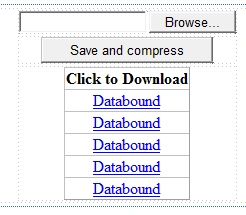
Or you can copy the following source code:
- <form id="form1" runat="server">
- <div>
- <table align="center">
- <tr>
- <td align="center">
- <asp:FileUpload ID="FileUpload1" runat="server" />
- </td>
- </tr>
- <tr>
- <td align="center">
- <asp:Button ID="Button1" runat="server" Text="Save and compress" OnClick="Button1_Click" />
- </td>
- </tr>
- <tr>
- <td align="center">
- <asp:GridView ID="gvZip" runat="server" AutoGenerateColumns="false" OnRowCommand="gvZip_RowCommand">
- <Columns>
- <asp:TemplateField HeaderText="Click to Download">
- <ItemTemplate>
- <asp:LinkButton ID="lnkDownload" runat="server" Text='<%# Bind("Name") %>' CommandName="Download"
- CommandArgument='<%# Bind("Name") %>' />
- </ItemTemplate>
- </asp:TemplateField>
- </Columns>
- </asp:GridView>
- </td>
- </tr>
- </table>
- </div>
- </form>
Now go to the code view.
Next add a reference of the following DLL to your website:
- Ionic.Zip.dll
And write the following code in the .cs file:
- using System;
- using System.Collections;
- using System.Linq;
- using System.Web;
- using System.Web.UI;
- using System.Web.UI.WebControls;
- using Ionic.Zip;
- using System.IO;
- public partial class _Default : System.Web.UI.Page
- {
- protected void BindDataList()
- {
- DirectoryInfo dir = new DirectoryInfo(MapPath("Zip"));
- FileInfo[] files = dir.GetFiles();
- ArrayList listItems = new ArrayList();
- foreach (FileInfo info in files)
- {
- listItems.Add(info);
- }
- gvZip.DataSource = listItems;
- gvZip.DataBind();
- }
- protected void Page_Load(object sender, EventArgs e)
- {
- BindDataList();
- }
- protected void Button1_Click(object sender, EventArgs e)
- {
- using (var zip = new ZipFile())
- {
- if (FileUpload1.HasFile)
- {
- zip.Password = "123";
- zip.Encryption = EncryptionAlgorithm.WinZipAes256;
- string filename = Path.GetFileName(FileUpload1.FileName);
- FileUpload1.SaveAs(Server.MapPath("~/Upload//") + filename);
- string filenameWitoutextension = Path.GetFileNameWithoutExtension(FileUpload1.FileName);
- string destdir = Server.MapPath(".") + @"\Zip\" + filenameWitoutextension + ".Zip";
- zip.AddDirectory(Server.MapPath(".") + @"\Upload\");
- zip.Save(destdir);
- string[] files = System.IO.Directory.GetFiles(Server.MapPath("~/Upload//"));
- foreach (string f in files)
- {
- System.IO.File.Delete(f);
- }
- BindDataList();
- }
- }
- }
- protected void gvZip_RowCommand(object sender, GridViewCommandEventArgs e)
- {
- if (e.CommandName == "Download")
- {
- Response.Clear();
- Response.ContentType = "application/octet-stream";
- Response.AppendHeader("content-disposition", "attachment; filename=" + e.CommandArgument.ToString());
- Response.TransmitFile(Server.MapPath("~/Zip//" + e.CommandArgument.ToString()));
- Response.End();
- }
- }
- }
In the code above just check these two lines:
- zip.Password = "123";
- zip.Encryption = EncryptionAlgorithm.WinZipAes256;
This is used for password protecting the zip bypassing your password and you can choose your Encryption algorithm.
If you don't want password protection then remove those two lines.
Now build your application. Then choose your file to be zipped.
Click on the "Save and compress" button.
Now it will show your file in the grid with Zip format.
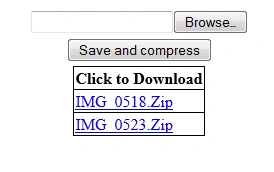
Now click on the file to download:
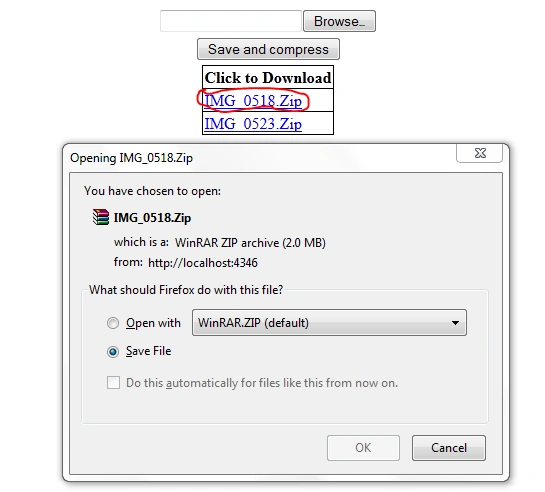
For any modifications or problems please comment.
Thank You.


Pintoo YadavPosted Aug 27, 2015, 7:26 AM
Nice Dear