

- Getting Started With ASP.NET MVC
- First ASP.NET MVC 5.0 Application
- How to Publish ASP.NET MVC on IIS MVC 5.0: Part 3
- How to Publish ASP.NET MVC 5.0 Application on Windows Azure: Part 4
- ASP.NET MVC 5.0 Views (Dynamic/Strongly Typed Views) - Part 5
- What Are Areas in ASP.NET MVC - Part 6
- Using Partial Views In ASP.NET MVC 5.0: Part 7
- MVC 5.0 Application using Entity Framework DB First Approach: Part 8
- MVC 5.0 Application using Entity Framework Code First Approach: Part 9
- HTML Helpers In ASP.NET MVC 5.0: Part 10
- Using TempData, ViewData and ViewBag in ASP.NET MVC 5.0: Part 11
- Filters in ASP.NET MVC 5.0: Part 12
- Validations In ASP.NET MVC 5.0: Part 13
- Layouts (Master Pages) in ASP.NET MVC 5.0: Part 14
- Facebook Authentication In ASP.NET MVC 5.0: Part 15
Introduction
Enabling an Authentication sign in with Google and to allow users of your application to sign in with their Google account, you will need to register an application in the Google Developers console. After you have registered the application you can use the Client ID and Client Secret supplied by Google to register the Google social login provider in your ASP.NET MVC application.
You can follow the below screenshot:
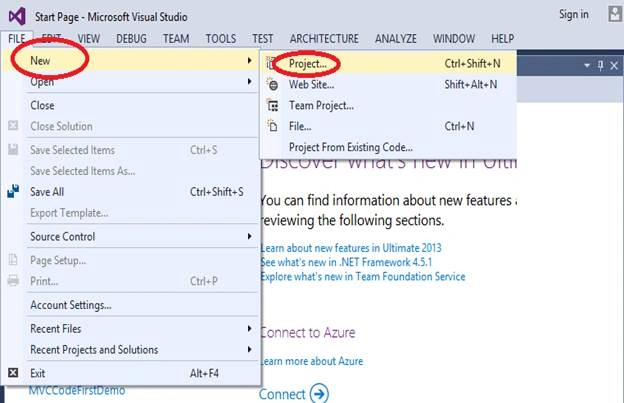
Open the Visual Studio and select the File, New, then click Project.
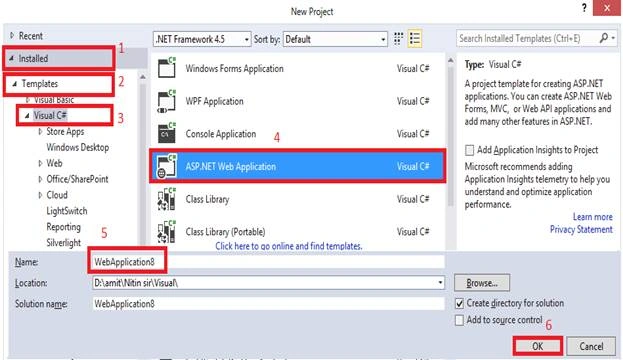
Select Installed > Templates > Visual C#, and select ASP.NET Web Application from the menu. Here, I have given the name of my project to be “WebApplication8”.
- You can give the project name as you wish.
- And then click on “OK” button to create your project.
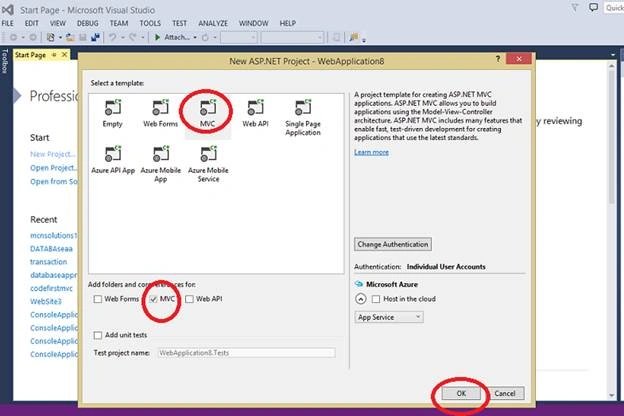
In the below figure as you can see the default MVC will be selected, select MVC and then click “OK” button.
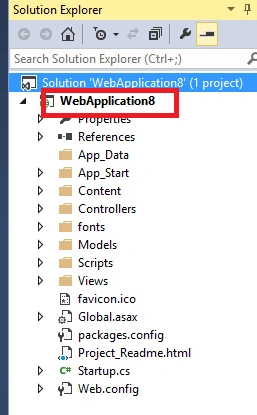
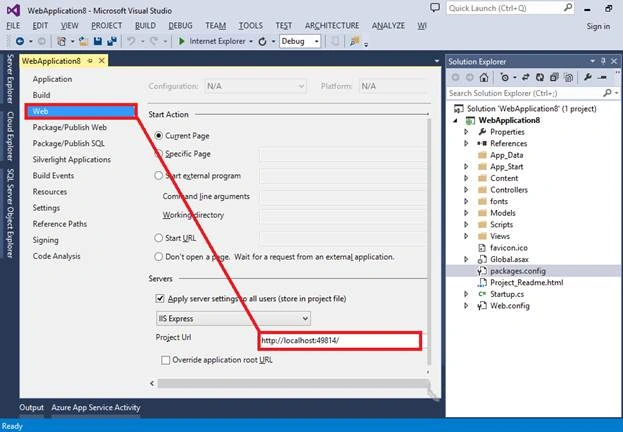
In Solution Explorer, your project has been created. Click on Web Application8 project.
Hit the ALT+ENTER key to show the properties.
Right click on to your project and select properties, select “Web” from the menus and take note of the “Project Url”, as you will need this when specifying the Redirect URI in Google.
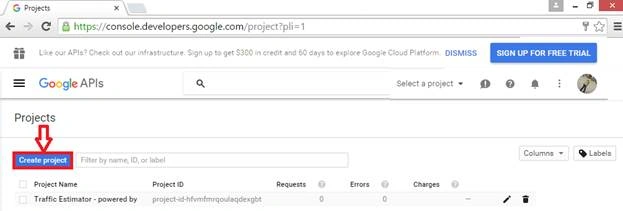
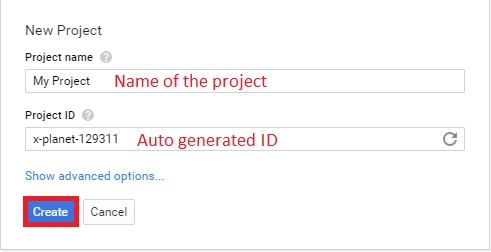
ID would be default auto created after giving name of project. Click on to “Create” button to create your project.
Now you can see project name in the below snapshot…
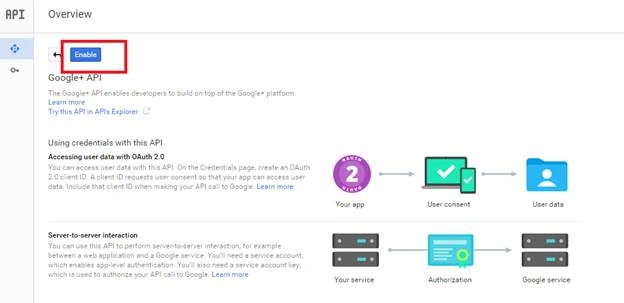
Next, we need to click on Google +API.
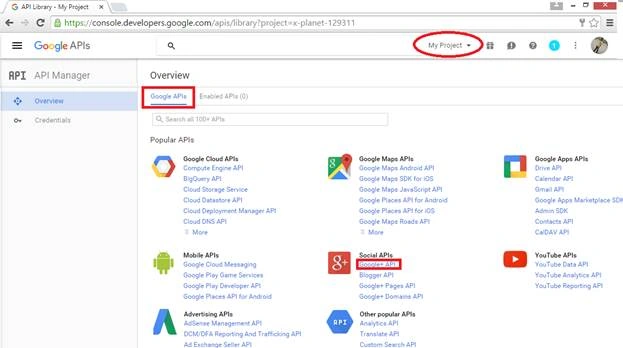
Click on to "Enable" button, by clicking on to enable button API will be enabled.
You must have to enter your credentials, by which we can’t use API in our project.
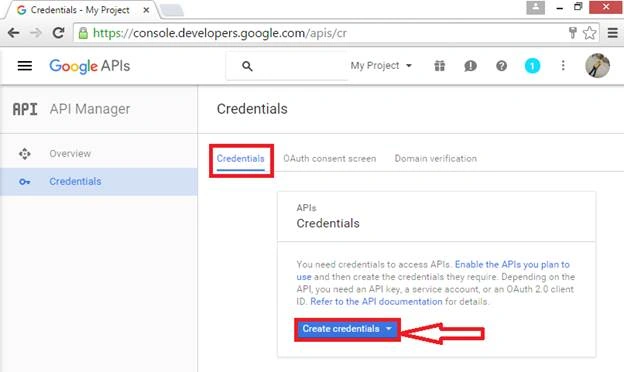
So click on to Create Credentials and under it choose OAuth client ID.
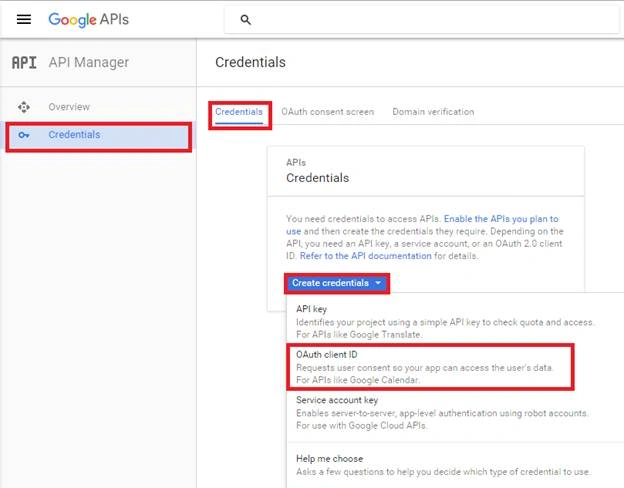
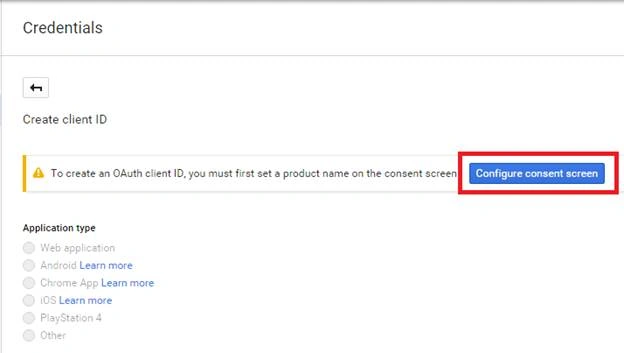
For OAuth consent screen, click on to it.
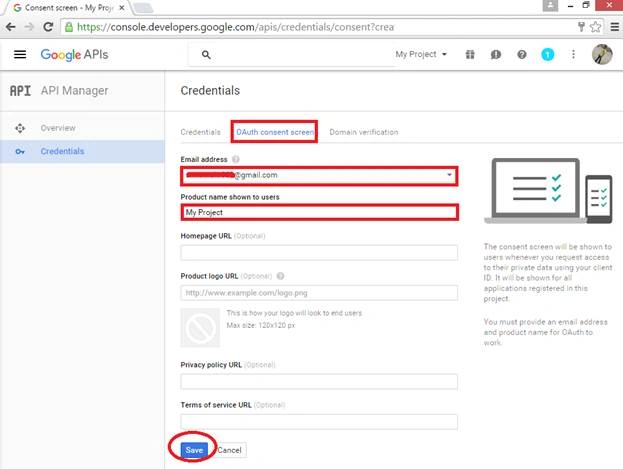
In the OAuth consent screen panel, enter your email_id and product name which have been registered yet, click on to save button to save this.
Now click on create credentials and you have shown oAuth client id option, And then click on client id.
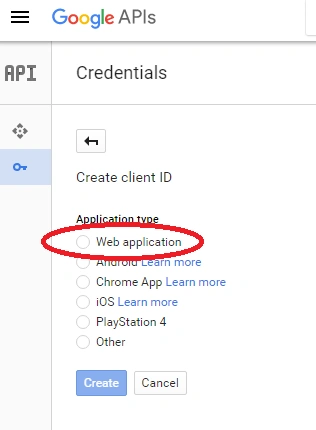
Click on radio button i.e. “web application” and click on to create button.
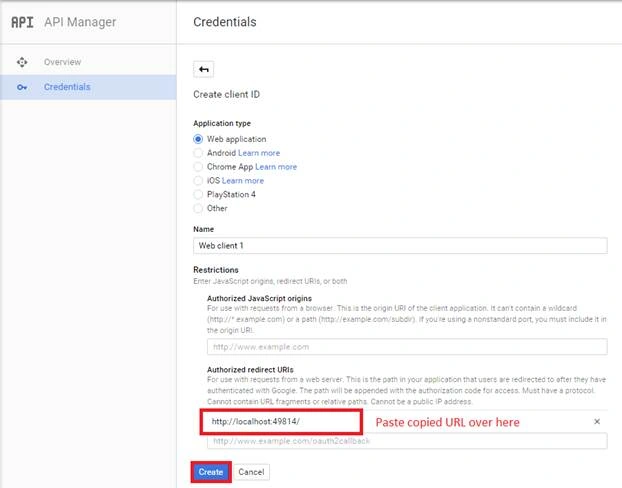
Now enter your URL in authorized redirect Urls
You mention your correct URL as on project in Visual Studio, go to properties of your existing project and copy URL from there.
Then click on create on click button.
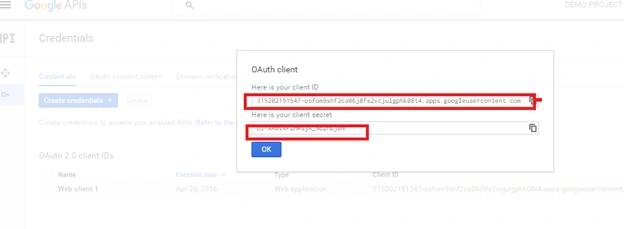
After click on create button the client ID and client secret will be generated. Now copy both client id and client secret form here.
Now go to project.
In Solution Explorer, APP_START folder would be there. In APP_START folder you have STARTUP.AUTH.CS class, just click on to that class.
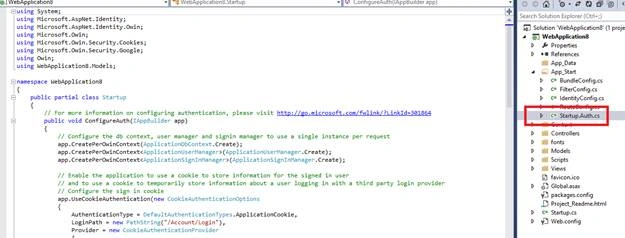
After clicking on that class, scroll down the page and you just show app.usegoogleAuthentication(), where I need to enter my client ID and client secret.
Below this you have a client id and client secret
Paste that client id and client secret
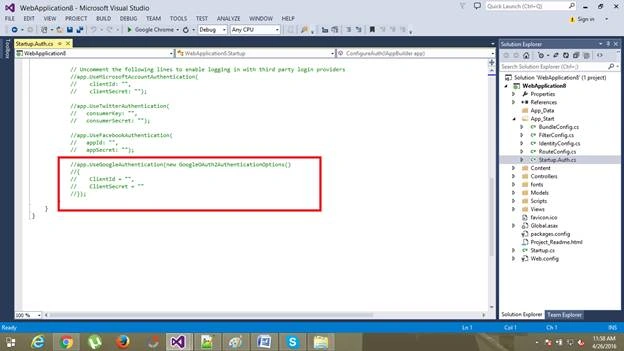
Just like this….

Now run your application. Press F5 to run it.
In the below screenshot, click on to Login button on the top-right of the page.
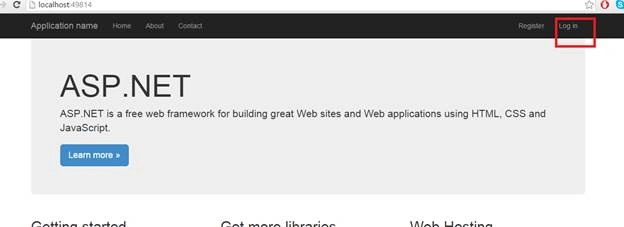
I’m going to Login with my Google account for authenticate. Click on Google to Login. After clicking on button, you will be redirected to Google website.
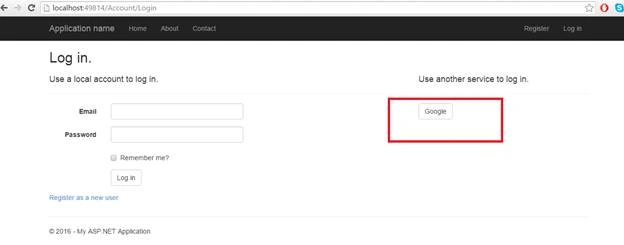
If you are not logged into Google yet, you will be prompted to do so.
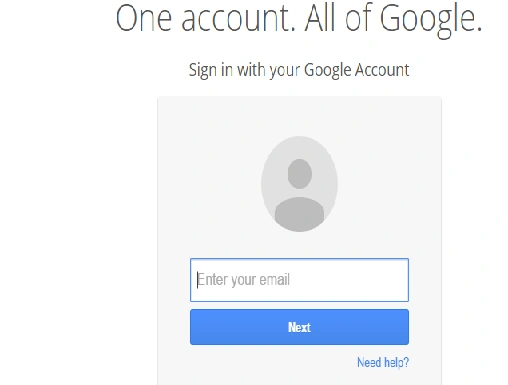
Now Google will then prompt you to give the application permissions to access your personal data.
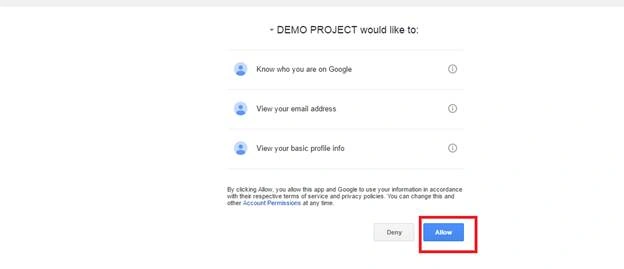
That's all about how we can configure Google Authentication in MVC Framework.
I hope you enjoyed this article. Stay tuned with me for more articles on all other Microsoft technologies.
Thanks.
afzal chaudharyPosted May 18, 2021, 10:04 AM
Thanks for sharing, But i am facing this issue , The redirect URI in the request, http://localhost:11988/Home/Index, does not match the ones authorized for the OAuth client. To update the authorized redirect URIs, visit: https://console.developers.google.com/apis/credentials/oauthclient/492703598655-809lgejj3sf5nje1qkfp8ssbi5qo6fse.apps.googleusercontent.com?project=492703598655please help me
afzal chaudharyPosted May 18, 2021, 10:03 AM
Thanks for sharing
Nishan AryalPosted Sep 6, 2018, 2:20 AM
Nice article.
Karthik RamachandranPosted Aug 29, 2018, 8:13 AM
Nice article, its working fine..
Sekul KamberovPosted Apr 6, 2017, 1:17 PM
Nice article, but after your last step here: Now Google will then prompt you to give the application permissions to access your personal data.. something goes wrong and: Object reference not set to an instance of an object.Description: An unhandled exception occurred during the execution of the current web request. Please review the stack trace for more information about the error and where it originated in the code. Exception Details: System.NullReferenceException: Object reference not set to an instance of an object. Source Error: Line 330: Line 331: // Sign in the user with this external login provider if the user already has a login Line 332: var result = await SignInManager.ExternalSignInAsync(loginInfo, isPersistent: false); Line 333: switch (result) Line 334: {
Anu VPosted Dec 20, 2016, 1:37 AM
Nice article sir.. thanks for sharing..
Manav PandyaPosted Dec 10, 2016, 2:50 AM
I am using MVC-4 so i dont have Startup.auth.cs , i have AuthConfig.cs file
Manav PandyaPosted Dec 10, 2016, 2:42 AM
But i want to ask that which mechanism you used in real life project's i mean client projects , reply me for that sir Nitin Pandit
Manav PandyaPosted Dec 10, 2016, 2:41 AM
OMG Its so easy to configure thanks sir Nitin Pandit
Hesham AdelPosted Dec 1, 2016, 4:31 AM
Thank You, For Your Great Effort
Fahad MirzaPosted Jul 14, 2016, 3:17 AM
It gives me an error: redirect_uri_mismatch.
Amit DavePosted May 3, 2016, 10:33 AM
Keep up the Good work!
Sonu ChaudharyPosted May 2, 2016, 5:55 AM
Thanks for sharing
Sayyed Mostafa RahmaniPosted May 2, 2016, 1:32 AM
It gives me an error: redirect_uri_mismatch. I checked everything twice!!
Thiruppathi RPosted May 2, 2016, 12:25 AM
My doubt is cleared. Nice article..
Debasis SahaPosted May 1, 2016, 1:50 PM
Good One..
Debasis SahaPosted May 1, 2016, 1:49 PM
Good One..
NitinPosted May 1, 2016, 1:26 PM
Good one
Kuppurasu NagarajPosted Apr 30, 2016, 2:11 PM
Nice Sharing..