

This configuration will help to connect the content between external document repositories through Central Admin Servers.
How to configure it?
Let’s open Central Admin of SharePoint on your machine. On your Windows desktop screen, click Start >> Administrative Tools >> SharePoint 2013 Central Administration.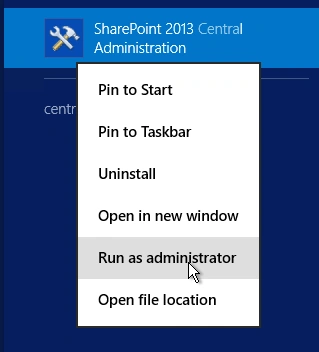
- Run it as an administrator to have the elevated privileges.
- You will see the screenshot given below.
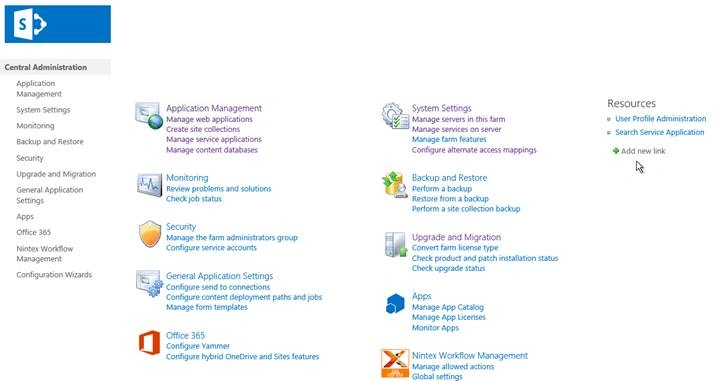
- Central Admin is configured under the categories given above.
- Click General Application Settings.
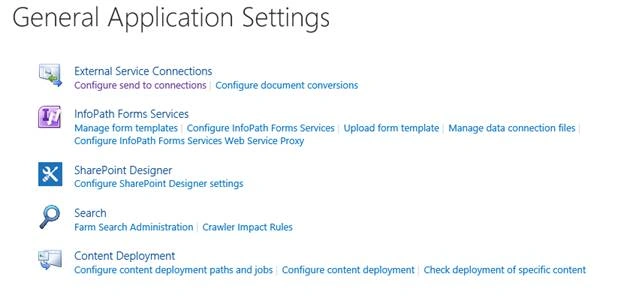
- Go to External Service Connections.
- Click Configure send to connections.
- You will see the screen given below.
Configure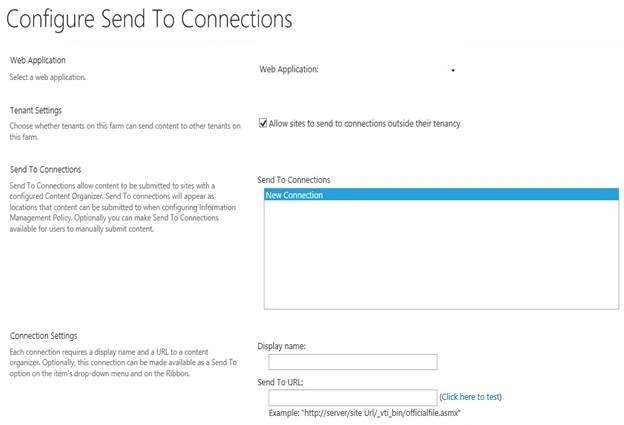
- Web Application
Choose a Web Application, where you want to have a connection. - Tenant Settings
Choose whether tenants on this farm can send the contents to other tenant. - Send to Connection
Here, you can choose one of the connections to use in the process. In our case, we don’t have one, so we will create a new connection. - Connection Settings
Here, you can have a display name and a URL to send the content across the connections.
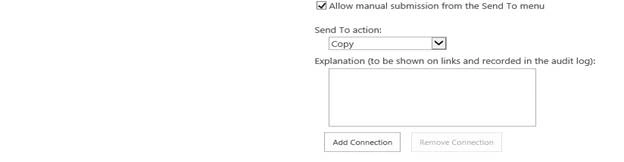
You can choose if you want to have a manual submission from send to menu or make it automatic.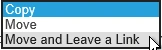
Under the send to action, you can copy, move or move and leave a link kind of actions.
You can also add your log event comments on the connection, when they run.
Once you complete the configuration, click OK and the setting to connect the content will be saved.
In this article, we saw how to configure send to connections in SharePoint 2013 Central Administration. There are more articles to come on Central Administration. Until then, keep reading and keep learning.
hadiat chouaiPosted Oct 25, 2019, 5:04 AM
Thank you for the post, i wanna ask if we can send a document Set with "Sent to" function to a another Library. i can just send a document. by document set is the function disable. thank you for answering!
hadiat chouaiPosted Oct 25, 2019, 5:00 AM
Hallo Manpreet,