

Introduction
In this article, we will learn how to convert a DataSet and DataReader to a list using a simple WPF application.
(This is simple only but many people are unaware of it so that is why I posted this article.)
Procedure
Step 1
Create a new project using "File" > "New" > "Project..." > "WPF Application" and name it: "ListConversions".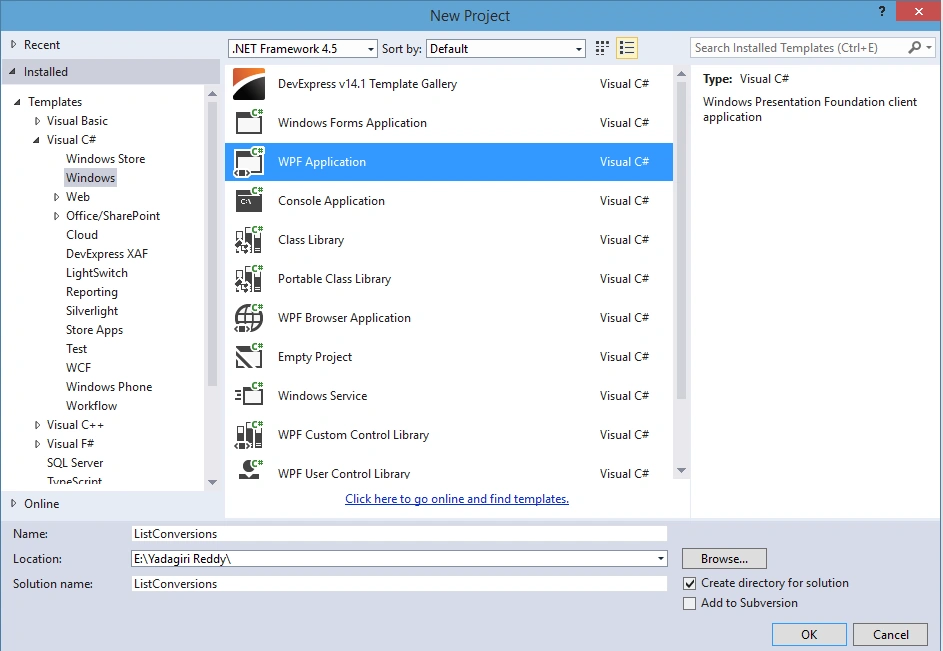
Step 2
Now to design your MainWindow.xaml View design part use the following code:
- <Window x:Class="DataReaderToList.MainWindow"
- xmlns="http://schemas.microsoft.com/winfx/2006/xaml/presentation"
- xmlns:x="http://schemas.microsoft.com/winfx/2006/xaml"
- Title="EmployeeList" Height="350" Width="525">
- <Grid>
- <Grid.RowDefinitions>
- <RowDefinition Height="*"/>
- </Grid.RowDefinitions>
- <DataGrid AutoGenerateColumns="False" ItemsSource="{Binding Path=EmployeeList}">
- <DataGrid.Columns>
- <DataGridTextColumn Header="Empno" Binding="{Binding Path=Eno}" Width="100"/>
- <DataGridTextColumn Header="Empname" Binding="{Binding Path=Ename}" Width="130"/>
- <DataGridTextColumn Header="Job" Binding="{Binding Path=Job}" Width="130"/>
- <DataGridTextColumn Header="Salary" Binding="{Binding Path=Salary}" Width="150"/>
- </DataGrid.Columns>
- </DataGrid>
- </Grid>
- </Window>
Step 3
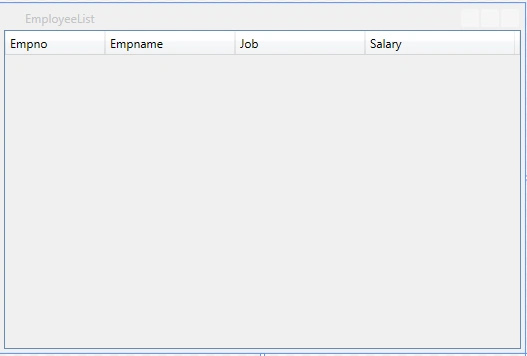
You will get the MainWindow.xaml window as below.
Step 4
Now add the configuration settings to the App.config file as iin the following (the username and word may be different in your SQL Server).
- <?xml version="1.0" encoding="utf-8" ?>
- <configuration>
- <startup>
- <supportedRuntime version="v4.0" sku=".NETFramework,Version=v4.5" />
- </startup>
- <connectionStrings>
- <add name="ConString" connectionString="Data Source=.; User Id=sa;word=Test123!;Database=WpfPractice" providerName="System.Data.SqlClient"/>
- </connectionStrings>
- </configuration>
Step 5
The following is the code for converting the DataReader to a List.
- using System;
- using System.Collections.ObjectModel;
- using System.Configuration;
- using System.Data;
- using System.Data.SqlClient;
- using System.Windows;
- namespace DataReaderToList.ViewModels
- {
- class DataReaderToListModel
- {
- #region Varible declarations
- private SqlConnection _sqlConnection;
- private SqlCommand _sqlCommand;
- private SqlDataReader _sqlDataReader;
- private string _strsqlcommand;
- #endregion
- #region Constructor
- public DataReaderToListModel()
- {
- EmployeeList = new ObservableCollection<EmployeeModel>();
- LoadData();
- }
- #endregion
- public ObservableCollection<EmployeeModel> EmployeeList { get; set; }
- #region Method for Getting the data from Databse
- public void LoadData()
- {
- try
- {
- _sqlConnection = new SqlConnection(ConfigurationManager.ConnectionStrings["ConString"].ConnectionString);
- if (_sqlConnection.State != ConnectionState.Open)
- _sqlConnection.Open();
- _strsqlcommand = "Select *From Emp";
- _sqlCommand = new SqlCommand(_strsqlcommand, _sqlConnection);
- _sqlDataReader = _sqlCommand.ExecuteReader();
- var employeemodellist = new ObservableCollection<EmployeeModel>();
- while (_sqlDataReader.Read())
- {
- var employeeModel = new EmployeeModel
- {
- Eno = _sqlDataReader.GetInt32(_sqlDataReader.GetOrdinal("Empno")),
- Ename = _sqlDataReader.GetString(_sqlDataReader.GetOrdinal("Ename")),
- Job = _sqlDataReader.GetString(_sqlDataReader.GetOrdinal("Job")),
- Salary = _sqlDataReader.GetDecimal(_sqlDataReader.GetOrdinal("Sal"))
- };
- employeemodellist.Add(employeeModel);
- }
- EmployeeList = employeemodellist;
- _sqlConnection.Close();
- }
- catch (Exception exception)
- {
- MessageBox.Show("DataLoading Failed beacause of following Reason \n" + exception.Message, "Error", MessageBoxButton.OK, MessageBoxImage.Error);
- }
- }
- #endregion
- }
- class EmployeeModel
- {
- #region Properties
- public int Eno { get; set; }
- public string Ename { get; set; }
- public string Job { get; set; }
- public decimal Salary { get; set; }
- #endregion
- }
- }
Step 6
The following is the code for converting the DataSet to a List.
- using System.Windows;
- using System;
- using System.Collections.ObjectModel;
- using System.Data;
- using System.Data.SqlClient;
- using System.Configuration;
- namespace WpfApplication1.ViewModels
- {
- class MainWindowViewModelcs
- {
- #region Variable Declaration
- private SqlConnection _cn;
- private SqlDataAdapter _da;
- private DataSet _ds;
- private string _strsqlcommand;
- #endregion
- #region Constructor
- public MainWindowViewModelcs()
- {
- EmployeeList = new ObservableCollection<EmployeeModel>();
- LoadData();
- }
- #endregion
- public ObservableCollection<EmployeeModel> EmployeeList { get; set; }
- #region Method for getting the data from database
- public void LoadData()
- {
- try
- {
- _cn = new SqlConnection(ConfigurationManager.ConnectionStrings["ConString"].ConnectionString);
- if (_cn.State != ConnectionState.Open)
- _cn.Open();
- _strsqlcommand = "Select *From Emp";
- _da = new SqlDataAdapter(_strsqlcommand, _cn);
- _ds = new DataSet();
- _da.Fill(_ds, "Employee");
- var dt = _ds.Tables["Employee"];
- var employeemodellist = new ObservableCollection<EmployeeModel>();
- for (int i = 0; i < dt.Rows.Count; i++)
- {
- var om = new EmployeeModel
- {
- Eno = Convert.ToInt32(dt.Rows[i]["Empno"]),
- Ename = dt.Rows[i]["Ename"].ToString(),
- Job = dt.Rows[i]["Job"].ToString(),
- Salary = Convert.ToDecimal(dt.Rows[i]["Sal"].ToString()),
- };
- employeemodellist.Add(om);
- }
- EmployeeList = employeemodellist;
- _cn.Close();
- }
- catch (Exception exception)
- {
- MessageBox.Show("DataLoading Failed beacause of following Reason \n" + exception.Message, "Error", MessageBoxButton.OK, MessageBoxImage.Error);
- }
- }
- #endregion
- }
- class EmployeeModel
- {
- #region Properties
- public int Eno { get; set; }
- public string Ename { get; set; }
- public string Job { get; set; }
- public decimal Salary { get; set; }
- #endregion
- }
- }
Step 7
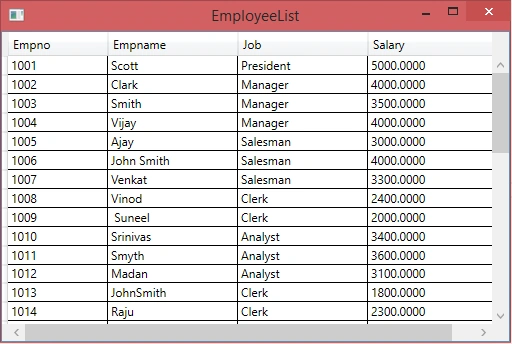
The following is the output window you will get after executing the project.
I hope you find this article useful. Please provide your valuable feedback, question, or comments about this article.
MUHAMMAD NAVEEDPosted Oct 6, 2021, 10:01 AM
Very good articlevery good article. what if one of the attribute is list your model (EmployeeModel). For eaxmple salary is not of type decimal it is type of list.