
Introduction
I am a .NET programmer and now I use DocX to create a Word document that contains all of my required elements, such as hyperlinks, tables, shapes, headers and footers.
But later I needed to convert this DocX into printable formats, PDF, HTML and XPS and so on.
I searched the internet and found that the writer of DocX recommends Microsoft's Office interop libraries to finish this requirements. For my develop situation, we don't want to install Microsoft Word or office to be installed on our machine. Finally I found the free Spire.Doc to finish this task, that is a standalone .NET Word API.
Application Overview
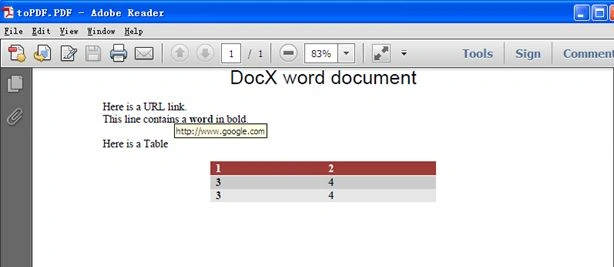
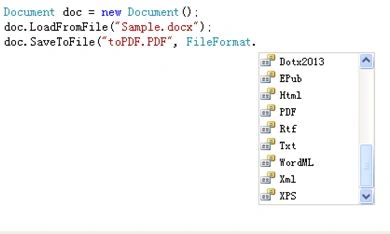
First, I use DocX to create an empty Word document and then insert a paragraph with a hyperlink, rich text and a table. Then save the Word document. Secondly, I use Spire.Doc to load the generated DocX Word document and convert it to other popular file formats, such as PDF, HTML, Image, TXT, Epub and XPS and so on.
To show how to create a Word document in DocX, I have created a sample document and here is how it looks.
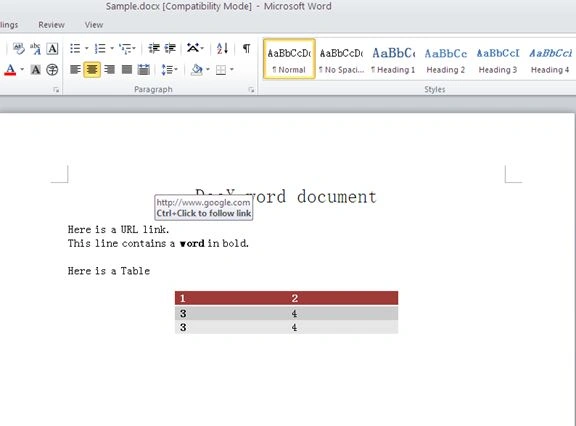
First, we need to generate a Word document using DocX, which is an open source API to work with Word 2007/2010 files.
Namespace to be used using Novacod
DocX makes creating and manipulating documents simple. Check out the code snippet of creating a Word document with hyperlinks and tables as below.
Console.WriteLine("\tHyperlinksImagesTables()");

// Create a document.
using (DocX document = DocX.Create(@"Sample.docx"))
{
    // Add a hyperlink into the document.
    Novacode.Hyperlink link = document.AddHyperlink("link", new Uri("http://www.google.com"));
    // Add a Table into the document.
    Novacode.Table table = document.AddTable(2, 2);
    //table.Design = TableDesign.ColorfulGridAccent2;
    table.Design = TableDesign.ColorfulList;
    table.Alignment = Alignment.center;
    table.Rows[0].Cells[0].Paragraphs[0].Append("1");
    table.Rows[0].Cells[1].Paragraphs[0].Append("2");
    table.Rows[1].Cells[0].Paragraphs[0].Append("3");
    table.Rows[1].Cells[1].Paragraphs[0].Append("4");
    Row newRow = table.InsertRow(table.Rows[1]);
    //Insert a new Paragraph into the document.
    Paragraph title = document.InsertParagraph().Append("DocX word document").FontSize(20).Font(new FontFamily("Arial"));
    title.Alignment = Alignment.center;
    // Insert a new Paragraph into the document.
    Paragraph p1 = document.InsertParagraph();
    // Append content to the Paragraph
    p1.AppendLine("Here is a URL ").AppendHyperlink(link).Append(".");
    p1.AppendLine("This line contains a ").Append("word").Bold().Append(" in bold.");
    p1.AppendLine();
    p1.AppendLine("Here is a Table");
    p1.AppendLine();
    // Insert the Table after Paragraph 1.
    p1.InsertTableAfterSelf(table);
    // Save this document.
    document.Save();
} 
rahul nasitPosted Apr 5, 2018, 7:25 AM
How to remove "Evaluation Warning : The document was created with Spire.PDF for .NET"
Ismail Hakki SenPosted Sep 27, 2014, 3:18 AM
good one.