

Introduction
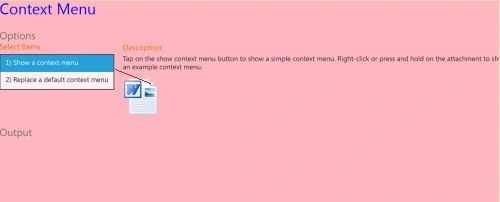
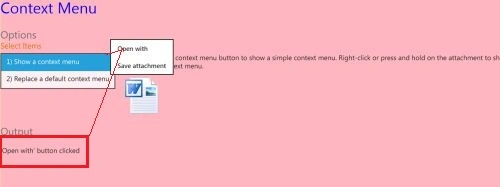
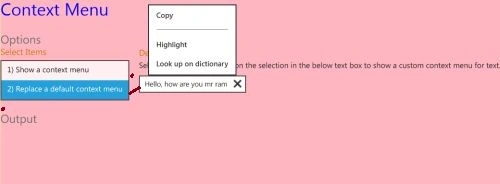
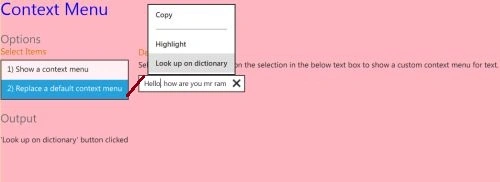
In this section we will learn how to create a context menu in Windows 8 and how to replace the default context menu for text. Here, we will present an example explaining the working procedure. In this example we have two points; first we create a context menu to show for a file and second replacing the default commands in the context menu that is shown for text. In this example we will use the oncontextmenu event.
So, we will use the following steps to make this application as below.
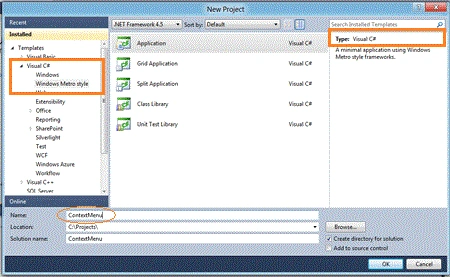
Step 1 : First of all you will create a new Metro Style Application. Let us see the description with images of how you will create it.
- Open Visual Studio 2011
- File -> New -> Project
- Choose Template -> Visual C# -> Windows Metro Style -> Application
- Rename this Application
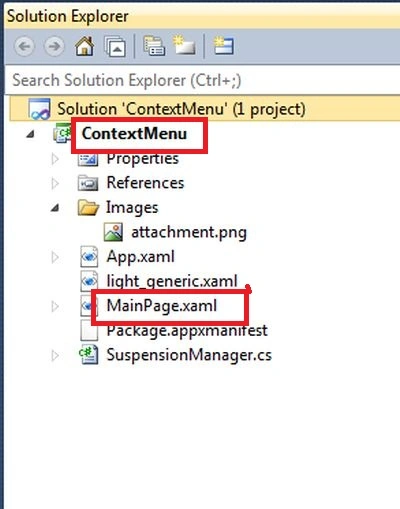
Step 2 : In the Solution Explorer there are two files that we will primarily work with; MainPage.xaml and MainPage.xaml.cs files. In the images folder add any image to the application but in this application we don't have to add an image.
Step 3 : The MainPage.xaml file is as in the following code.
Code : Let us see the code which is given below:
<Grid x:Name="LayoutRoot" Background="PaleGoldenrod">
<!--App Orientation States-->
<VisualStateManager.VisualStateGroups>
<VisualStateGroup x:Name="OrientationStates">
<VisualState x:Name="Full"/>
<VisualState x:Name="Fill">
<Storyboard>
<ObjectAnimationUsingKeyFrames Storyboard.TargetProperty="(FrameworkElement.Margin)" Storyboard.TargetName="ContentRoot">
<DiscreteObjectKeyFrame KeyTime="0">
<DiscreteObjectKeyFrame.Value>
<Thickness>40,20,40,20</Thickness>
</DiscreteObjectKeyFrame.Value>
</DiscreteObjectKeyFrame>
</ObjectAnimationUsingKeyFrames>
<ObjectAnimationUsingKeyFrames Storyboard.TargetProperty="(StackPanel.Orientation)" Storyboard.TargetName="InputPanel">
<DiscreteObjectKeyFrame KeyTime="0">
<DiscreteObjectKeyFrame.Value>
<Orientation>Horizontal</Orientation>
</DiscreteObjectKeyFrame.Value>
</DiscreteObjectKeyFrame>
</ObjectAnimationUsingKeyFrames>
<ObjectAnimationUsingKeyFrames Storyboard.TargetProperty="(FrameworkElement.MaxWidth)" Storyboard.TargetName="Description">
<DiscreteObjectKeyFrame KeyTime="0" Value="700">
</DiscreteObjectKeyFrame>
</ObjectAnimationUsingKeyFrames>
</Storyboard>
</VisualState>
<VisualState x:Name="Portrait">
<Storyboard>
<ObjectAnimationUsingKeyFrames Storyboard.TargetProperty="(FrameworkElement.Margin)" Storyboard.TargetName="ContentRoot">
<DiscreteObjectKeyFrame KeyTime="0">
<DiscreteObjectKeyFrame.Value>
<Thickness>40,20,40,20</Thickness>
</DiscreteObjectKeyFrame.Value>
</DiscreteObjectKeyFrame>
</ObjectAnimationUsingKeyFrames>
<ObjectAnimationUsingKeyFrames Storyboard.TargetProperty="(FrameworkElement.MaxWidth)" Storyboard.TargetName="Description">
<DiscreteObjectKeyFrame KeyTime="0" Value="700">
</DiscreteObjectKeyFrame>
</ObjectAnimationUsingKeyFrames>
</Storyboard>
</VisualState>
<VisualState x:Name="Snapped">
<Storyboard>
<ObjectAnimationUsingKeyFrames Storyboard.TargetProperty="(FrameworkElement.Margin)" Storyboard.TargetName="ContentRoot">
<DiscreteObjectKeyFrame KeyTime="0">
<DiscreteObjectKeyFrame.Value>
<Thickness>20,20,20,20</Thickness>
</DiscreteObjectKeyFrame.Value>
</DiscreteObjectKeyFrame>
</ObjectAnimationUsingKeyFrames>
<ObjectAnimationUsingKeyFrames Storyboard.TargetProperty="(StackPanel.Orientation)" Storyboard.TargetName="InputPanel">
<DiscreteObjectKeyFrame KeyTime="0">
<DiscreteObjectKeyFrame.Value>
<Orientation>Vertical</Orientation>
</DiscreteObjectKeyFrame.Value>
</DiscreteObjectKeyFrame>
</ObjectAnimationUsingKeyFrames>
<ObjectAnimationUsingKeyFrames Storyboard.TargetProperty="(FrameworkElement.MaxWidth)" Storyboard.TargetName="Description">
<DiscreteObjectKeyFrame KeyTime="0" Value="250">
</DiscreteObjectKeyFrame>
</ObjectAnimationUsingKeyFrames>
<ObjectAnimationUsingKeyFrames Storyboard.TargetProperty="(FrameworkElement.Margin)" Storyboard.TargetName="LegalPanel">
<DiscreteObjectKeyFrame KeyTime="0">
<DiscreteObjectKeyFrame.Value>
<Thickness>0,0,10,0</Thickness>
</DiscreteObjectKeyFrame.Value>
</DiscreteObjectKeyFrame>
</ObjectAnimationUsingKeyFrames>
</Storyboard>
</VisualState>
</VisualStateGroup>
</VisualStateManager.VisualStateGroups>
<Grid x:Name="ContentRoot" Background="LightPink" Margin="100,20,100,20">
<Grid.RowDefinitions>
<RowDefinition Height="Auto"/>
Vijay PrativadiPosted Apr 1, 2012, 2:56 AM
Good Going Arjun!!!....Keep Posting More and More!!!