

If you have been working on AngularJS you must have come across a business requirement to display data in a tabular format with all basic features such as “sorting”, “filtering”, “pagination”, “showing / hiding columns”, “exporting data,” etc. Well, most developers have their own preference for executing the stated requirement using their beloved plugin. Some of the mostly preferred plugins are UiGrid, JqGrid, DataTables, and Smart Table etc.
I’m very fond of using UI-Grid for handling the above requirement. If you are not aware of what UI-Grid is please take a look at the below link.
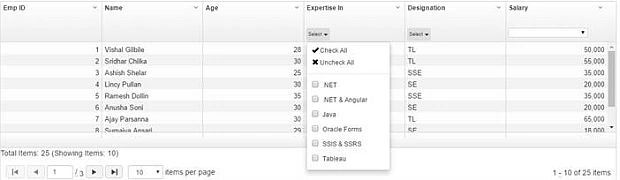
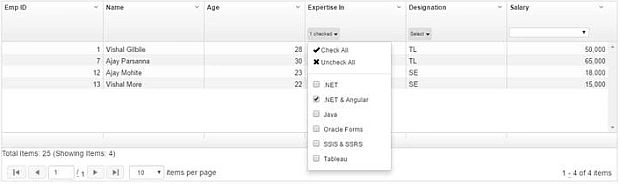
In this article we’ll discuss about how we can create a custom multi-select filter for UI-Grid. By default UI-Grid provides us with a single selection filter. Take a look at the below link which describes how we can use single selection filter in UI-Grid.
http//ui-grid.info/docs/#/tutorial/103_filtering
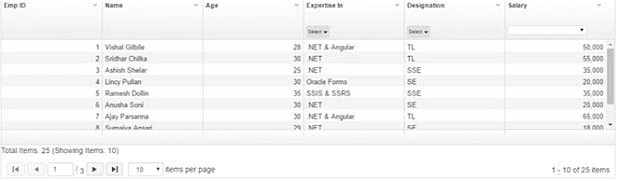
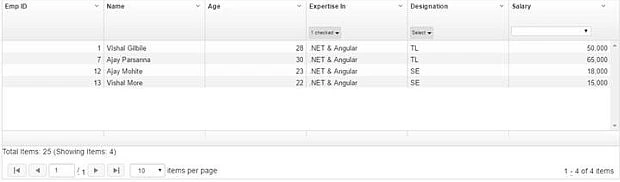
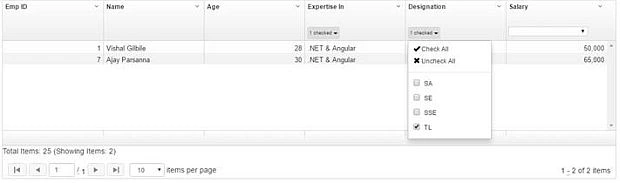
In one of my project requirements I came across a situation where we need a multi-select filter for filtering UI-Grid data. The main advantage of UI-Grid is that it is fully extensible. You are free to customize each and every part of the UI-Grid right from the top headers columns template to the page navigation template of the UI-Grid. In this article we’ll be customizing the default filterHeaderTemplate template with our custom one. Our final application will look like the below figure.
Note
- Two of the filters are custom multi-select and the salary filter is the default single select filter.
- For Multi-select filter I’m going to use the Angular dropdown multi-select plugin. For more information about this plugin please go thorough the below link
To help you understand the concept I’m going to use AngularJs(1.x), Typescript as my technology stack and for editor I’m using VS2015. So let’s get started.
I’ve created a VS2015 empty Asp.NET web application solution named “UiGridCustomFilter”. Now we’ll add our required technology stack i.e. A ngularJs and Typescript. Below is how I built my application architecture.
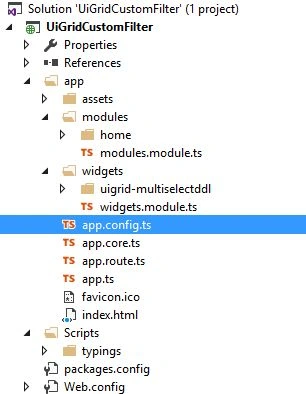
Just to give a brief description, our application architecture contains the below files/folders
- “app” is the main folder for the AngularJs application. It contains Angular main module registration and we register our application’s sub modules i.e. app.core, app.widgets&app.modulesetc
- “app.core” where we register our third party librariesangular module as dependency
- “app.route” is the application routing file
- “app.config” is the application configuration file
- “assets” is the container for application “css”, “js”, “imgs” & “libs”
- “modules” is the container for application modules such as “home”, “menus” etc
- “modules.module.ts” contains angular module registration
- “widgets” is the container for application reusable components/directives
- “widgets.module.ts” contains angular module registration
- “Scripts/typings” is folder which contains our d.ts. files
We are done setting up our application framework, now we are ready for coding. To start with I’ve created a Ts file with named “app.ts” which is the bootstrap of our application and also for folders named “modules” & “widgets” we’ve created a ts files named “modules.module.ts” & “widgets.module.ts”. All these files basically register Angular module with Javascript IIFE (Immediately invoked function expression).
App.ts
Main application file. Here we reigster the sub modules i.e. core, widgets etc.
- (() void => {
- "use strict";
- angular.module("app", [
- /application dependencies/
- "app.core", "app.widgets", "app.modules",
- ]);
- })();
Registers an angular module named "app.core".
In this module we list our angular as well as any third party plugins we'll be using in this application.
- /*
- Registers an angular module named "app.core".
- In this module we list our angular as well as any third party plugins we'll be using in this application.
- */
- (() void => {
- "use strict";
- angular.module("app.core", [
- /*modules or Libraries used*/
- 'ui.router', 'ui.grid', 'ui.grid.pagination', 'ui.grid.pinning', 'ui.grid.resizeColumns', 'ui.grid.autoResize', 'ui.grid.exporter', 'ui.grid.selection',
- //For multiselect control we are using angularjs-Dropdown-Multiselect plugin.
- 'angularjs-dropdown-multiselect',
- ]);
- })();
- App.Route.ts
- //JS IIFE
- (() void => {
- "use strict";
- /*
- Angular Route Configuration class.
- */
- angular.module("app").config(routeConfig);
- //Injecting the dependencies
- routeConfig.$inject = ["$stateProvider"];
- functionrouteConfig($stateProvider ng.ui.IStateProvider) {
- $stateProvider.state('index', {
- url "/index",
- templateUrl "app/index.html",
- controller "indexController",
- controllerAs "idxc"
- })
- }
- });
- Modules.module.ts
- /*
- Registers an angular module named "app.modules".
- */
- (() void => {
- "use strict";
- angular.module("app.modules", [
- /*modules or Libraries used*/
- ]);
- })();
- Widgets.module.ts
- /*
- Registers an angular module named "app.widgets".
- */
- (() void => {
- "use strict";
- angular.module("app.widgets", [
- /*modules or Libraries used*/
- ]);
- })();
- Note“ Typescript modules” has no relation with“ angular modules” & vice versa.
- Now we’ ll create our reusable directive in widgets / uigrid - multiselectddl folder with name“ uigrid - multiselectddl.directive.ts”.This directive will be used
- for displaying custom multi - select in the ui - grid filter header template.Below is the code snippet
- for the same.
- uigrid - multiselectddl.directive.ts
- moduleapp.widgets.uigrid.multiselectddl {
- "use strict";
- interfaceIDropDown {
- id number;
- label string;
- $$hashKey ? string;
- }
- /**
- * DropDown
- */
- classDropDownimplementsIDropDown {
- id number;
- label string;
- $$hashKey string;
- constructor(id number, label string, $$hashKey ? string) {
- this.id = id;
- this.label = label;
- this.$$hashKey = $$hashKey
- }
- }
- interfaceIMultiSelectDDLDirectiveScopeextendsng.IScope {
- selectedDataModel IDropDown[];
- eventListeners Object;
- extraSettings Object;
- checkboxes boolean;
- colFilter uiGrid.IFilterOptions;
- }
- /**
- * MultiSelectDDL Directive Controller Class.
- */
- classMultiSelectDDLController {
- static $inject = ["$scope", "uiGridConstants"];
- constructor(private $scope IMultiSelectDDLDirectiveScope, privateuiGridConstants uiGrid.IUiGridConstants) {
- let self = this;
- //initializing the selectedModel to empty array
- $scope.selectedDataModel = [];
- //binding the events
- $scope.eventListeners = {
- /**
- * Func for item Select
- * @paramcheckedItem Selected Item Label
- */
- onItemSelect(checkedItem string) => {
- self.doFilter();
- },
- /**
- * Func for item Deselect
- * @paramuncheckedItem Deselected Item Label
- */
- onItemDeselect(unCheckedItem string) => {
- self.doFilter();
- },
- /**
- * Func for select all elements
- */
- onSelectAll() => {
- self.doFilter();
- },
- /**
- * Func for deselecting all elements
- */
- onDeselectAll(sendEvent any) => {
- //emptying the array
- self.$scope.selectedDataModel.splice(0, self.$scope.selectedDataModel.length);
- self.doFilter();
- }
- };
- //extra Settings for the MultiSelect control
- $scope.extraSettings = {
- externalIdProp '',
- displayProp 'label',
- idProp 'value',
- showCheckAll true,
- showUncheckAll true,
- buttonDefaultText "",
- scrollable false,
- buttonClasses "btnfilterBtn"
- }
- }
- /**
- * Func for filter UI-Grid Data
- */
- doFilter() {
- let self = this;
- self.$scope.colFilter.term = self.$scope.selectedDataModel.map(function(element) {
- returnelement.label
- }).join(",")
- self.$scope.colFilter.condition = newRegExp(self.$scope.selectedDataModel.map(function(element) {
- returnelement.label
- }).join("|"));
- }
- }
- /**
- * AngularJsMultiSelectDropDown Directive
- */
- exportclassMultiSelectDDLDirectiveimplementsng.IDirective {
- //Restricting the directive to be used as either "element" or "attribute"
- public restrict string = "EA";
- //view for the directive
- publictemplateUrl string = "widgets/uigrid-multiselectddl/uigrid-multiselectddl.html";
- //replace property of directive
- public replace = false;
- //default scope i.e. Shared scope
- public scope = false;
- //controller for the directive
- controller = MultiSelectDDLController;
- //default constructor
- constructor() {}
- static instance() ng.IDirective {
- returnnewMultiSelectDDLDirective();
- }
- }
- //Registering the directive with app.widgets angular module
- angular.module("app.widgets").directive("app.widgets.uigrid.multiselect", MultiSelectDDLDirective.instance);
- }
- uigrid - multiselectddl.directive.html < div > < style > div.dropdown - multiselect > ul.dropdown - menu > liaspan {
- font - weight bold;
- color black!important;
- } < /style> < divname = "multiDDL"
- ng - dropdown - multiselect = ""
- options = "colFilter.selectOptions"
- selected - model = "selectedDataModel"
- events = "eventListeners"
- extra - settings = "extraSettings"
- checkboxes = "true" > < /div> < /div>
Index.controller.ts
- moduleapp.modules {
- /
- Used for converting boolean string representation to Boolean value
- /
- classStringToBooleanConverter {
- static Convert(value string) boolean {
- return (value === "true");
- }
- }
- /
- Dropdown option and value
- /
- interfaceIOption {
- value string;
- label string;
- }
- /
- interfaceIEmployee {
- empId number;
- name string;
- age number;
- designation string;
- expertiseIn string;
- salary number;
- }
- /
You can add more properties to this class as required which may include "custom properties" as well as "uiGrid Col definition" properties
- /
- interfaceIUiGridColDefinition {
- //#region uiGrid Properties"
- name string;
- displayName string;
- field string;
- filterHeaderTemplate ? string;
- cellClass ? string;
- cellFilter ? string;
- enableFiltering ? string;
- //#endregion
- //#region Custom Properties
- useCustomFilterHeaderTemplate ? string;
- //#endregion
- }
- interfaceIIndexController {
- gridApi uiGrid.IGridApi;
- gridOptions uiGrid.IGridOptions;
- dataSource IEmployee[];
- gridColumnDefinitions IUiGridColDefinition[];
- bindData() void;
- getGridSettings() void;
- configureGrid() void;
- }
- /
Sonu GuptaPosted Dec 5, 2017, 1:39 AM
If you have any example of such type in mvc please share a link
Sonu GuptaPosted Dec 5, 2017, 1:38 AM
Can i use this grid in mvc
Vishal GilbilePosted Mar 17, 2017, 2:57 AM
Hi Sahil this is done using Angular1.x version only. The only difference is that I used Typescript as the coding language instead of using JavaScript
Sahil SainiPosted Mar 17, 2017, 2:47 AM
Hi Can we do the same with angular 1 if we can please tell me.