

Creating a dll file
To create a DLL follow the below steps
Open 'Visual Studio' and select File -> Open -> New ->Project
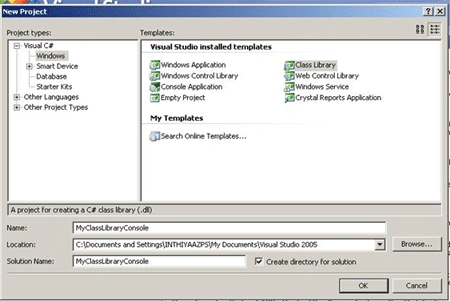
Click on OK Button. Once you click on Ok 'Button' your Class Library looks as
follows.
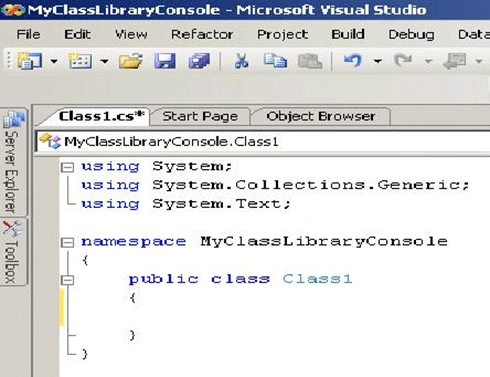
Now you can add whatever code that you need to. Here I have String as the return data type for the function. I will use this function in another project (.aspx) and show the Result in a TextBox.
namespace MyClassLibraryConsole
{
public class Class1
{
public string strfunction(string input)
{
string strmessage = input;
return strmessage;
}
}
}
Now you have to call this function in another project. Add New (or) Existing Project to your Solution. Here I am adding Existing .asp WebPages to my solution as follows.
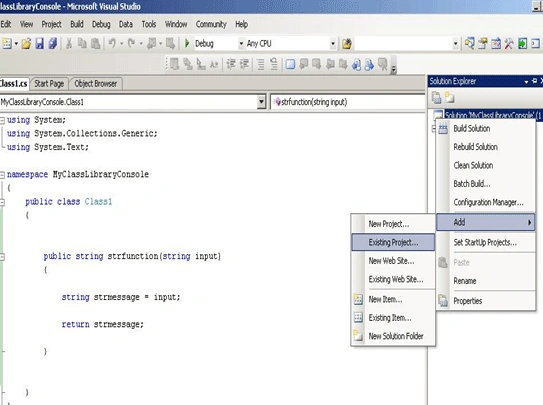
Once you have added your New or Existing Project your Solution will looks as follows.
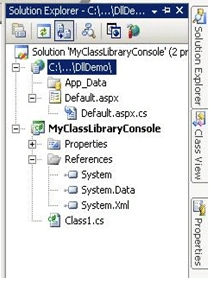
Adding created dll file in Solution Explorer:
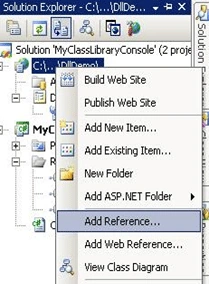
Right click on DllDemo(.asp) solution and click on the select 'Add Reference'.
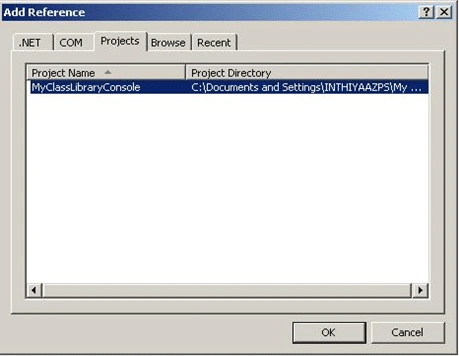
Now you can find dialog Box. Select 3rd tab 'Projects'. Now can find your created ClassLibrary (dll) as 'MyClassLibraryconsole'.Select it and click 'OK' button.
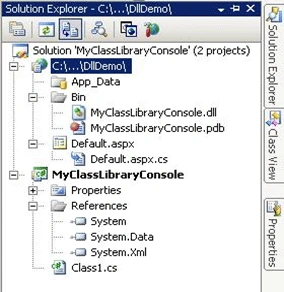
Now your dll is added successfully to your website. You can see your added dll in solution Explorer.
Calling dll file function in .aspx.cs page:
protected void Button1_Click(object sender, EventArgs e)
{
MyClassLibraryConsole.Class1 obj = new MyClassLibraryConsole.Class1();
TextBox1.Text = obj.strfunction("Hellow World");
}
Showing the Result in TextBox:

Thanks for Reading my Article!
Shakeer
Njamilah_empiresarPosted Feb 18, 2016, 4:22 AM
i had the aspx.cs file...how to convert the file to dll file ??any method of using command prompt
Njamilah_empiresarPosted Feb 18, 2016, 4:21 AM
hello...
Kiran Kumar TalikotiPosted Jul 22, 2013, 6:27 AM
@Shakeer ur just adding an existing project to old project ,and calling an class using namespace thats it
Kiran Kumar TalikotiPosted Jul 22, 2013, 6:25 AM
@Shakeer This is not the right way to create .Dll file.I agree with u sam sir:) please make changes to article title.This is actually a class libray.
tAhIra sgdPosted Mar 11, 2011, 10:35 AM
i m installing microsoft visual studio 2008. i treid many times but all time it is going to be failed i dont know why it is failing again n agian... nad it gives an error in a small dialog box that ENU is encournterd an error..... plz solve it
Manish TewatiaPosted Feb 2, 2011, 10:49 PM
Very Good Article....... thankx for sharing........
sarfaraj MdPosted Feb 2, 2011, 5:19 AM
very good.......article..thanks
sarfaraj MdPosted Feb 2, 2011, 5:15 AM
very good process..................thanks.
knightsPosted Jan 31, 2011, 5:52 PM
This is inappropriate title and further more these kind of quick writeups should go in How do I section firstly, since its not qualifying to be categorized as an article in my point of view. Secondly its unclear as what the authors is looking to deliver,wont write anything more as Sam has already shed the light on what this article tells.
Sam HobbsPosted Jan 31, 2011, 2:48 PM
I think it is misleading and confusing for beginners to call it a DLL file, since that implies it is a regular DLL with unmanaged code. It should be called a Class Library or something such as that, since that is what it is. I am concerned that a C++ programmer unfamiliar with .Net and managed code could think that this article explains a way to create a regular DLL using .Net; this article does not do that.