

Provider-hosted apps for SharePoint include components that are deployed and hosted outside the SharePoint Farm. They are installed to the host web, but their remote components are hosted on another server. In this article the website is hosted in the Microsoft Windows Azure and the app is installed in Office 365.
In this article you will perform the following procedure.
- Sign up for an Office 365 Developer Site
- Sign up for an Azure trial subscription
- Set up an App Catalog in Office 365
- Create a Provider-Hosted App using Visual Studio 2013
Be sure you have access to an Office 365 Developer Site. Here are three ways to get one:
- Are you an MSDN subscriber? Visual Studio Ultimate and Visual Studio Premium with MSDN subscribers receive an Office 365 Developer Subscription as a benefit. Redeem your benefit today.
- Do you have one of the following Office 365 subscription plans?
Office 365 Enterprise E1, E3, E4, or K1
Office 365 Education A2, A3, or A4
Office 365 Government G1, G3, G4, or K1
If so, you can provision a Developer Site from the Office 365 admin center. For more information, see How to: Create a Developer Site within your existing Office 365 subscription.
- You can either start with a free 30-day trial, or buy an Office 365 developer subscription (with one user license for either option) using one of the following links. This subscription costs $99.00 per year.
Sign up for an Azure trial subscription
Be sure you have access to a Windows Azure. Here is the way to get the trial subscription:
- Navigate to the Azure Portal.
- If prompted, log in using the credentials you created for your O365 subscription.
- After logging in, you should see a screen notifying you that you do not have a subscription
- Click Sign Up for Windows Azure.
- Fill out the form to obtain your free trial.
- You should provide the credit card details to register but it will not be charged.
In SharePoint 2013 there is a special site collection that holds the apps called the App Catalog. There cannot be more than one App Catalog site collection in a web application or each web application can have only one App Catalog site collection. An app catalog is a dedicated site collection in a SharePoint 2013 web application (or a SharePoint Online tenancy) that hosts document libraries for apps for SharePoint and apps for Office. Administrators can upload apps for Office manifest files to the app catalog for use within their organization.
Please refer to How to set up an App Catalog on SharePoint 2013 Online for more details.
Create a Provider-Hosted App using Visual Studio 2013:
- Open Visual Studio.
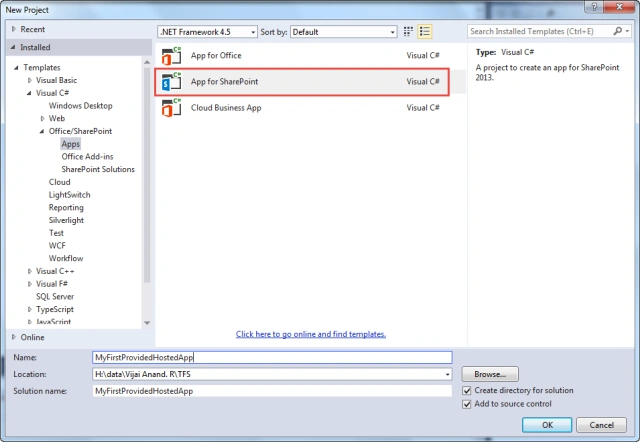
- Go to File => New => Project.
- From the install templates, select Apps.
- Click on App for SharePoint.
- Enter the name for the project and then click on the Ok button
- In the New app for SharePoint wizard, enter the Office 365 SharePoint developer site URL and select Provider-hosted as the hosting model.
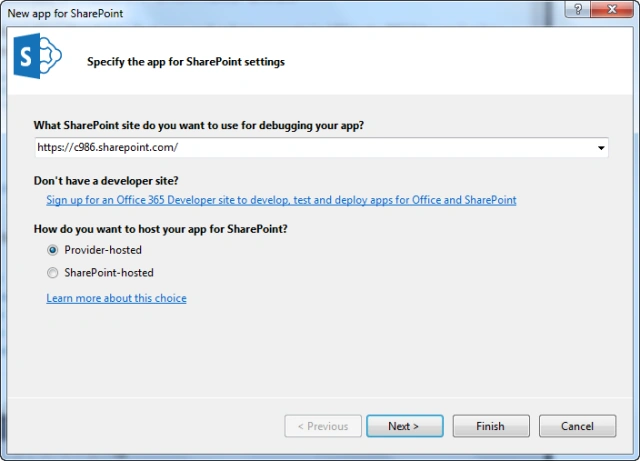
- Click on the Next button.
- Select ASP.NET MVC Web Application as the type of web application for this app.
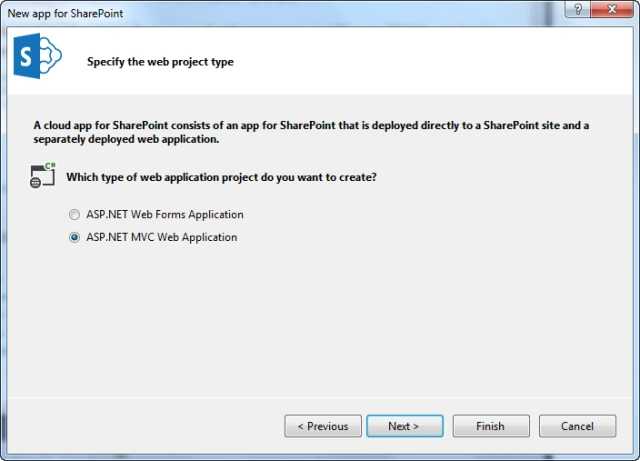
- Click on the Next button.
- Select Use Windows Azure Access Control Service (for SharePoint cloud apps).
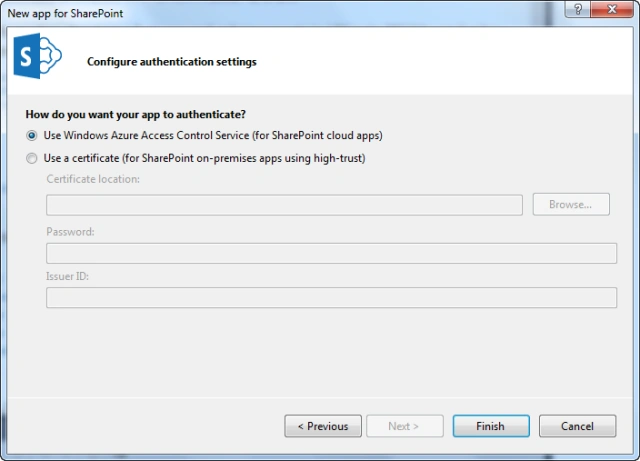
- Click on the Finish button.
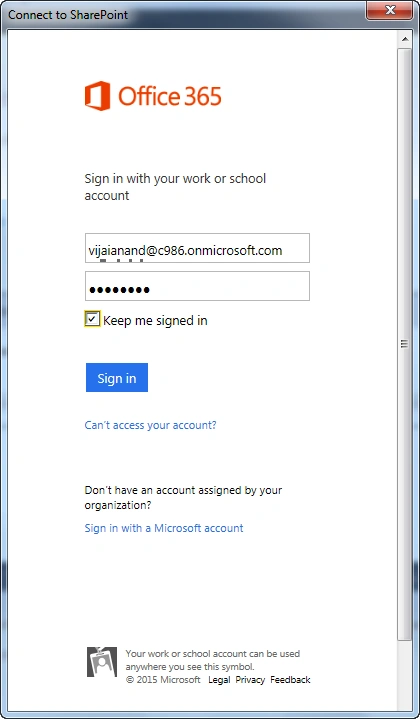
- Enter the Office 365 administrator credentials in the pop-up to allow Visual Studio to access the Office 365 developer site.
- Visual Studio is creating the project.
- Provider-hosted app solution is created successfully as shown below.
The solution contains the 2 projects MyFirstProvidedHostedApp and MyFirstProvidedHostedAppWeb.
MyFirstProvidedHostedApp project contains the app manifest file that will have all the metadata required for the app that must be installed in the SharePoint.
MyFirstProvidedHostedAppWeb project is the web application that will be deployed in the Azure environment.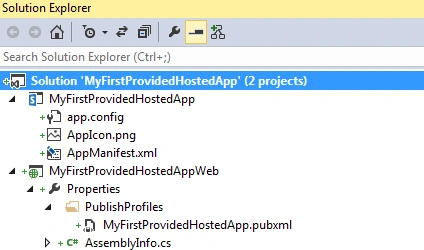
Anirban MazumdarPosted Feb 20, 2018, 12:50 AM
The above blog series is really helpful. I have one question. In #8, why to select 'ASP.NET MVC Web Application' rather 'ASP.NET Web Forms Application' while creating Provider Hosted App?
Gowtham RajamanickamPosted Apr 10, 2016, 1:34 AM
Good one...
Veena SardaPosted Sep 4, 2015, 7:06 AM
Useful ...
SharadPosted Jul 22, 2015, 12:27 AM
good one...
Tom MohanPosted Mar 23, 2015, 4:50 AM
good one