

Introduction
In this article, you will learn how to create an HTML report using inline code in ASP.NET.
In one of my previous articles, I explained the Difference between Inline Code and Code Behind, in this article, we will use inline code to create an HTML report.
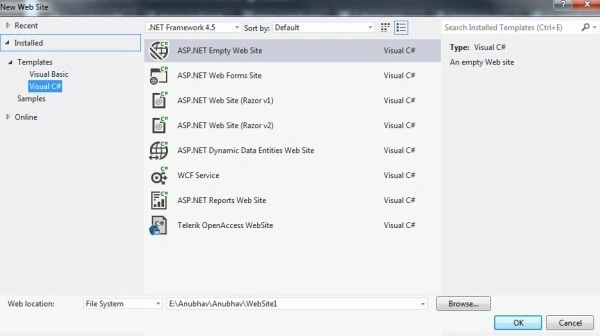
Step 1. First of all, create a new empty website in your Visual Studio.
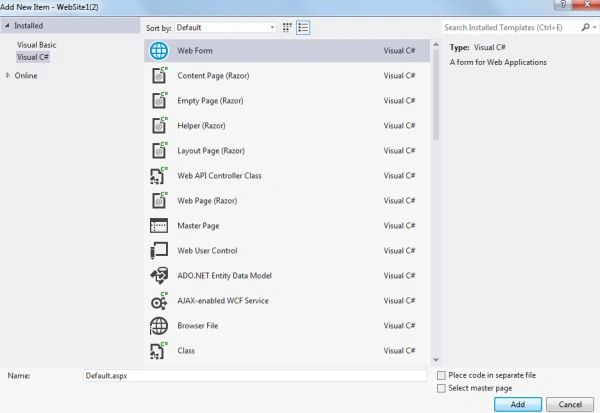
Now right-click on your website name and then add a new Web Page but while adding this new page ensure that you uncheck the "Place Code in Separate File", otherwise it will not be inline code.
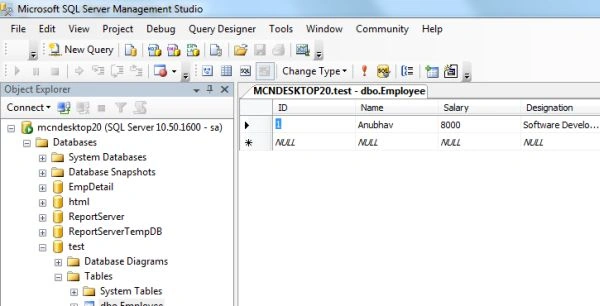
Step 2. Now create a database of any name and add one table to it. Make some entries in this new table and save it. For here I created a database named "Test" and a table added to it named "Employee".
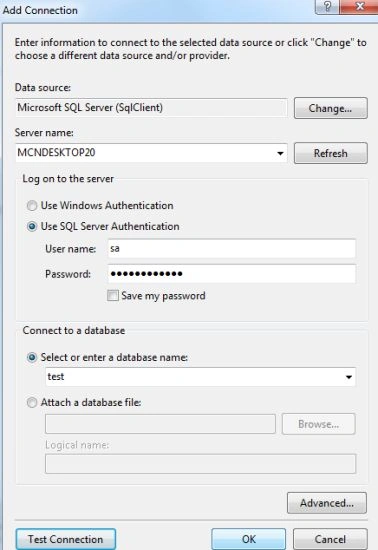
Now in Visual Studio add this database by adding it through Server Explorer. Provide all the necessary details for the connection and connect to it.
Step 3. Now you need to add a class through which a connection to this database will be declared, for again right-click on your website click on "Add New Item" and then add the class.
In this class, a connection will be created that will help us to fetch the data from the database. Here the connectme function is used to make the connection with the database and the getvalue function is used to read the data from the database.
using System;
using System.Collections.Generic;
using System.Linq;
using System.Web;
using System.Data.SqlClient;

public class callme
{
    public SqlConnection x = new SqlConnection();
    public SqlCommand y = new SqlCommand();
    public SqlDataReader z;

    public void connectme()
    {
        x.Close();
        x = new SqlConnection(@"Data Source=MCNDESKTOP20;Initial Catalog=test;User ID=sa;Password=**********");
        x.Open();
    }

    public void getvalue(string task)
    {
        connectme();
        y = new SqlCommand(task, x);
        z = y.ExecuteReader();
    }
}
Step 4. Now you want to go to the Coding Section of the page, then you must double-click on the Design page; double-clicking will not open any new page since here inline code is to be used. Now in the .aspx page we will call the class created above, this can be done by simply dragging the class to the head section.
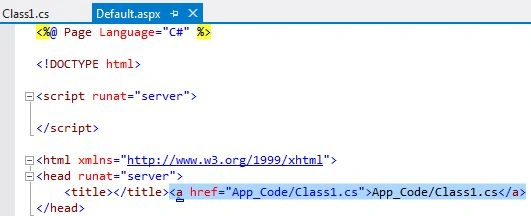
Now we will create an object of this class because we are using the functions declared in the class, and after that, by using these functions we will show the data of the database in the table format.
<%@ Page Language="C#" %>
<!DOCTYPE html>
<script runat="server">
</script>
<html xmlns="http://www.w3.org/1999/xhtml">
<head runat="server">
    <title></title><a href="App_Code/Class1.cs">App_Code/Class1.cs</a>
</head>
<body>
    <form id="form1" runat="server">
        <div>
            <center>
                <% callme me = new callme(); %>
                <table border="2">
                    <tr>
                        <td>
                            <% me.connectme();
                    me.getvalue("SELECT [ID],[Name],[Salary],[Designation] FROM [Employee]");
                    if (me.z.HasRows)
                    {
                        while (me.z.Read())
                        {
                            string id = me.z["ID"].ToString();
                            string name = me.z["Name"].ToString();
                            string salary = me.z["Salary"].ToString();
                            string desig = me.z["Designation"].ToString();
                            %>
                        </td>
                    </tr>
                    <tr>
                        <td>ID: </td>
                        <td>
                            <%=id%>
                        </td>
                    </tr>
                    <tr>
                        <td>Name: </td>
                        <td>
                            <%= name %>
                        </td>
                    </tr>
                    <tr>
                        <td>Salary: </td>
                        <td>
                            <%= salary %>
                        </td>
                    </tr>
                    <tr>
                        <td>Designation: </td>
                        <td>
                            <%= desig %>
                        </td>
                    </tr>
                    <tr>
                </table>
            </center>
            <%}
      } %>
            </tr>
        </div>
    </form>
</body>
</html>
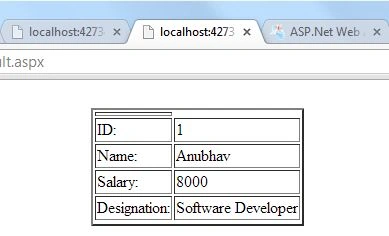
Step 5. Now if we debug our program then its output will be something like this.
Join the conversation! Your thoughts help the community grow.