

Introduction
Nowadays, all air-conditioning systems contain temperature management systems to maintain a constant temperature inside the room. This system measures the temperature with the help of a temperature sensor. This sensor works like a thermometer.
In this article, you will learn about how to create a digital thermometer using the Arduino microcontroller board.
Prerequisites for developing this system
Hardware requirements
| Hardwares | Nos |
| Arduino UNO | 1 |
| DHT11 Temperature sensor | 1 |
| 10k ohm potentiometer | 1 |
| 10k ohm Resistor | 1 |
| LCD crystal display | 1 |
| 220-ohm resistor | 1 |
| Breadboard | - |
| Connecting wires | - |
Software requirements
-
Arduino IDE (For uploading code to Arduino Microcontroller)
In this experiment, we can do three stages of work for creating Digital Room Thermometer:
1. Connect all hardware
2. Write & upload code to Arduino board
3. Test our developed system
Stage 1 [Connecting all hardware’s]
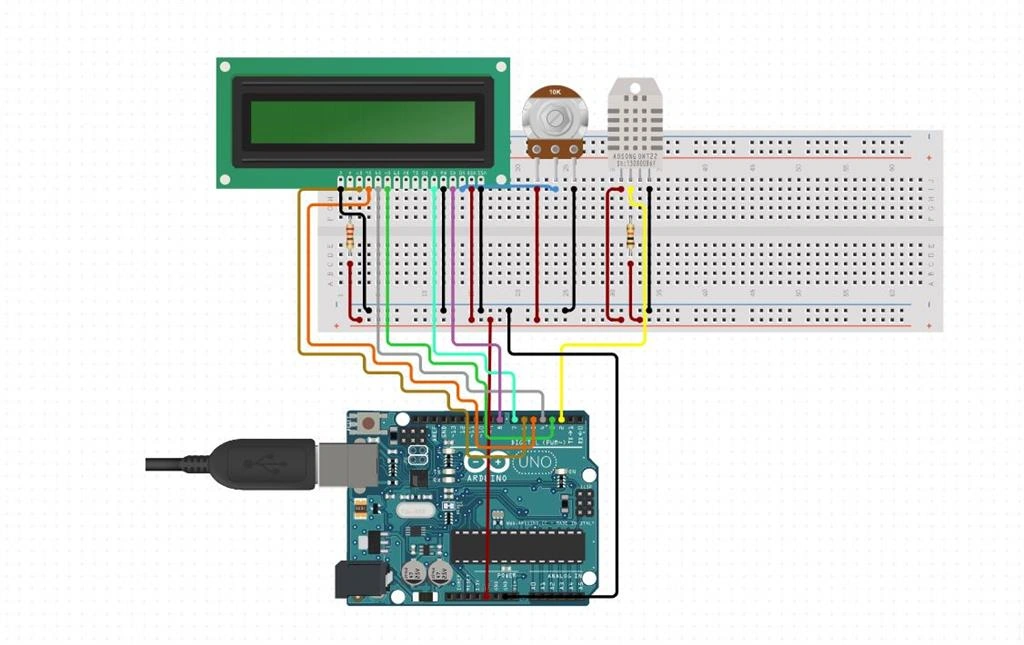
Step 1
First, we can connect the LCD crystal display with the Arduino UNO board using Jumper wires. I am using a breadboard to extend power terminals for making this system.
Refer to the below LCD crystal Pin diagram for making an easy connection with Arduino
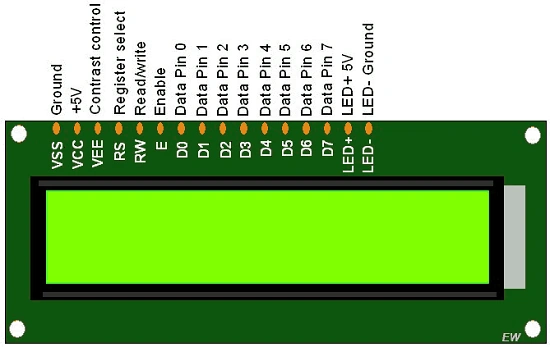
Place a 10K ohm potentiometer near the LCD crystal display. It can adjust the contrast of the LCD screen and create a power connection from Arduino +5V and GND right and left end of the potentiometer. Make a connection from the center terminal of the potentiometer to VEE (contrast control) LCD crystal display. (Refer to the connection diagram)
Pin Configuration
Arduino Breadboard LCD Crystal Display
Pin 3 ---------------------------------------------------------------------------> Data pin 4
Pin 4 ---------------------------------------------------------------------------> Data pin 5
Pin 5 ---------------------------------------------------------------------------> Data pin 6
Pin 6 ----------------------------------------------------------------------------> Data pin 7
Pin 8 ----------------------------------------------------------------------------> Register select
Pin 7 ----------------------------------------------------------------------------> Enable
+ 5V -----------------> Potentiometer Right Terminal-------------------->Potentiometer Centre terminal ----> VEE (Contrast Control) LCD crystal
+5V ---------------------------> 220-ohm Resistor -------------------------> LED +5V pin [LCD Crystal]
Join the conversation! Your thoughts help the community grow.