

Introduction
Microsoft Excel is a very useful application for businesses.
Excels contain data in cells like a database so it is also easy to manage data stored in an Excel file from a database or another type.
Excel creates files in the .xls and .xlsx file formats. Excel files are difficult to manage using C#.
Interop
First add a reference from the right side in Solution Explorer. Right-click on the project then select Add Reference then select Microsoft.Office.Interop.Excel.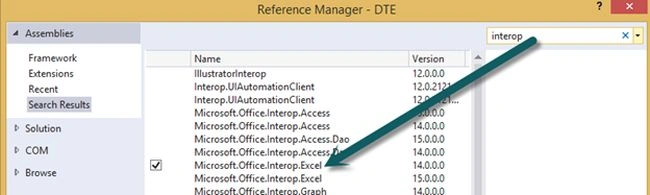
Add the following namespace to the project.
“using Microsoft.Office.Interop.Excel”
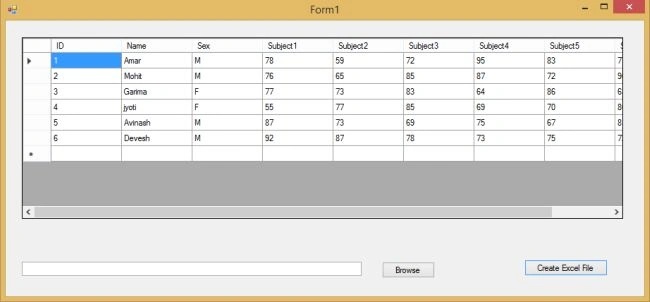
First create a table using a DataGridView in the C# code.
- private void Form1_Load(object sender, EventArgs e)
- {
- dataGridView1.DataSource = ExportToExcel();
- }
- public System.Data.DataTable ExportToExcel()
- {
- System.Data.DataTable table = new System.Data.DataTable();
- table.Columns.Add("ID", typeof(int));
- table.Columns.Add("Name", typeof(string));
- table.Columns.Add("Sex", typeof(string));
- table.Columns.Add("Subject1", typeof(int));
- table.Columns.Add("Subject2", typeof(int));
- table.Columns.Add("Subject3", typeof(int));
- table.Columns.Add("Subject4", typeof(int));
- table.Columns.Add("Subject5", typeof(int));
- table.Columns.Add("Subject6", typeof(int));
- table.Rows.Add(1, "Amar", "M", 78, 59, 72, 95, 83, 77);
- table.Rows.Add(2, "Mohit", "M", 76, 65, 85, 87, 72, 90);
- table.Rows.Add(3, "Garima", "F", 77, 73, 83, 64, 86, 63);
- table.Rows.Add(4, "jyoti", "F", 55, 77, 85, 69, 70, 86);
- table.Rows.Add(5, "Avinash", "M", 87, 73, 69, 75, 67, 81);
- table.Rows.Add(6, "Devesh", "M", 92, 87, 78, 73, 75, 72);
- return table;
- }
Then create an object of Excel Application, Workbook, Worksheet and Range.
- Microsoft.Office.Interop.Excel.Application excel;
- Microsoft.Office.Interop.Excel.Workbook worKbooK;
- Microsoft.Office.Interop.Excel.Worksheet worksheet
- Microsoft.Office.Interop.Excel.Range celLrangE;
- excel = new Microsoft.Office.Interop.Excel.Application();
- excel.Visible = false;
- excel.DisplayAlerts = false;
- worKbooK = excel.Workbooks.Add(Type.Missing);
- worKsheeT = (Microsoft.Office.Interop.Excel.Worksheet)worKbooK.ActiveSheet; worKsheeT.Name = "StudentRepoertCard";
- worKsheeT.Range[worKsheeT.Cells[1, 1], worKsheeT.Cells[1, 8]].Merge();
- Microsoft.Office.Interop.Excel.Application excel;
- Microsoft.Office.Interop.Excel.Workbook worKbooK;
- Microsoft.Office.Interop.Excel.Worksheet worKsheeT;
- Microsoft.Office.Interop.Excel.Range celLrangE;
- try
- {
- excel = new Microsoft.Office.Interop.Excel.Application();
- excel.Visible = false;
- excel.DisplayAlerts = false;
- worKbooK = excel.Workbooks.Add(Type.Missing);
- worKsheeT = (Microsoft.Office.Interop.Excel.Worksheet) worKbooK.ActiveSheet;
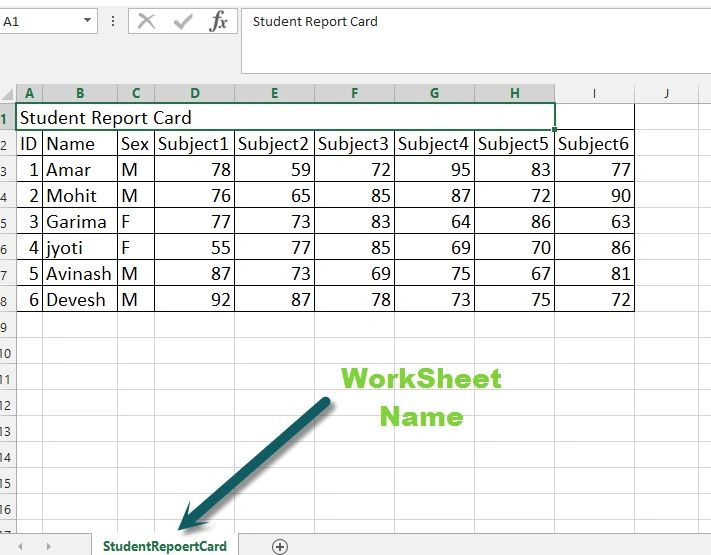
- worKsheeT.Name = "StudentRepoertCard";
- worKsheeT.Range[worKsheeT.Cells[1, 1], worKsheeT.Cells[1, 8]].Merge();
- worKsheeT.Cells[1, 1] = "Student Report Card";
- worKsheeT.Cells.Font.Size = 15;
- int rowcount = 2;
- foreach(DataRow datarow in ExportToExcel().Rows)
- {
- rowcount += 1;
- for (int i = 1; i <= ExportToExcel().Columns.Count; i++)
- {
- if (rowcount == 3)
- {
- worKsheeT.Cells[2, i] = ExportToExcel().Columns[i - 1].ColumnName;
- worKsheeT.Cells.Font.Color = System.Drawing.Color.Black;
- }
- worKsheeT.Cells[rowcount, i] = datarow[i - 1].ToString();
- if (rowcount > 3)
- {
- if (i == ExportToExcel().Columns.Count)
- {
- if (rowcount % 2 == 0)
- {
- celLrangE = worKsheeT.Range[worKsheeT.Cells[rowcount, 1], worKsheeT.Cells[rowcount, ExportToExcel().Columns.Count]];
- }
- }
- }
- }
- }
- celLrangE = worKsheeT.Range[worKsheeT.Cells[1, 1], worKsheeT.Cells[rowcount, ExportToExcel().Columns.Count]];
- celLrangE.EntireColumn.AutoFit();
- Microsoft.Office.Interop.Excel.Borders border = celLrangE.Borders;
- border.LineStyle = Microsoft.Office.Interop.Excel.XlLineStyle.xlContinuous;
- border.Weight = 2d;
- celLrangE = worKsheeT.Range[worKsheeT.Cells[1, 1], worKsheeT.Cells[2, ExportToExcel().Columns.Count]];
- worKbooK.SaveAs(textBox1.Text);;
- worKbooK.Close();
- excel.Quit();
- }
- catch (Exception ex)
- {
- MessageBox.Show(ex.Message);
- }
- finally
- {
- worKsheeT = null;
- celLrangE = null;
- worKbooK = null;
- }
Thank you.
Steven MellingerPosted May 23, 2019, 10:58 AM
Exactly what I was looking for to set up Excel sheets from C# - thanks!
Asif ShahzadPosted Feb 27, 2019, 1:00 AM
"Exception from HRESULT: 0x800AC472 " this exception araise in type.missing
Johnson ManickamPosted Jan 30, 2019, 12:44 AM
Well Explained. But I couldn't use this in my server, as there should be an Excel installed in the machine. I cannot install Excel in that machine. So I had to go for another option. I searched for an option to create Excel in C#, and found this was useful. https://www.syncfusion.com/kb/6968/how-to-create-an-excel-file-in-c-vb-net
Philip LeePosted Jan 15, 2019, 2:31 PM
Very well explained article. although the fast and easy way is to use excel SDK's. Recently I have used https://zetexcel.com/ that is fast and easy to use.
Navneet SinghPosted Nov 29, 2018, 6:27 AM
How we protect Excel File level using Password. Want when user open excel, need to password prompt before open.
nitin babuPosted Sep 12, 2016, 6:03 AM
How do i create two Worksheets in a single workbook
Neeraj KumarPosted May 24, 2016, 1:20 AM
Thank you all
Mohammed AshrafPosted May 11, 2016, 7:38 AM
Good one
Neeraj KumarPosted Sep 21, 2015, 10:31 AM
hello vikas sangal , see this code in my above code "worKbooK.SaveAs(textBox1.Text);" in this textBox1.text contain directory text for save file and Add .xlsx file format means you can replace textBox1.text by "H:\csharp\filename.xlsx".you can also choose save diolog box.Thank you for ask Question
vikas sangalPosted Sep 21, 2015, 8:18 AM
where it save the file
SharadPosted Jul 6, 2015, 3:10 AM
Nice Article...
junaid mPosted Jun 7, 2015, 11:17 PM
before i was using third party dll for that now i know thank you neeraj
Santhakumar MunuswamyPosted Jun 7, 2015, 12:23 PM
Thanks for nice one
Amol SarkatePosted Jun 7, 2015, 7:19 AM
nice