

Learn how to create or add an email signature in Office 365 Exchange Online. Here we are discussing the step by step process for adding an email signature in O365 cloud platform, so follow all the given instructions.
When you are relating to individuals through traditional mail, you usually include a signature. Adding an email signature to Office 365 in each email is an opportunity to boost your business. With this email signature, you look professional and you can also display your organization’s identity. So here we are going to explain the way of creating or adding an email signature in Office 365 Exchange Online. Follow all the step-by-step solutions to insert an email signature into Office 365 webmail.
Method 1 - Step by step process to adding an email signature in o365 Cloud mailbox
Step 1
Step 2
Step 3
Step 4
Step 5
Step 6
You will see that the signature will automatically enter in the email.
Method 2 - Insert the signature by logging in with Office 365 Outlook
Step 1
Step 2
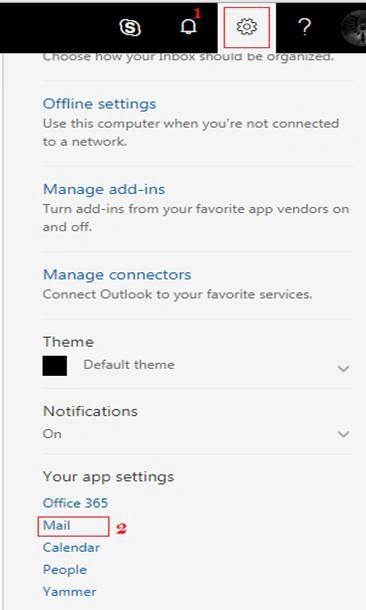
Step 3
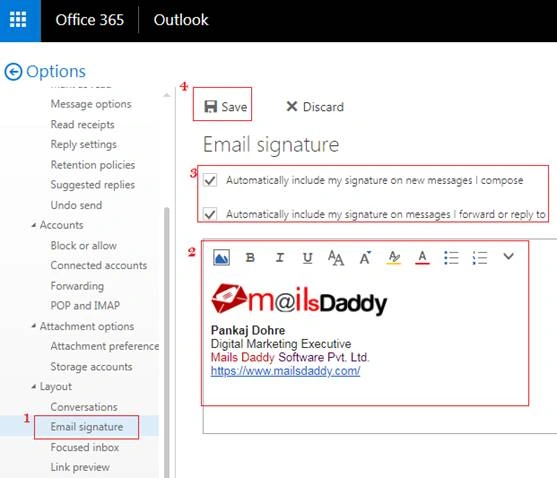
Now, you can send the email to another and verify that the signature will automatically be inserted on email.
Conclusion
Join the conversation! Your thoughts help the community grow.