

Introduction
PRIMEREACT UI framework that has Over 80 React UI Components with top-notch quality to help you implement all your UI requirements in style.
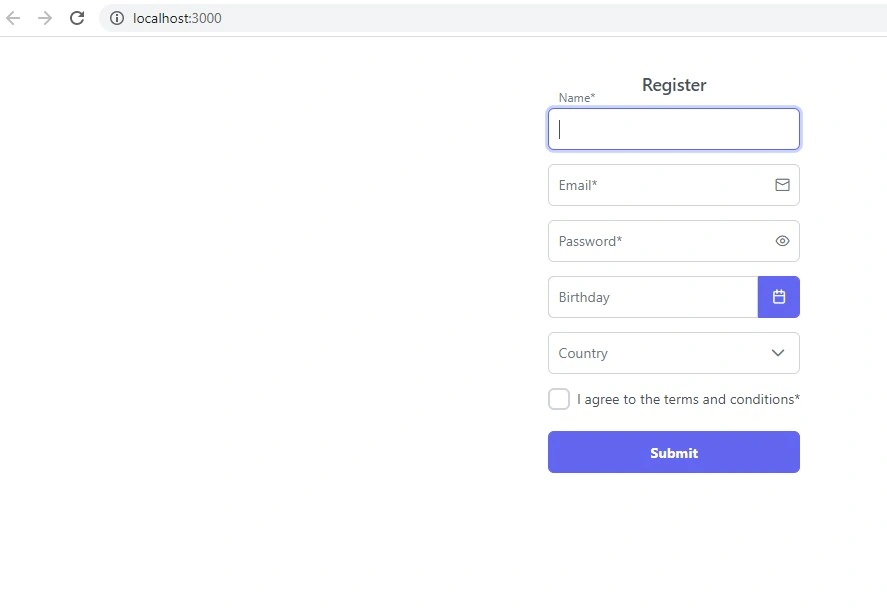
PrimeReact components can be easily used/integrated with React Hook Form. In this example, a register panel is simulated using React Hook Form.
Preconditions
- Javascript
- Basic knowledge of React js
- Basic knowledge of React hooks
- Node.js
- V.S. Code,Visual Studio
We cover the below things,
- Create React application
- Installation of Primeface
- How to Apply ReactHookForm of Primeface in React js
Step 1
npx create-react-app prime-app
cd prime-app
npm start
Step 2
Run the below command for installing PrimeReact
npm install primereact primeicons
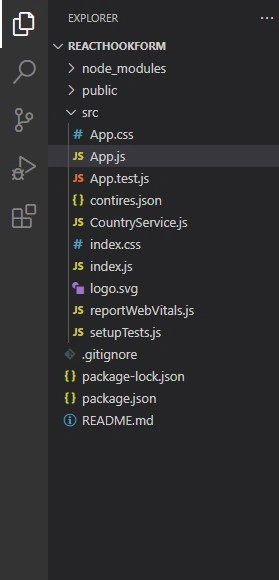
Create files according to the below image
Step 3
Add the below code in the App.js
import React, { useEffect, useState } from 'react';
import { useForm, Controller } from 'react-hook-form';
import { InputText } from 'primereact/inputtext';
import { Button } from 'primereact/button';
import { Dropdown } from 'primereact/dropdown';
import { Calendar } from 'primereact/calendar';
import { Password } from 'primereact/password';
import { Checkbox } from 'primereact/checkbox';
import { Dialog } from 'primereact/dialog';
import { Divider } from 'primereact/divider';
import { classNames } from 'primereact/utils';
import { CountryService } from './CountryService';
import 'primeicons/primeicons.css';
import 'primereact/resources/themes/lara-light-indigo/theme.css';
import 'primereact/resources/primereact.css';
import 'primeflex/primeflex.css';
import './App.css';
import ReactDOM from 'react-dom';
// import './FormDemo.css';

function App() {

    const [countries, setCountries] = useState([]);
    const [showMessage, setShowMessage] = useState(false);
    const [formData, setFormData] = useState({});
    const countryservice = new CountryService();
    const defaultValues = {
        name: '',
        email: '',
        password: '',
        date: null,
        country: null,
        accept: false
    }

    useEffect(() => {
     let datas=   countryservice.getCountries();
     setCountries(datas)
    }, []); // eslint-disable-line react-hooks/exhaustive-deps

    const { control, formState: { errors }, handleSubmit, reset } = useForm({ defaultValues });

    const onSubmit = (data) => {
        setFormData(data);
        setShowMessage(true);

        reset();
    };

    const getFormErrorMessage = (name) => {
        return errors[name] && <small className="p-error">{errors[name].message}</small>
    };

    const dialogFooter = <div className="flex justify-content-center"><Button label="OK" className="p-button-text" autoFocus onClick={() => setShowMessage(false)} /></div>;
    const passwordHeader = <h6>Pick a password</h6>;
    const passwordFooter = (
        <React.Fragment>
            <Divider />
            <p className="mt-2">Suggestions</p>
            <ul className="pl-2 ml-2 mt-0" style={{ lineHeight: '1.5' }}>
                <li>At least one lowercase</li>
                <li>At least one uppercase</li>
                <li>At least one numeric</li>
                <li>Minimum 8 characters</li>
            </ul>
        </React.Fragment>
    );

    return (
        <div className="form-demo">
            <Dialog visible={showMessage} onHide={() => setShowMessage(false)} position="top" footer={dialogFooter} showHeader={false} breakpoints={{ '960px': '80vw' }} style={{ width: '30vw' }}>
                <div className="flex justify-content-center flex-column pt-6 px-3">
                    <i className="pi pi-check-circle" style={{ fontSize: '5rem', color: 'var(--green-500)' }}></i>
                    <h5>Registration Successful!</h5>
                    <p style={{ lineHeight: 1.5, textIndent: '1rem' }}>
                        Your account is registered under name <b>{formData.name}</b> ; it'll be valid next 30 days without activation. Please check <b>{formData.email}</b> for activation instructions.
                    </p>
                </div>
            </Dialog>

            <div className="flex justify-content-center">
                <div className="card">
                    <h5 className="text-center">Register</h5>
                    <form onSubmit={handleSubmit(onSubmit)} className="p-fluid">
                        <div className="field">
                            <span className="p-float-label">
                                <Controller name="name" control={control} rules={{ required: 'Name is required.' }} render={({ field, fieldState }) => (
                                    <InputText id={field.name} {...field} autoFocus className={classNames({ 'p-invalid': fieldState.invalid })} />
                                )} />
                                <label htmlFor="name" className={classNames({ 'p-error': errors.name })}>Name*</label>
                            </span>
                            {getFormErrorMessage('name')}
                        </div>
                        <div className="field">
                            <span className="p-float-label p-input-icon-right">
                                <i className="pi pi-envelope" />
                                <Controller name="email" control={control}
                                    rules={{ required: 'Email is required.', pattern: { value: /^[A-Z0-9._%+-]+@[A-Z0-9.-]+\.[A-Z]{2,4}$/i, message: 'Invalid email address. E.g. [email protected]' } }}
                                    render={({ field, fieldState }) => (
                                        <InputText id={field.name} {...field} className={classNames({ 'p-invalid': fieldState.invalid })} />
                                    )} />
                                <label htmlFor="email" className={classNames({ 'p-error': !!errors.email })}>Email*</label>
                            </span>
                            {getFormErrorMessage('email')}
                        </div>
                        <div className="field">
                            <span className="p-float-label">
                                <Controller name="password" control={control} rules={{ required: 'Password is required.' }} render={({ field, fieldState }) => (
                                    <Password id={field.name} {...field} toggleMask className={classNames({ 'p-invalid': fieldState.invalid })} header={passwordHeader} footer={passwordFooter} />
                                )} />
                                <label htmlFor="password" className={classNames({ 'p-error': errors.password })}>Password*</label>
                            </span>
                            {getFormErrorMessage('password')}
                        </div>
                        <div className="field">
                            <span className="p-float-label">
                                <Controller name="date" control={control} render={({ field }) => (
                                    <Calendar id={field.name} value={field.value} onChange={(e) => field.onChange(e.value)} dateFormat="dd/mm/yy" mask="99/99/9999" showIcon />
                                )} />
                                <label htmlFor="date">Birthday</label>
                            </span>
                        </div>
                        <div className="field">
                            <span className="p-float-label">
                                <Controller name="country" control={control} render={({ field }) => (
                                    <Dropdown id={field.name} value={field.value} onChange={(e) => field.onChange(e.value)} options={countries} optionLabel="name" />
                                )} />
                                <label htmlFor="country">Country</label>
                            </span>
                        </div>
                        <div className="field-checkbox">
                            <Controller name="accept" control={control} rules={{ required: true }} render={({ field, fieldState }) => (
                                <Checkbox inputId={field.name} onChange={(e) => field.onChange(e.checked)} checked={field.value} className={classNames({ 'p-invalid': fieldState.invalid })} />
                            )} />
                            <label htmlFor="accept" className={classNames({ 'p-error': errors.accept })}>I agree to the terms and conditions*</label>
                        </div>

                        <Button type="submit" label="Submit" className="mt-2" />
                    </form>
                </div>
            </div>
        </div>
    );
}
export default App;
Step 4
Add the below code in index.html
<!DOCTYPE html>
<html lang="en">
  <head>
    <meta charset="utf-8" />
    <link rel="icon" href="%PUBLIC_URL%/favicon.ico" />
    <meta name="viewport" content="width=device-width, initial-scale=1" />
    <meta name="theme-color" content="#000000" />
    <meta
      name="description"
      content="Web site created using create-react-app"
    />
    <link rel="apple-touch-icon" href="%PUBLIC_URL%/logo192.png" />

     <!-- PrimeReact -->
     <link rel="stylesheet" href="https://unpkg.com/primeicons/primeicons.css" />
     <link rel="stylesheet" href="https://unpkg.com/primereact/resources/themes/lara-light-indigo/theme.css" />
     <link rel="stylesheet" href="https://unpkg.com/primereact/resources/primereact.min.css" />
     <link rel="stylesheet" href="https://unpkg.com/[email protected]/primeflex.min.css" />

     <!-- Dependencies -->
     <script src="https://unpkg.com/react/umd/react.production.min.js"></script>
     <script src="https://unpkg.com/react-dom/umd/react-dom.production.min.js"></script>
     <script src="https://unpkg.com/@babel/standalone/babel.min.js"></script>
     <script src="https://unpkg.com/[email protected]/dist/react-transition-group.js"></script>

     <!-- Demo -->
     <script src="https://unpkg.com/primereact/core/core.min.js"></script>
     <script src="https://unpkg.com/primereact/slidemenu/slidemenu.min.js"></script>

    <!--
      manifest.json provides metadata used when your web app is installed on a
      user's mobile device or desktop. See https://developers.google.com/web/fundamentals/web-app-manifest/
    -->
    <link rel="manifest" href="%PUBLIC_URL%/manifest.json" />

    <!--
      Notice the use of %PUBLIC_URL% in the tags above.
      It will be replaced with the URL of the `public` folder during the build.
      Only files inside the `public` folder can be referenced from the HTML.

      Unlike "/favicon.ico" or "favicon.ico", "%PUBLIC_URL%/favicon.ico" will
      work correctly both with client-side routing and a non-root public URL.
      Learn how to configure a non-root public URL by running `npm run build`.
    -->

    <script src="https://unpkg.com/primereact/core/core.min.js"></script>
    <script src="https://unpkg.com/primereact/slidemenu/slidemenu.min.js"></script>

    <title>React App</title>
  </head>
  <body>

    <noscript>You need to enable JavaScript to run this app.</noscript>
    <div id="root"></div>
    <!--
      This HTML file is a template.
      If you open it directly in the browser, you will see an empty page.

      You can add webfonts, meta tags, or analytics to this file.
      The build step will place the bundled scripts into the <body> tag.

      To begin the development, run `npm start` or `yarn start`.
      To create a production bundle, use `npm run build` or `yarn build`.
    -->
  </body>
</html>
Step 5
Add the below code in App.css
Join the conversation! Your thoughts help the community grow.