

Introduction
This article will help you to create a responsive website using ASP.NET with Bootstrap. Learn more about Bootstrap from here.
Step 1
Download the responsive CSS and JavaScript files from Bootstrap.com.
Step 2
Open your Visual Studio then add your downloaded file into your project then add index.aspx page and call your necessary files with in the head tag from that downloaded folder.
- <head runat="server">
- <title></title>
- <script src="https://ajax.googleapis.com/ajax/libs/jquery/1.11.2/jquery.min.js"></script>
- <script src="js/bootstrap.min.js"></script>
- <link href="css/bootstrap.min.css" rel="stylesheet" />
- </head>
Step 3
Consider <div class="row"></div> as a new line. Whatever you want to design in a row you should design with in a <div class="row">My design</div>.
Then <div class="col-lg-12"></div>
- <div class="row">
- <div class="col-lg-12">
- My design
- </div>
- </div>
Full Example
- <%@ Page Language="C#" AutoEventWireup="true" CodeBehind="index.aspx.cs" Inherits="Responsive_Website.index" %>
- <!DOCTYPE html>
- <html
- xmlns="http://www.w3.org/1999/xhtml">
- <head runat="server">
- <title></title>
- <script src="https://ajax.googleapis.com/ajax/libs/jquery/1.11.2/jquery.min.js"></script>
- <script src="js/bootstrap.min.js"></script>
- <link href="css/bootstrap.min.css" rel="stylesheet" />
- </head>
- <body>
- <form id="form1" runat="server">
- <div class="container">
- <div class="row">
- <div class="col-lg-3"></div>
- <div class="col-lg-6">
- <form class="form-signin">
- <h2 class="form-signin-heading">Please sign in</h2>
- <label for="inputEmail" class="sr-only">Email address</label>
- <input type="email" id="inputEmail" class="form-control" placeholder="Email address" required autofocus>
- <label for="inputPassword" class="sr-only">Password</label>
- <input type="password" id="inputPassword" class="form-control" placeholder="Password" required>
- <div class="checkbox">
- <label>
- <input type="checkbox" value="remember-me">
- Remember me
- </label>
- </div>
- <button class="btn btn-lg btn-primary btn-block" type="submit">Sign in</button>
- </form>
- </div>
- <div class="col-lg-3"></div>
- </div>
- </div>
- </form>
- </body>
- </html>
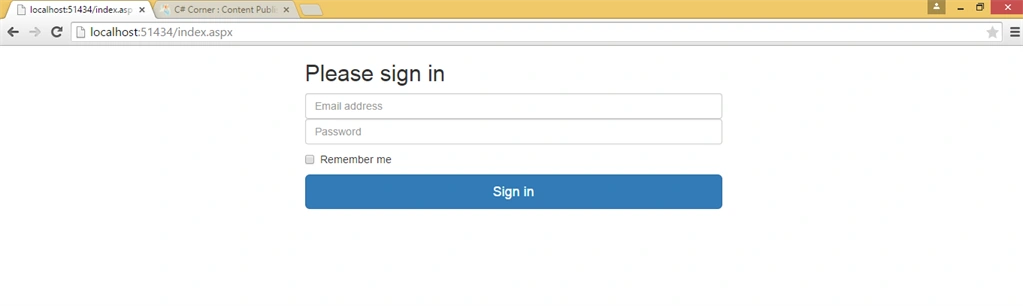
Output (on large screens)
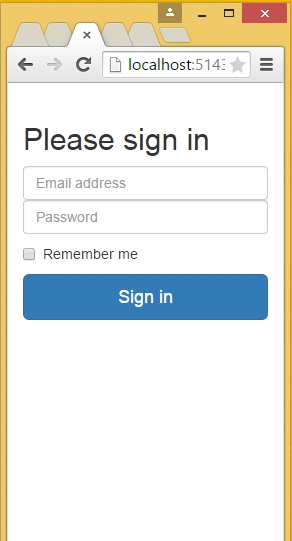
Output (on small screens)
Tomas BujnaPosted May 10, 2018, 4:03 AM
Is nested forms good practice?
Chinna DuraiPosted Mar 24, 2017, 4:25 AM
I said this is really nice code for me !!!
Shahbaz AliPosted Nov 25, 2016, 12:36 AM
Very handy and instruct full article. nice one
Bruno PétersonPosted Jun 19, 2015, 10:03 AM
Simple, this is a good starting.
NitinPosted May 11, 2015, 12:17 PM
nice
Sibeesh VenuPosted May 11, 2015, 3:00 AM
Good One :)
Abhishek JaiswalPosted May 11, 2015, 2:31 AM
Bootstrap is always there, when we talk about responsiveness(recent times)! Well nice article! :)
Manoj BhoirPosted May 11, 2015, 2:07 AM
Good One
Karthik Muthu KaruppanPosted May 4, 2015, 2:03 PM
nice
Saroj Kumar SahuPosted May 4, 2015, 7:59 AM
Great job :)
Hëàrt BëàtPosted May 3, 2015, 6:39 AM
thanks for sharing ! keep up the good work :)
Santhakumar MunuswamyPosted May 3, 2015, 1:43 AM
Good Work