
Skip to content
C# Corner
Searcharticlesvideosblogsforumsinterview questionsarticles
  • CSharp TV
  • Videos
  • Tech
  • Articles
  • Blogs
  • News
  • Forums
  • Books
  • Events
    • Interviews
    • Jobs
    • Stories
Login
  • Article
  • Blog
  • Video
  • Ebook
  • Interview Question
Loading
Upcoming Events
View all
  • 23 NOV
    AI Agents Conference 2026 - 3rd Edition

Latest Forum Questions

View all
  • NJ

    How are people using AI for local SEO in 2026?

    Naomi jason·17h ago6
  • HS

    how can i save my gmail data as pdf for offline access?

    Himanshu Sharma·1d ago1
  • S

    Can I recover SQL Server database records along with the documents stored in them?

    samaira·1d ago4
  • tejasri

    How is data analytics transforming modern businesses, and which tools like Python, SQL, and Power BI are most important for aspiring data analysts in 2027?

    tejasri·2d ago0
  • G

    Performance Improvements and Optimization Features in the Latest Python Release

    G.Devi·3d ago1
About UsContact UsPrivacy PolicyTermsBrand GuidelinesPartnersC# TutorialsConsultantsIdeasReport A BugFAQsSitemapStoriesCSharp TVDB TalksWeb3 UniverseJumpstart Blockchain

©2026 C# Corner.

All contents are copyright of their authors.

How to create Top-Level site in SharePoint Server 2007
  1. Home
  2. Technologies
  3. SharePoint
SharePoint

How to create Top-Level site in SharePoint Server 2007

Hung Hung

Hung Hung

15yPublished Apr 22, 2011, 12:00 AMUpdated Apr 22, 2011, 3:22 AM10k00
Reactions
100Article
create Top-Level site in SharePointHow to create Top-Level site in SharePointHow to create Top-Level site in SharePoint ServerHow to create Top-Level site in SharePoint Server 2007Top-Level site in SharePoint

Comments

Join the conversation! Your thoughts help the community grow.

Sign in to leave a comment

It is the same account you read, post and publish with — and you will come straight back to this page.

Sign inCreate an account
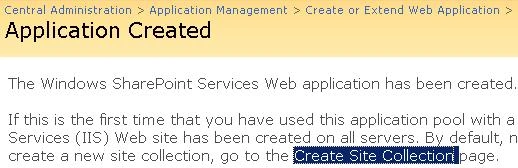
  • Immediately after creating the Web Application is complete click the create Site Collection
    moss_lesson01_exercise02_01.jpg

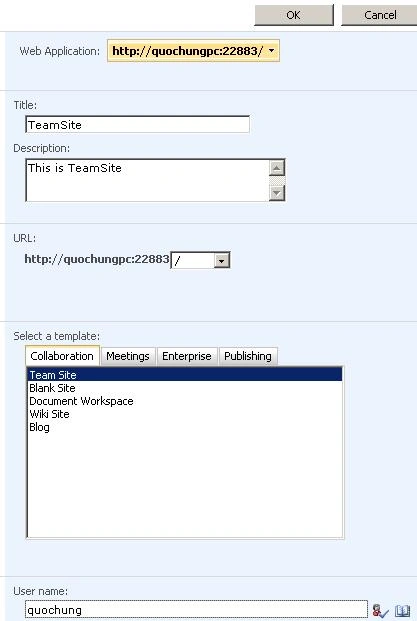
  • Select Collaboration | TeamSite

  • Provides information for the site name (title) and description (Description)

  • Select the url is / (Top-Level sites first)

  • Enter the username is the account in the operating system
    moss_lesson01_exercise02_02.jpg