

This article explains what the Web API is and its basics.
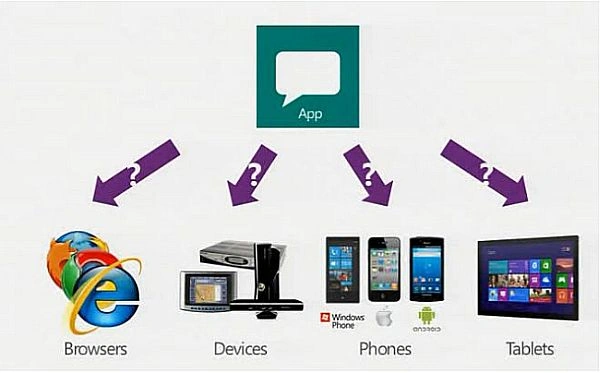
The preceding image is from: http://forums.asp.net/t/1903769.aspx?When+to+use+web+api
Let's start with a definition first.
Web API
The ASP.NET Web API is a framework that makes it easy to build HTTP services that reach a broad range of clients, including browsers and mobile devices.
The ASP.NET Web API is an ideal platform for building Restful applications on the .NET Framework. Referred from “Microsoft.com”.
Why to use the Web API
Currently most mobile devices, browsers and tablets are the medium for accessing most of the internet and in this also people are using mobile apps the most and to provide data to apps we are now going to use the Microsoft new technology called Web API.
When to use it
If you want to expose the data/information of your application to your clients and other people then that other people can use your data and interact with the data/information you expose to them.
For example, a mobile application requires a service.
HTML 5 requires a service.
Desktop PC and tablets require services.
Currently most device apps require Web API services.
The ASP.Net Framework leverages both web standards such as HTTP, JSON and XML and it provides a simple way to build and expose REST based data services.
Some core concepts of ASP.Net MVC are similar to the ASP.Net Web API such as routing and controllers.
Requirements
We are using Visual Studio 2012 for a demo application.
Building a Web API
Let's start with creating a Web API project.
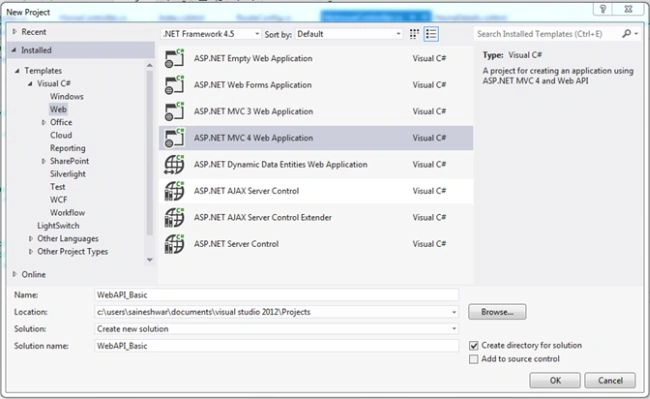
Start Visual Studio and select New project from the Start page or from the File menu select "File" -> "New" -> "Project...".
In the template pane select Installed Templates and expand the Visual C# menu. Inside that Visual C# select Web. In the list of projects select ASP.Net MVC 4 Web Application.
And name the project WebAPI_Basic.
For reference see the following snapshot.
After adding, a new dialog will pop-up.

Inside the project template select Web API and in the view engine select Razor.
A new project is created now.
Let's begin with adding Web API Controller
Now let's begin with adding a Web API Controller. It is nearly similar to adding a Controller in ASP.NET MVC.
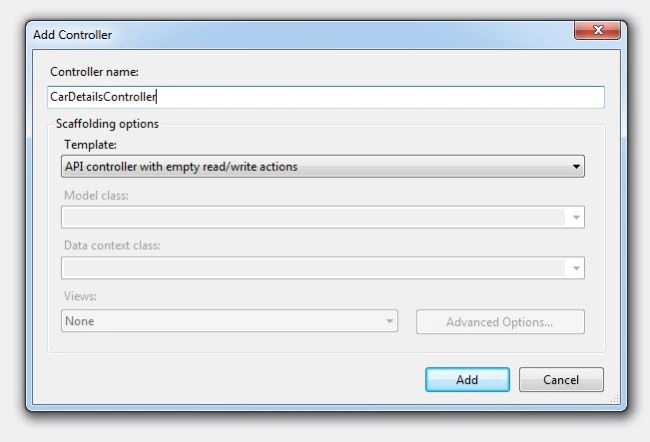
Right-click on the Controller folder and add a new Web API Controller with the name CarDetailsController and in the template select API Controller with an empty read / write action.
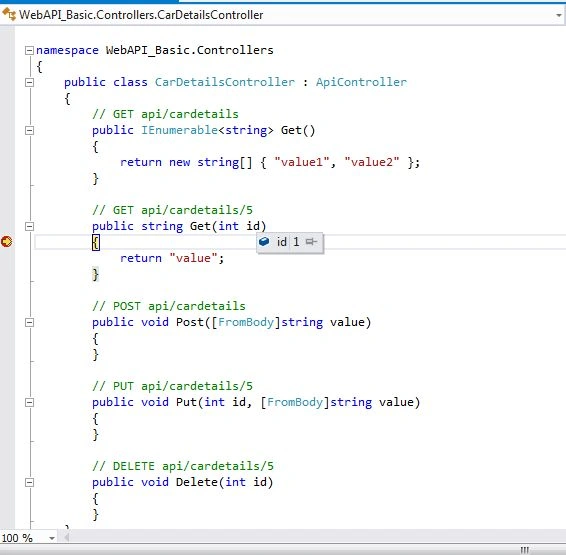
After adding the Controller you will see the code as in the following snapshot.
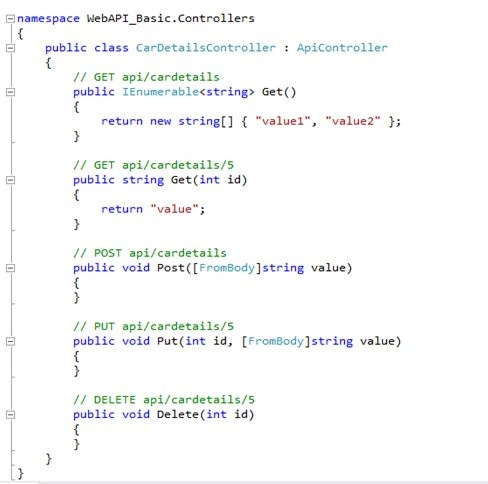
You can keep this Web API controller anywhere in the application.
If you want to follow the convention then create the new folder in the root your of application with the name API.
Inside that you can add a Web API controller.
You have successfully added a Web API controller to your application.
Now you can run the application and test it.
For testing I am passing http://localhost:32359/api/cardetails/1 for calling the method get.
Wow, it's working!
It's easy to configure it as a Web API.
The ASP.Net MVC and ASP.Net Web API makes heavy use of convention for configuration to lighten the work load for creating the services.
For example, add a decorating method with attributes to make it easy to do CRUD operations.
Else it will make it difficult to understand and code.
- [HttpPut]
- public void Put(int id, [FromBody]string value)
- {
- }
- [HttpPost]
- public void Post([FromBody]string value)
- {
- }
- [HttpDelete]
- public void Delete(int id)
- {}
The HTTP actions and their corresponding CRUD operations are:
- GET (Read)
Retrieves the representation of the resource.
- PUT(Update)
Update an existing resource.
- POST (Create)
Create new resource.
- DELETE (Delete)
Delete an existing resource.
Now let's begin with how to create a CRUD operation with the WEB API.
Let's start by adding a Model.
To add the model right-click on the model folder and add a class with the name CarsStock.
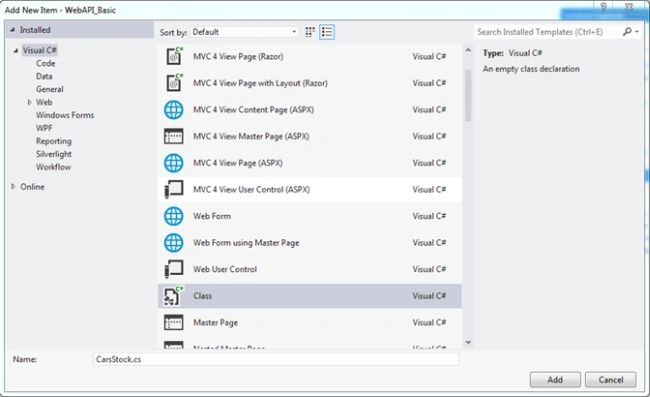
After adding the Model CarsStock.cs now let's start with adding properties to the class.
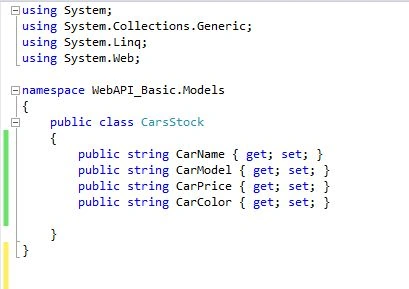
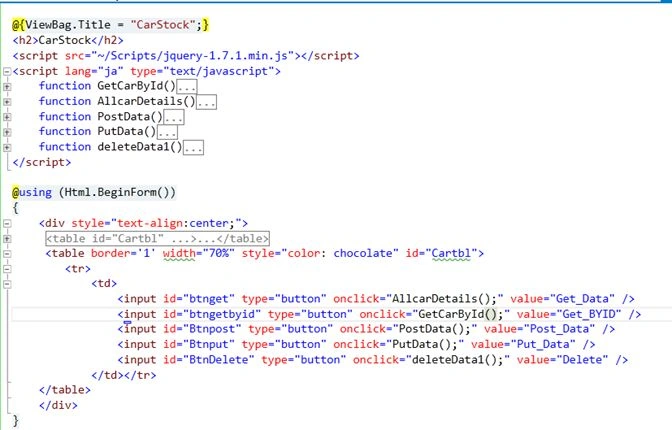
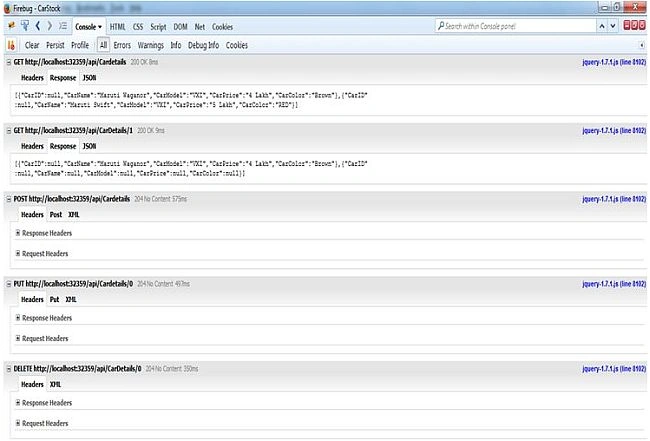
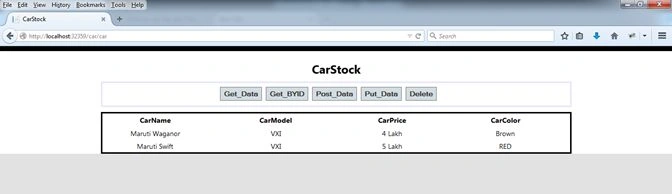
After adding the model properties now I will consume the HTTP service developed using the ASP.NET Web API in a simple cshtml page with jQuery and Ajax.
For that in the View folder I will add a folder named Car and inside that folder will add a CarStock named view. To add it just right-click on the View folder and select View.
The following snapshot shows how I had added the view.

After adding the view you will get a blank view because we are not using any tightly coupled model here.
Then add a Controller with the name CarController. Call this view Carstock for the demo of consuming the Web API.
In this I called the view CarStock.
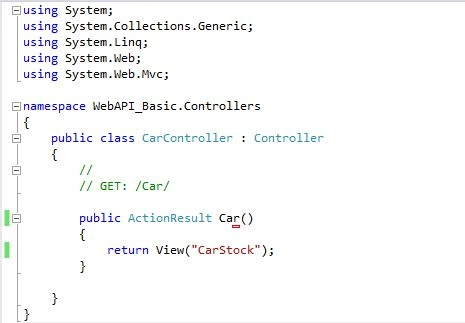
After adding the Controller and View now let us move back towards the Web API and make some changes that we have already created with the name “CarDetailsController”.
Let's get to the first method in CarDetailsController.
- GET IEnumerable
This method is used to get a list of data.- [HttpGet]
- public IEnumerable<CarsStock> GetAllcarDetails()
- {
- CarsStock ST = new CarsStock();
- CarsStock ST1 = new CarsStock();
- List<CarsStock> li = new List<CarsStock>();
- ST.CarName = "Maruti Waganor";
- ST.CarPrice = "4 Lakh";
- ST.CarModel = "VXI";
- ST.CarColor = "Brown";
- ST1.CarName = "Maruti Swift";
- ST1.CarPrice = "5 Lakh";
- ST1.CarModel = "VXI";
- ST1.CarColor = "RED";
- li.Add(ST);
- li.Add(ST1);
- return li;
- }
In this method, I have used the Model CarsStock and created a list of CarsStock “List<CarsStock>“.
And returning it.
- GET by id
In this GET method, you can retrieve records for the database by passing an id.- public IEnumerable<CarsStock> Get(int id)
- {
- CarsStock ST = new CarsStock();
- CarsStock ST1 = new CarsStock();
- List<CarsStock> li = new List<CarsStock>();
- if (id == 1)
- {
- ST.CarName = "Maruti Waganor";
- ST.CarPrice = "4 Lakh";
- ST.CarModel = "VXI";
- ST.CarColor = "Brown";
- li.Add(ST);
- }
- else
- {
- ST1.CarName = "Maruti Swift";
- ST1.CarPrice = "5 Lakh";
- ST1.CarModel = "VXI";
- ST1.CarColor = "RED";
- li.Add(ST1);
- }
- return li;
- }
- POST
In this POST method, you can post data (CREATE) to the database. In this, I am using the Carstock model to post the data.- [HttpPost]
- public void PostCar([FromBody] CarsStock cs)
- {
- }
- PUT
In this PUT method you can UPDATE the data (UPDATE) to the database. I am using the Carstock model to update the data.- [HttpPut]
- public void Putcar(int id, [FromBody]CarsStock cs)
- {
- }
- DELETE
- [HttpDelete]
- public void Deletecar(int id)
- {
- }

MelbinPosted Apr 14, 2021, 3:08 PM
Why we are going for webApi to access ,Delete and Update data from datasources ,Instead we can use asp.net MVC for that what was the difference?
Sanjay KumarPosted Jan 22, 2021, 10:14 AM
Nice and helpful
Prashant JaylePosted Dec 14, 2018, 12:34 AM
Nice Info. Thank for sharing...... Can you please comment something about Authentication and Authorization about Web API
Abhijeet PatilPosted Dec 4, 2018, 5:13 AM
It helped me in my application ... Thanks
Bhuvaneswari SPosted Nov 7, 2018, 10:51 PM
I want to call html5C# project into mvc Web API, then need to consume webApi in 3rd mvc web application project. all are in a single solutions. Pls suggest.
Manish ShahiPosted Jul 3, 2018, 3:48 AM
Your Explanation is good but not proper explanation for beginner
KALPESH PATILPosted Dec 13, 2017, 7:58 AM
Very Nice Sir...!,
Jaygovind ChauhanPosted Dec 4, 2017, 11:22 PM
Sir can i return view while consuming api from mvc controller..bcz in api i redirect on payment getway view.but when i consuming this api and post data .that give response ok instead of opening a payment getway view
Manav PandyaPosted Nov 20, 2017, 11:33 PM
Variable "datavalue" is not declared and used , i think you have mistaken , refer 1st ajax call
Rahul PalPosted Nov 20, 2017, 11:43 AM
Very nice Tutorial for beginner
Ganapati PanapanaPosted Sep 12, 2017, 2:19 PM
Nice info, thanks !!
V CPosted Jun 13, 2017, 10:59 PM
How can programmatically change connection string based on login? for example, there is a drop down to select "live", "staging", and "dev". When user select one of the option with login detail. it will connect and access to the right database.
Ankit YadavPosted Jun 2, 2017, 4:28 AM
Can u tell me what is the url in the last image http://localhost:32359/car/.......
Abhay ShankerPosted May 29, 2017, 12:27 PM
Nice explanation.................Thanks for sharing
Kunal PanchalPosted May 8, 2017, 6:06 AM
Great Explaining. Thanks for sharing .
Sameer ParabPosted Apr 27, 2017, 8:46 AM
Very clearly explained. Thanks buddy :)
Prithvi singhPosted Mar 17, 2017, 2:00 AM
Very nice Yaar...its very helpful to web api learner.
Mohd NiyazPosted Mar 7, 2017, 1:19 AM
Nice artical for learning web api
Abhirup GhoshPosted Jan 20, 2017, 1:13 AM
Hello sir i am getting this error 'Response for preflight has invalid HTTP status code 404'.please suggest me what should i do.
Bhuvan PandeyPosted Dec 13, 2016, 4:30 AM
Great work. It's clear description about Web API.
Manav PandyaPosted Oct 2, 2016, 2:04 AM
Sir i am not able to download code
Manav PandyaPosted Oct 2, 2016, 2:00 AM
Much needed sir .. thanks
Vaibhav DeshmukhPosted Sep 14, 2016, 6:03 AM
Helpful for beginners .thanks for sharing.
ranju ramPosted Jul 2, 2016, 11:48 AM
The view "CarStock" or its master was not found
Munesh SharmaPosted May 28, 2016, 7:32 AM
nice
Ankit SaxenaPosted May 6, 2016, 6:01 AM
It's helpful. Thanks sir.
Arvind ChourasiyaPosted Apr 30, 2016, 7:18 AM
@Saineshwar Bageri here you are using view i'm confused
EnosPosted Apr 25, 2016, 9:17 AM
Nice Article for someone very new to this, But i think you should have added more info on the prject , like when you run it(steps)
Prakash KaruppiahPosted Feb 17, 2016, 7:37 AM
nice....
Saineshwar BageriPosted Jan 15, 2016, 3:17 AM
it is vs 2012 which version you have
Kavneet RekhiPosted Jan 15, 2016, 1:58 AM
Server Error in '/' Application.-------------------------------------------------------------------------------- The view 'CarStock' or its master was not found or no view engine supports the searched locations. The following locations were searched: ~/Views/Home/CarStock.aspx ~/Views/Home/CarStock.ascx ~/Views/Shared/CarStock.aspx ~/Views/Shared/CarStock.ascx ~/Views/Home/CarStock.cshtml ~/Views/Home/CarStock.vbhtml ~/Views/Shared/CarStock.cshtml ~/Views/Shared/CarStock.vbhtml Description: An unhandled exception occurred during the execution of the current web request. Please review the stack trace for more information about the error and where it originated in the code. Exception Details: System.InvalidOperationException: The view 'CarStock' or its master was not found or no view engine supports the searched locations. The following locations were searched: ~/Views/Home/CarStock.aspx ~/Views/Home/CarStock.ascx ~/Views/Shared/CarStock.aspx ~/Views/Shared/CarStock.ascx ~/Views/Home/CarStock.cshtml ~/Views/Home/CarStock.vbhtml ~/Views/Shared/CarStock.cshtml ~/Views/Shared/CarStock.vbhtml Source Error: An unhandled exception was generated during the execution of the current web request. Information regarding the origin and location of the exception can be identified using the exception stack trace below.
Kavneet RekhiPosted Jan 15, 2016, 1:57 AM
solution isn't running
Kavneet RekhiPosted Jan 14, 2016, 5:40 AM
'datavalue' is undefined ?
Saineshwar BageriPosted Jan 12, 2016, 6:10 AM
Are you new to MVC swarna upadhyay
Saineshwar BageriPosted Jan 12, 2016, 6:10 AM
swarna upadhyay there is no view of this in your project which it is hunting for
swarna upadhyayPosted Jan 12, 2016, 5:31 AM
Hello Saineshwar Bageri Sir my code is not running.
Sridhar SharmaPosted Dec 23, 2015, 12:47 AM
Nice Share :)
Atul RawatPosted Dec 22, 2015, 8:28 AM
nice article sir
Ankush BandPosted Dec 18, 2015, 7:46 AM
really good article
Mayank SharmaPosted Dec 10, 2015, 1:28 AM
really good .
Pintoo YadavPosted Nov 27, 2015, 12:48 AM
good
Ankur MistryPosted Nov 24, 2015, 2:29 PM
Nice article
Upendra Pratap ShahiPosted Oct 22, 2015, 6:17 AM
nice and easy...thanks for sharing...
Insidious Axphey KhanPosted Oct 18, 2015, 8:00 AM
Such an awesome detailed idea.GOD BLESS YOU.
Sumit RKPosted Oct 12, 2015, 10:09 AM
Good Articles
Heemanshu BhallaPosted Sep 4, 2015, 3:40 AM
you should also tell about cross-origin problem that come while working with web api as many of time our webapi and project are at different origins
Yashwanth MuthineniPosted Aug 27, 2015, 6:08 AM
Nice Article
Sanjit KumarPosted Aug 27, 2015, 6:07 AM
This is one of the best code and explanation provided. Actually I am novice in Web API but I understood properly. Thanks its very nice article.
Buddika WiduPosted Aug 25, 2015, 10:15 PM
really great ..
nikolai yemenevPosted Aug 25, 2015, 5:25 PM
Hi Saineshwar, downloaded the file 'WebAPIBasic.rar', found only one issue when running App - it did not find CarStock.cshtml under Car view, copied it to Home view, App worked like a charm. Question: How do you modify the App to retrieve values from MSSQLServer database (instead of using static values).
Bavani MPosted Aug 10, 2015, 8:22 AM
hi i couldn't download this article, it shows error
Anil KumarPosted Jul 30, 2015, 4:54 AM
Good article for making the small demo on asp .net web api and learn how to make and consume it in our application.
Gopal RohilaPosted Jun 14, 2015, 10:54 AM
When I try to post, I get Unsupported Media Type response
Anjani PandeyPosted Jan 14, 2015, 5:00 AM
Great ...... Congrates :)
Saineshwar BageriPosted Jan 14, 2015, 12:59 AM
thanks Dinesh Beniwal sir once again on Asp.net
Dinesh BeniwalPosted Jan 14, 2015, 12:24 AM
Congratulations Sai, one more articles of the day on ASP.NET
Humayun Kabir MamunPosted Dec 18, 2014, 5:30 AM
Great work...
Anjani PandeyPosted Dec 11, 2014, 5:08 AM
Nice Article...
Pradip PandeyPosted Dec 2, 2014, 5:49 AM
Nicely explained about Web API.
Rajeev RanjanPosted Nov 27, 2014, 10:49 PM
Saineshwar Bageri sir can you explain how to consume services without ajax calls, might be i mean to ask , call PUT,POST,DELETE services in MVC controller.
Prashant PandePosted Nov 25, 2014, 11:36 PM
Congratz..Nice Article
Pranit DangePosted Nov 25, 2014, 6:07 AM
Nice sai...
Dinesh BeniwalPosted Nov 24, 2014, 11:11 PM
Great work Saineshwar.
Omprakash AmarwalPosted Nov 24, 2014, 2:15 PM
nice....
Vithal WadjePosted Nov 24, 2014, 3:39 AM
great one ,keep it up
Manish Kumar ChoudharyPosted Nov 24, 2014, 3:30 AM
Nice explanation Saineshwar Bageri sir..