

In this article, we are going to see how to create, update, and delete SharePoint 2010 list items using the Client Object Model.
I have created one list named Test in the SharePoint 2010 site with one column "Title". I will be creating a Console Application using Visual Studio 2010 to create, update, and delete methods.
Create List Item
- Go to Visual Studio 2010.
- Go to File => New => Project.
- Select Console Application and name it as CreateListItem.
- Click Add.
- Add the references Microsoft.SharePoint.dll and Microsoft.SharePoint.Client.dll.
using System; using System.Collections.Generic; using System.Linq; using System.Text; using Microsoft.SharePoint; using Microsoft.SharePoint.Client; namespace CreateListItem { class Program { static void Main(string[] args) { string siteUrl = "http://servername:39130/"; ClientContext clientContext = new ClientContext(siteUrl); List oList = clientContext.Web.Lists.GetByTitle("Test"); ListItemCreationInformation listCreationInformation = new ListItemCreationInformation(); ListItem oListItem = oList.AddItem(listCreationInformation); oListItem["Title"] = "Item1"; oListItem.Update(); clientContext.ExecuteQuery(); } } } - Hit F5.
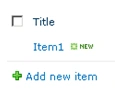
- Go to the SharePoint list "Test" and you can see a new item is added.
Update List Item
- Go to Visual Studio 2010.
- Go to File => New => Project.
- Select Console Application and name it as UpdateListItem.
- Click Add.
- Add the references Microsoft.SharePoint.dll and Microsoft.SharePoint.Client.dll.
using System; using System.Collections.Generic; using System.Linq; using System.Text; using Microsoft.SharePoint; using Microsoft.SharePoint.Client; namespace UpdateListItem { class Program { static void Main(string[] args) { string siteUrl = "http://servername:39130/"; ClientContext clientContext = new ClientContext(siteUrl); List oList = clientContext.Web.Lists.GetByTitle("Test"); ListItem oListItem = oList.GetItemById(5); oListItem["Title"] = "My Updated Item."; oListItem.Update(); clientContext.ExecuteQuery(); } } } - Hit F5.
- Go to the SharePoint list "Test" and you can see an item is updated.
Delete List Item
- Go to Visual Studio 2010.
- Go to File => New => Project.
- Select Console Application and name it as DeleteListItem.
- Click Add.
- Add the references Microsoft.SharePoint.dll and Microsoft.SharePoint.Client.dll.
using System; using System.Collections.Generic; using System.Linq; using System.Text; using Microsoft.SharePoint; using Microsoft.SharePoint.Client; namespace UpdateListItem { class Program { static void Main(string[] args) { string siteUrl = "http://servername:39130/"; ClientContext clientContext = new ClientContext(siteUrl); List oList = clientContext.Web.Lists.GetByTitle("Test"); ListItem oListItem = oList.GetItemById(5); oListItem.DeleteObject(); clientContext.ExecuteQuery(); } } } - Hit F5.
- Go to the SharePoint list "Test" and you can see a new item is added.
Kumaresh RajalingamPosted Mar 24, 2016, 9:59 AM
Nice one sir
Ano MepaniPosted Sep 15, 2015, 2:41 AM
How can we get ListItem ID dynamically so we can update list item programmatically using CSOM?
ManuraPosted Aug 21, 2013, 5:48 AM
I'm new to SharePoint and using SharePoint Foundation server 2010 to save files using client object model. The application will list the files in the server using MVC4 UI. To retreive the files and folders I use SharePoint 2010 client object model. I want to implement the Edit feature for the word and excel documents which is already available when we access SharePoint site directly through IE. Simply I just want to open the file and save changes to the server when we save it or close the program. Is it possible to do using client object model. I can open the file but not save the changes to the server. I google it to find a solution but yet not succeeded. If anybody knows how to do it please answer. Thanks in advance