

Introduction
When building Power Automate solutions across DEV, TEST/UAT, and PROD, connection management is an important part of a successful ALM strategy. Two concepts that are often confused are Connections and Connection References.
Although both are related to connecting Power Automate to services such as SharePoint, Dataverse, Outlook, SQL Server, and other connectors, they serve different purposes.
A simple way to remember the difference is:
Connection = authenticated access
Connection Reference = pointer to that connection
Microsoft recommends using solution-aware cloud flows and connection references to make flows easier to move and manage across environments.
1. What is a Connection?A Connection represents the actual authenticated access between Power Automate and an external service.
For example:
SharePoint connection
Microsoft Dataverse connection
Office 365 Outlook connection
SQL Server connection
OneDrive connection
The connection contains the authentication information required for Power Automate to communicate with the service.
Example
Suppose you create a Power Automate flow that uses:
SharePoint → Get items
Power Automate needs a SharePoint connection to access the SharePoint site and list.
Conceptually:
Power Automate Flow
        |
        v
SharePoint Connection
        |
        v
SharePoint Site/List
The connection is the actual authenticated access.
2. What is a Connection Reference?A Connection Reference is a solution component that acts as an abstraction layer between a solution-aware flow and the actual connection.
Instead of having the flow directly depend on a specific user's connection, the flow uses a connection reference.
Conceptually:
Cloud Flow
    |
    v
Connection Reference
    |
    v
Actual Connection
    |
    v
SharePoint / Dataverse / Outlook
Microsoft describes connection references as placeholders or shortcuts that make solution-aware flows easier to manage and move between environments.
3. Connection vs. Connection ReferenceFeature | Connection | Connection Reference |
|---|---|---|
Purpose | Provides authenticated access | Points the solution component to a connection |
Authentication | Yes | No, it references the authentication |
Used by | Connectors/actions | Solution-aware apps and flows |
Environment-specific | Yes | The reference can remain consistent while its mapped connection changes |
ALM benefit | Limited by itself | High |
DEV → TEST → PROD | Requires different connections | Can be mapped to environment-specific connections |
Solution component | No | Yes |
Example |
|
|
Imagine you have the following environments:
DEV
 |
 |-- SharePoint DEV Connection
 |
 |-- Power Automate Flow
You then deploy the solution to TEST:
TEST
 |
 |-- SharePoint TEST Connection
 |
 |-- Power Automate Flow
And finally to PROD:
PROD
 |
 |-- SharePoint PROD Connection
 |
 |-- Power Automate Flow
The flow logic should ideally remain the same.
The connection reference allows the solution to use the appropriate connection in each environment without redesigning every action in the flow.
For example:
             Connection Reference
                     |
          -------------------------
          |           |           |
         DEV         TEST        PROD
          |           |           |
       DEV Conn    TEST Conn   PROD Conn
This separation is one of the major benefits of solution-aware cloud flows.
5. Practical Example – SharePointSuppose your flow contains:
SharePoint – Get items
Without proper solution management
The flow may directly depend on a particular SharePoint connection.
When the solution is moved to another environment, the connection may need to be changed or recreated.
With a Connection Reference
Create:
Connection Reference:
CR_SharePoint
Then configure it against the appropriate SharePoint connection.
For example:
DEV
CR_SharePoint
      ↓
SharePoint DEV Connection
After deployment:
TEST
CR_SharePoint
      ↓
SharePoint TEST Connection
And:
PROD
CR_SharePoint
      ↓
SharePoint PROD Connection
The flow can continue using the same connection reference.
6. How to Create a Connection ReferenceA typical approach is:
Step 1 – Open your solution
Go to Power Apps / Power Automate → Solutions.
Open the solution containing your flow.
Solution-aware flows and their related objects can be managed from the solution, including connection references and environment variables.
Step 2 – Create Connection Reference
Inside the solution:
New → More → Connection Reference
Select the required connector.
For example:
Connector:
SharePoint

Name:
CR_SharePoint
Step 3 – Select the connection
Select an existing authenticated SharePoint connection or create a new one.
Step 4 – Use it in the flow
When configuring connector actions in a solution-aware flow, the action can use the appropriate connection reference.
7. DEV → TEST/UAT → PROD DeploymentA recommended ALM structure is:
                SOLUTION
                    |
          Connection Reference
                    |
       ---------------------------
       |            |            |
      DEV          TEST         PROD
       |            |            |
   DEV Conn     TEST Conn    PROD Conn
For example:
Environment | Connection Reference | Actual Connection |
|---|---|---|
DEV |
| SharePoint DEV |
TEST |
| SharePoint TEST |
PROD |
| SharePoint PROD |
This allows the same solution design to work with environment-specific connections.
Microsoft specifically identifies connection references as a mechanism that improves portability between environments.
8. Connection References and Environment VariablesConnection References and Environment Variables solve different problems.
Connection Reference
Used for:
How does my flow connect to a service?
Example:
CR_SharePoint
CR_Dataverse
CR_Outlook
Environment Variable
Used for:
What configuration value should my solution use in this environment?
Examples:
SharePoint Site URL
API URL
Email Address
Environment-specific setting
Boolean configuration
Microsoft recommends environment variables for configuration values that can change between environments, helping separate configuration from flow logic.
So:
Connection Reference
        ↓
Authentication / Connection

Environment Variable
        ↓
Configuration / ValuesFor an Invoice Approval solution with DEV, UAT, and PROD, you could have:
Connection References
CR_SharePoint
CR_Outlook
CR_Dataverse
Environment Variables
EV_SharePointSiteURL
EV_LogAuditConfigure
EV_InvoiceCreationLogReq
EV_InvApprovalLogReq
EV_InvReportingLogReq
The architecture becomes:
                 Invoice Approval Solution
                           |
              -------------------------
              |                       |
     Connection References     Environment Variables
              |                       |
       ----------------          -----------------
       |       |      |          |       |       |
   SharePoint Outlook DB       DEV     UAT     PROD
This makes the solution much easier to deploy and maintain.
10. Common Deployment ProblemOne common issue occurs when a solution is imported into another environment but the connection reference is not configured.
You may see errors such as:
Connection not configured
Invalid connection
Unauthorized
Connection reference requires configuration
Microsoft notes that imported solution flows can require their connection references to be mapped to connections in the target environment.
Resolution
Go to:
Solutions → Your Solution → Connection References
Then configure the appropriate connection for the target environment.
For example:
CR_SharePoint
        ↓
Select SharePoint PROD Connection
Save and verify the flow.
11. Best Practices1. Use solution-aware flows
Create important business flows inside a solution rather than managing them only as standalone flows.
Solution-aware flows are designed to support portability and ALM.
2. Create reusable connection references
Use meaningful names such as:
CR_SharePoint
CR_Outlook
CR_Dataverse
CR_SQL
3. Avoid hard-coded configuration
Use environment variables for values that differ between DEV, UAT, and PROD.
4. Keep naming consistent
For example:
CR_SharePoint
CR_Outlook
CR_Dataverse

EV_SharePointSiteURL
EV_EnvironmentName
EV_AuditLogEnabled
5. Configure references during deployment
Before enabling the flow in the target environment, verify that every connection reference points to the correct target-environment connection.
6. Consider service accounts/service principals where appropriate
For production workloads, avoid unnecessary dependency on an individual maker's personal connection. Microsoft also recommends considering service-principal connections for production scenarios where appropriate.
12. Key TakeawayThe easiest way to understand the difference is:
CONNECTION
= Actual authenticated access

CONNECTION REFERENCE
= Pointer/abstraction to the connection
For a single development environment, the difference may not seem significant. However, when deploying a Power Platform solution across DEV → TEST/UAT → PROD, connection references become very useful because they separate the flow design from the environment-specific connection.
Recommended architecture
                 Power Platform Solution
                           |
                    Cloud Flow
                           |
                 Connection Reference
                           |
          --------------------------------
          |              |               |
         DEV            UAT             PROD
          |              |               |
     DEV Connection  UAT Connection  PROD Connection
This approach supports cleaner deployments, easier connection management, and better ALM practices across Power Platform environments.
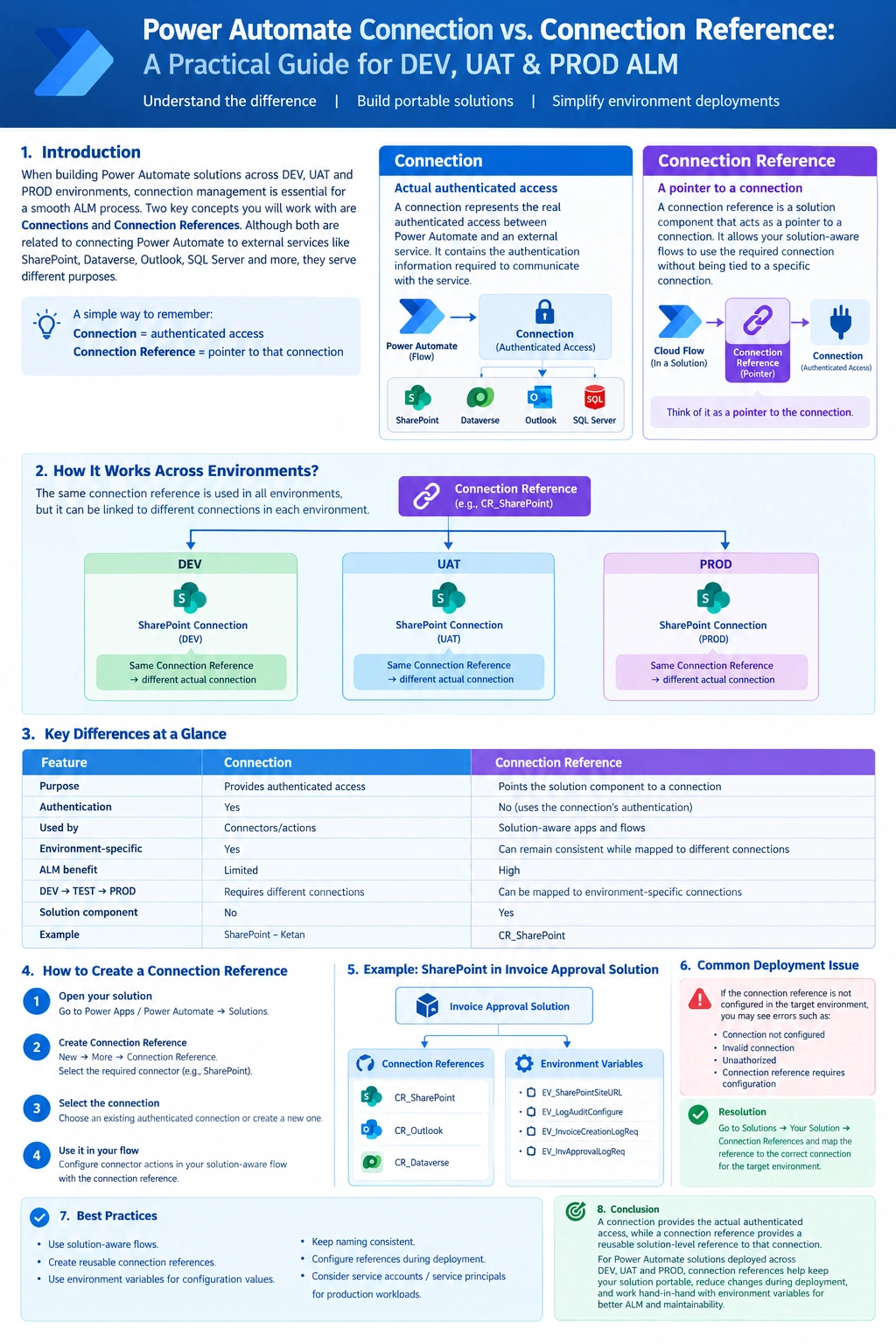
Conclusion
Connections and connection references are related but serve different purposes. A connection provides the actual authenticated access, while a connection reference provides a reusable solution-level reference to that connection.
For Power Automate solutions that are deployed across multiple environments, using connection references helps keep the solution portable and reduces the need to modify flow logic during deployment. Combined with environment variables, they provide a strong foundation for managing DEV, UAT, and PROD Power Platform solutions.
Suggested article title:
“Power Automate Connection vs. Connection Reference: A Practical Guide for DEV, UAT & PROD ALM”
Join the conversation! Your thoughts help the community grow.