

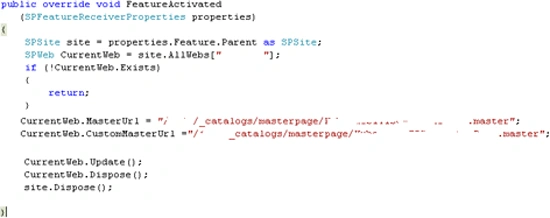
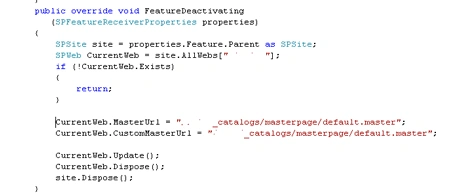
I am under the assumption we already have a custom master page designed and we are trying to convert it to a feature. The MasterUrl and CustomMasterUrl attributes represent two replaceable parameters that can be used to set the Masterpage attribute of the @Page declaration on the pages of a SharePoint site. By default .aspx pages point to a Master page at ~/masterurl/default.master. This will be replaced at runtime by the MasterUrl property of the Website. The default setting for this is _catalogs/masterpage/default.master. This is the default.master file in the Master Pages gallery of the website. Until you edit this file using SharePoint Designer it will point to a ghosted copy of the file in the TEMPLATE\GLOBAL directory of the 12 hive. You can also ghost custom .Master files from your Site Definition directory into the Master page gallery of the site using a Module Element. Then you can set the MasterUrl and/or CustomMasterUrl attributes of the Configuration Element in the ONET.xml file to point at these ghosted .Master files. If you also change the @Page directive of the .aspx files on your site to use ~/masterurl/custom.master you will establish a hierarchy of master pages that will be used. The page will first try to use the customMasterUrl setting, then the masterUrl setting, and finally the default.master file in GLOBAL.
Create Feature folder with Elements.XML, feature.xml, Master Page folder
containing the Master Page.

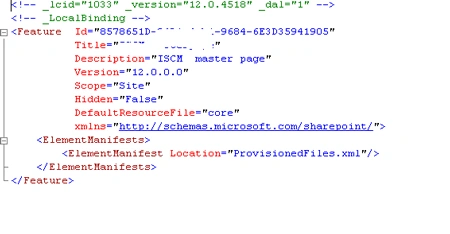
Feature.XML file can be found below. Set the Scope
of the feature to the site collection.
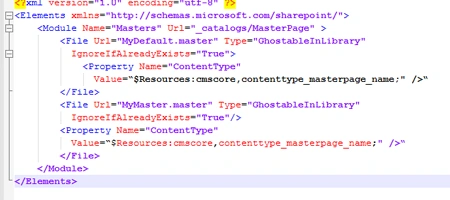
Element.xml file

Vijay SPosted May 29, 2015, 7:18 AM
Thanks for Sharing