

In a VMware ESXi environment, IPv6 is enabled by default to support modern networking standards. However, there are situations where you may need to disable IPv6, such as to troubleshoot network issues or to align with your organization's network policies. Disabling IPv6 in ESXi typically requires a reboot to apply the changes. However, there is a way to disable IPv6 without the need for an additional reboot, ensuring uninterrupted network connectivity for your virtual machines.
Steps to Disable IPv6 in ESXi without Additional Reboot
Step 1. Access the ESXi Shell
- Open an SSH session or access the ESXi Shell directly from the server's console.
Step 2. Verify Current IPv6 Configuration
- Run the following command to verify the current IPv6 configuration:
Note down the current settings for reference.esxcli network ip interface ipv6 get
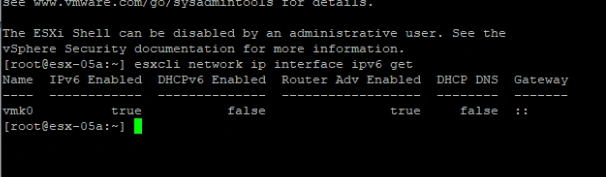
Step 3. Disable IPv6
- Run the following command to disable IPv6 without rebooting:
localcli system module parameters set -m tcpip4 -p ipv6=0
Step 4. Verify the Changes
- Run the following command to verify that IPv6 has been successfully disabled:
esxcli network ip interface ipv6 get
Step 5. Restart Management Services (Optional)
- While not required, you can restart the management services to apply the changes immediately:
/etc/init.d/hostd restart
/etc/init.d/vpxa restart
Step 6. Confirm Network Connectivity
- Test the network connectivity of your virtual machines to ensure that disabling IPv6 has not impacted their ability to communicate.
Conclusion
Disabling IPv6 in ESXi without additional reboot is a straightforward process that can be completed through the ESXi Shell. By following the steps outlined above, you can disable IPv6 and manage your ESXi networking configuration without the need for a reboot, minimizing downtime and ensuring uninterrupted network connectivity for your virtual machines.
Join the conversation! Your thoughts help the community grow.