

In this article I will explain with an example, how to disable or remove ViewState Hidden Field in ASP.Net Page using C# .
Problem
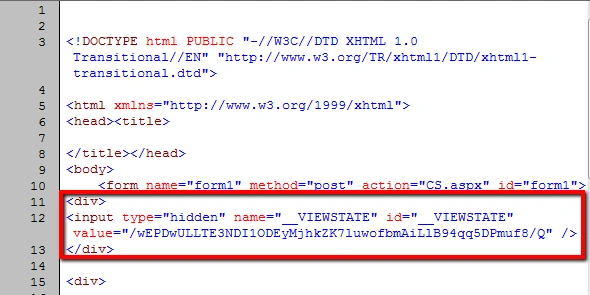
Even after disabling the ViewState at Page level, Master Page level or in Web.Config, still the Hidden Field of the ViewState with some amount of encrypted data is rendered on Page as shown in the figure below.
Solution
There is no straight forward way to disable or remove the ViewState Hidden Field.
The only possible way to remove the ViewState Hidden Field is by removing it from the generated HTML of the Page with the help of Regular Expressions.
In order to achieve the above objective, the Render event will be overridden and the ViewState Hidden Field will be removed from the generated HTML.
Namespaces
You will need to import the following namespaces.
using System.IO;

using System.Text;

using System.Text.RegularExpressions;
Base Class
A new class named BasePage inheriting the Page class will be created. Inside this class, the Render event will be overridden and inside the Render event handler, the ViewState Hidden Field will be replaced with a Blank string using Regular Expressions, thus removing it from the generated HTML of the Page.
Note: The BasePage class will have to be inherited by all the Pages for which the ViewState Hidden Field needs to be removed.
public class BasePage : Page

{

    protected override void Render(HtmlTextWriter writer)

    {

        StringBuilder sb = new StringBuilder();

        StringWriter sw = new StringWriter(sb);

        HtmlTextWriter hWriter = new HtmlTextWriter(sw);

        base.Render(hWriter);

        string html = sb.ToString();

        html = Regex.Replace(html, "<input[^>]*id=\"(__VIEWSTATE)\"[^>]*>", string.Empty, RegexOptions.IgnoreCase);

        writer.Write(html);

    }

}
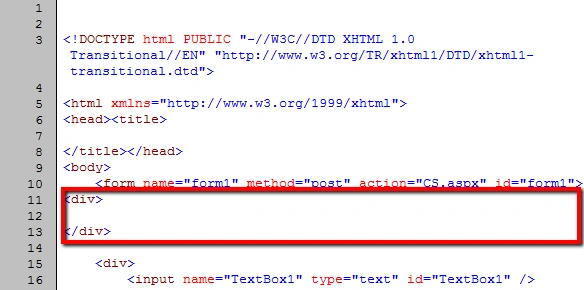
The ViewState Hidden Field has been removed from the Page.
Join the conversation! Your thoughts help the community grow.