

Introduction
Lately, analytics and visualization play a significant role in boosting up businesses. To that end, PowerBi is one of the most powerful visualization tools in the present market. On the other hand, Angular SPA has become more popular. So today you're going to learn how to embed PowerBi reports in angular applications.
Prerequisite
- Angular App.
- Sample PowerBi report.
- power-client.
Step 1 - Create Angular App using Angular CLI.
We are going to create a sample Angular application to embed PowerBi reports using Angular CLI. Use the below command to generate the Angular application.
ng new angular-powerbi
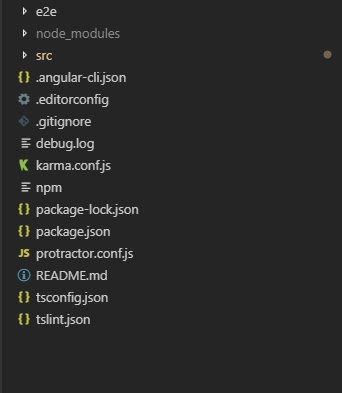
The generated code structure looks like this.
Step 2 - Install powerbi-client npm.
powerbi-client is an official plugin from powerbi community. Reference link. Use below command to install.
npm install --save powerbi-client
Step 3 - Code Configuration.
After AD authentication you'll get the access token.(If AD is not integrated, we need to write an API to get access token). PowerBi has two categories of reports.
- Application Own App(Single license).
- User Own App(AD).
After getting access token, you need to configure in your component and html as follow.
View
- <div style=" width: 100%;" [ngStyle]="{ 'height': (screenHeight-150)+ 'px' }" #reportContainer></div>
Import powerbi-client first like below.
- import * as pbi from 'powerbi-client';
- public screenHeight:number;
- @ViewChild('reportContainer') reportContainer: ElementRef;
- showReport(accessToken) {
- // Embed URL
- let embedUrl = POWERBI.BASE_URL + POWERBI.REPORT_ID + "&groupId=" + POWERBI.GROUP_ID;
- let embedReportId = POWERBI.REPORT_ID;
- let config = {
- type: 'report',
- accessToken: accessToken,
- embedUrl: embedUrl,
- id: embedReportId,
- settings: {}
- };
- let reportContainer = this.reportContainer.nativeElement;
- let powerbi = new pbi.service.Service(pbi.factories.hpmFactory, pbi.factories.wpmpFactory, pbi.factories.routerFactory);
- let report = powerbi.embed(reportContainer, config);
- report.off("loaded");
- report.on("loaded", () => {
- console.log("Loaded");
- });
- report.on("error", () => {
- this.getToken();
- });
- }
Replace you're POWERBI.REPORT_ID, POWERBI.GROUP_ID.
Call show report method in page load.
- ngOnInit() {
- this.screenHeight = (window.screen.height);
- var token =this.getToken();
- this.showReport(token);
- }
Step 4 - Settings
Remove filter panel from the report. Change your embedded url like this:
- let embedUrl = POWERBI.BASE_URL + POWERBI.REPORT_ID + "&groupId=" + POWERBI.GROUP_ID + "&filterPaneEnabled=false";
- let embedUrl = POWERBI.BASE_URL + POWERBI.REPORT_ID + "&groupId=" + POWERBI.GROUP_ID + "&navContentPaneEnabled=false";
To render a specifice page, Replace POWERBI.DASHBOARD_REPSECTION with your page sectionId
- let embedUrl = POWERBI.BASE_URL + POWERBI.REPORT_ID + "&groupId=" + POWERBI.GROUP_ID + "&pageName=" + POWERBI.DASHBOARD_REPSECTION";
- let embedUrl = this.appConstants.powerBiBaseUrl + this.appConstants.pbiReportId + "&groupId=" + this.appConstants.pbiGroupId + "&pageName=" + this.appConstants.pbiOrgListingRepSection + "&$filter=" + this.appConstants.pbiTransactionRepFilter + "'" + yourfilterName+ "'";
Summary
In this article, I discussed how to embed a PowerBI report in an Angular application and how to configure settings like remove filter & nav pane and how to render specific pages, and also how to add filters to it. I hope this article is useful.
satya MPosted Feb 8, 2023, 4:22 PM
Hi Veerandra,This PowerBI Embed explained above is free or it is cost based from powerBI Side?PLease suggest ..if i use this approach in my web application and accessing powerbi reports do i need purchase powerBI Embed license? please suggest with details.Thank you for the nice article.
satya MPosted Feb 8, 2023, 4:20 PM
Hi Veerandra,This PowerBI Embed explained above is free or it is cost based from powerBI Side?
mark goldinPosted Feb 8, 2021, 12:35 PM
Do I need to have a tenant to follow your article?
Davidson SalesPosted Jun 16, 2020, 1:11 AM
I think I got it wrong on the "let embedUrl" line I implemented: getToken() { this.accesToken = "MY TOKEN with the return of the postman parameter access_token" } but after making the request (GET) I couldn't find Embed_ url in the return, should I do something else? Thank you very much and congratulations for your impressive article!
Wellington Hayner Santos SousaPosted Mar 16, 2020, 8:25 AM
Where is function getToken() in article?
Veerendra AnnigerePosted Jan 17, 2020, 4:37 PM
You need to deploy and get the embedding URL
Elvin ReinosoPosted Jan 16, 2020, 5:41 PM
Is it possible to embed from the local PowerBI server?
Desmond FernandoPosted Oct 22, 2019, 12:58 AM
Thanks alot for the clean and neat solution. I used the same code to implement in Angular 4 also.
Clair rrPosted Sep 27, 2019, 10:56 AM
How to embed powerbi report without iframe in website using any javascript library?
Jesús MartínPosted Jul 2, 2019, 1:06 AM
Veerendra, please need code help about: "...After getting access token". Thanks!!