

Introduction
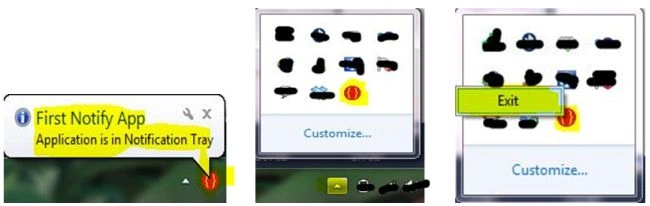
In this article we will build a very simple Windows Forms application that will enable your application to be in the Taskbar Notification Area.
This is a demo application that will just show you how to implement the Notification Class as well as the mere implementation of the ContextMenuStrip Class.
Procedures
Step 1: Create a new “Windows Forms Application” in Visual Studio and name it as you choose (I here named it NotificationTray).
Now a new form is created.
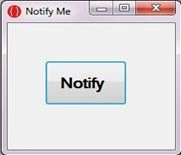
Step 2: Add a Button Control to your form and resize the window, also try to add an icon for your application as you choose. Your form will look like this:
Step 3: Navigate to the toolbox and add the "NotifyIcon" control (for Notification Class) to your project. Similarly add the "ContextMenuStrip" control (used to show some Context Menu) to your project.
As you add the "ContextMenuStrip" control you will see something like this:
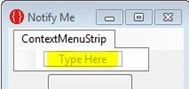
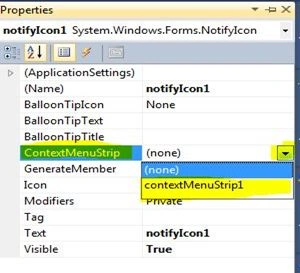
When you are done with all these things just go to the property window of the "NotifyIcon" control and in the "ContextMenuStrip" click on the drop down list, it will show the "ContextMenuStrip" control name that you have added previously to your project, you need to just select that.
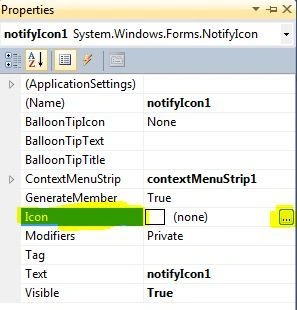
Now in the "Icon" tab add an Icon that will be visible in the Taskbar Notification Area.
Step 4: After you have done with all these things, it's time to code for the Notification to be appear. Just navigate to the Button control Click Event that you added to your project and add the following code:
private void buttonNotify_Click(object sender, EventArgs e)
{
//Shows the Text whenever Mouse is Hover on the
// Application Icon
notifyIcon1.Text = "Notify Me";
//Set the Notification visibility to true
notifyIcon1.Visible = true;
//Calling the ShowBallonTip method which
// takes 4 arguments:
//1-For how much time the Popup will be shown
// (I have set here 500 ms)
//2-Popup Title that is the text shown on the Head
// of Popup
//3-Text on the popup
//4-Icon for the Popup (I have chosen the Info Icon)
Sam HobbsPosted Apr 22, 2014, 6:02 PM
Note that Microsoft discourages the use of the Taskbar Notification Area and says it is "not intended for quick program or command access". "As of Windows 7, much of that functionality is best accomplished through an application's taskbar button." See: http://msdn.microsoft.com/en-us/Library/ee330740(v=vs.85).aspx