
Problem
By default in SharePoint 2013 there is no option for "Sign in as different user".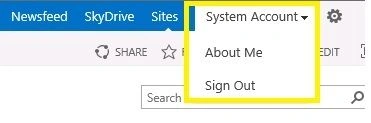
Use the following procedure to enable this in SharePoint 2013.
Solutions
Step 1
Go to the location:
C:\Program Files\Common Files\microsoft shared\Web ServerExtensions\15\TEMPLATE\CONTROLTEMPLATES
Here we have a file named "welcome.ascx".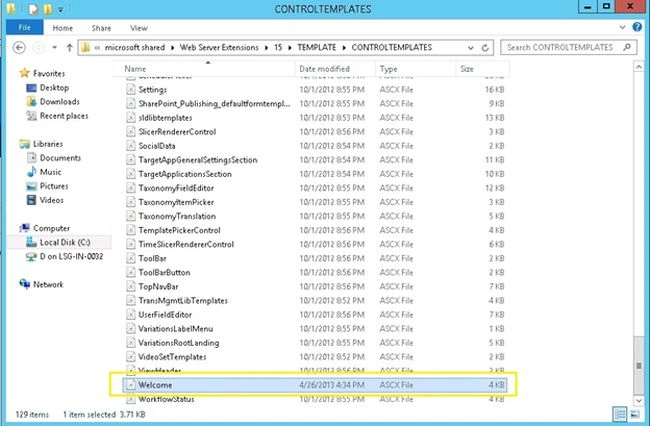
We need to edit this file to enable the option.
Step 2
Open the welcome.ascx file in Visual Studio or in Notepad and add the following code and save it:
<SharePoint:MenuItemTemplate runat="server" ID="ID_LoginAsDifferentUser"
Text="<%$Resources:wss,personalactions_loginasdifferentuser%>"
Description="<%$Resources:wss,personalactions_loginasdifferentuserdescription%>"
MenuGroupId="100"
Sequence="100"
UseShortId="true"
/>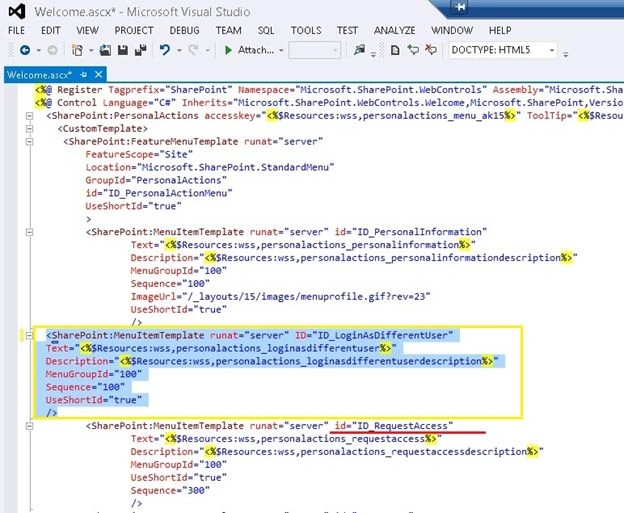
And it should be above the tag that has ID_RequestAcess.
Step 3
Refresh the site and then "Sign in as different user" will be enabled.
Summary
In this article I tried to explain how to enable the "Sign in as different user" option in SharePoint2013.

How to Enable Sign in as Different User Option in SharePoint 2013
Join the conversation! Your thoughts help the community grow.
Sign in to leave a comment
It is the same account you read, post and publish with — and you will come straight back to this page.
Shiju JosephPosted Jun 6, 2013, 2:00 AM
When you are creating the visual web part use list title to get the list instance in Visual web part. SPContext.Current.Web.Lists["List Title"]