

Problem Statement
In Master Data Services, a business rule is a rule that you use to ensure the quality and accuracy of your master data.
Is it possible to have a business rule to ensure a fixed length of value within an attribute?
Unfortunately, there is no direct feature/condition/operator to achieve this ask, but it can be overcome with a combination of multiple features/conditions/operators.
Solution
- Within the Master Data Service (MDS) homepage, Go to Administrative Tasks.

- Click on Manage >> Business Rules

- Select the Model and Entity within which you need to add the Business Rule. And Click on Add.
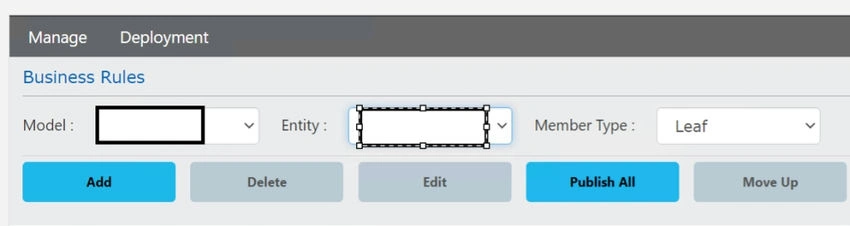
- Provide the Name and Description for the Business rule and Click on the Add section within Then

- Select the Attribute ( one column ) and Operator as Must have a minimum length of
Post that provides the intended length value and Click Add. Finally, Click on Save.

Similarly, Add one with a Maximum length validation rule, which would finally result in the below aspect.
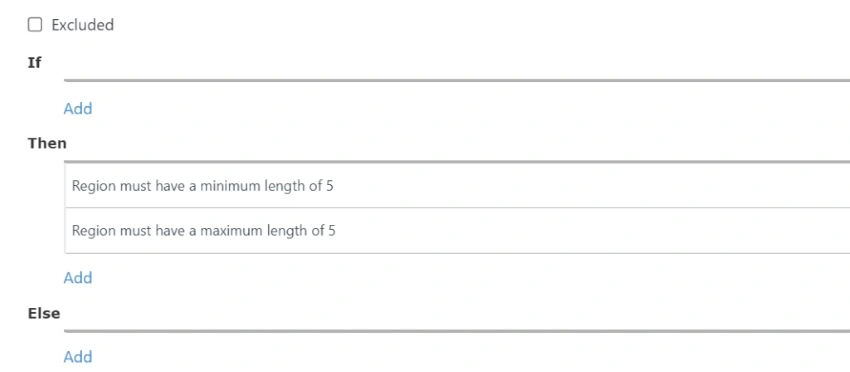
- Click on Save to Create the Business Rule.
- The Business Rule would be in Activation Pending State.

To Activate it, Click on Publish All.

Post this, the Business Rule would be in an Active state.

Output
- The length of the value is 5.

- Length of value is other than 5
a) Length < 5


b) Length > 5


Join the conversation! Your thoughts help the community grow.