

Introduction
Fetching the data from API and displaying it in a structured format is a common requirement for modern web applications.
In this article, we will build a basic concept of Live News application in React,
Calls a News API
Displays API data in a table
Search data by source name, title, or author
Sorts data alphabetically by author name
Now we start the implementation step by step :
Step 1: Create a React app
npm create vite@latest liveNews
cd liveNews
npm run dev
Step 2: Create a LiveNews.jsx file
import { useEffect, useState } from 'react';

const LiveNews = () => {
  const [newsData, setNewsData] = useState([]);
  const [search, setSearch] = useState('');

  useEffect(() => {
    getNews();
  }, []);

  async function getNews() {
    const newsApi = await fetch('https://inshorts.vercel.app/news/top');
    const apiData = await newsApi.json();
    setNewsData(apiData.data.articles);
  }

  const filteredData = newsData.filter((a) => {
    return (
      a.authorName.toLowerCase().includes(search) ||
      a.subtitle.toLowerCase().includes(search) ||
      a.sourceName.toLowerCase().includes(search)
    );
  });

  const sortedData = filteredData.sort((a, b) =>
    a.authorName.localeCompare(b.authorName)
  );

  return (
    <>
    <div className='main'>
      <input
        type="text"
        value={search}
        placeholder="Search by source name / title / author name..."
        onChange={(e) => setSearch(e.target.value.toLowerCase())}
      />

      <h2>Live News</h2>
      <table>
        <thead>
          <tr>
            <th>Source Name</th>
            <th>Title</th>
            <th>Author Name</th>
          </tr>
        </thead>
        <tbody>
          {sortedData.length ? (
            sortedData.map((data, id) => (
              <tr key={id}>
                <td>{data.sourceName}</td>
                <td>{data.subtitle}</td>
                <td>{data.authorName}</td>
              </tr>
            ))
          ) : (
            <tr>
              <td>No Records Found</td></tr>
          )}
        </tbody>
      </table>
      </div>
    </>
  );
};

export default LiveNews;
Step 3: Use the component in App.jsx
import LiveNews from './LiveNews'
import './App.css'

function App() {

  return (
    <>
    <LiveNews/>
    </>
  )
}

export default App;
Step 4: Add some styling in App.css
.main{
  margin-left: 25%;
  padding: 2%;
}
h2{
  padding-left:25%;
}
table,
th,
td {
  border: 1px black solid;
  padding: 8px;
}
th{
  font-size: 18px;
}
input{
  width: 40%;
  border-radius: 20px;
  margin: 2%;
  padding: 10px 0px;
  padding-left: 2%;
}
Now run the code and show the output.
Output
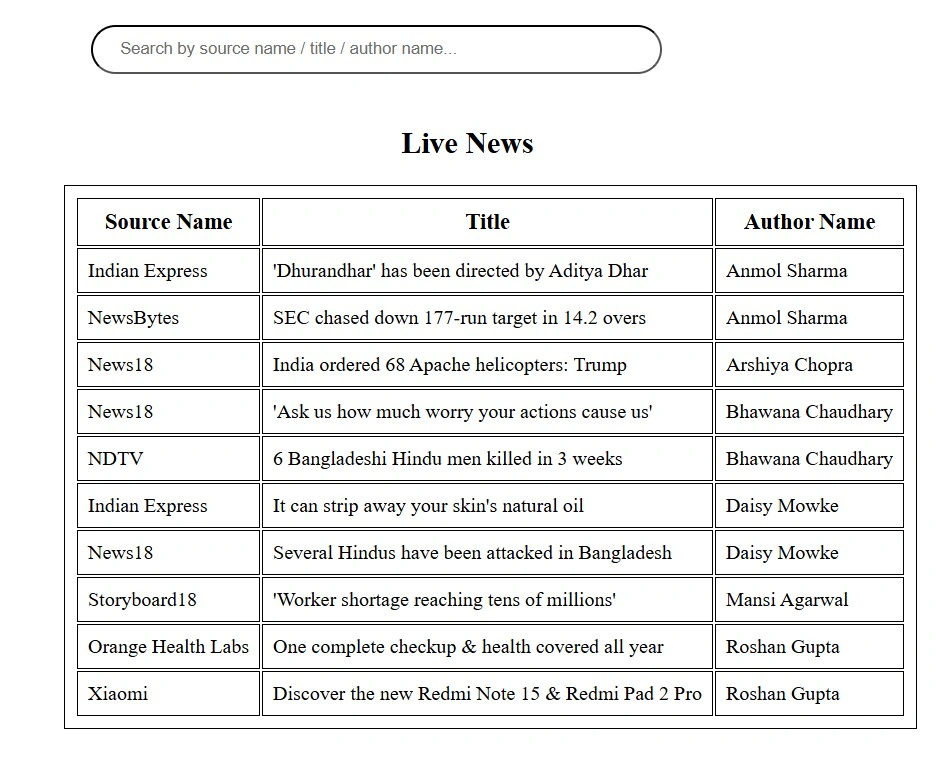
All data is sorted by author name and display in table.
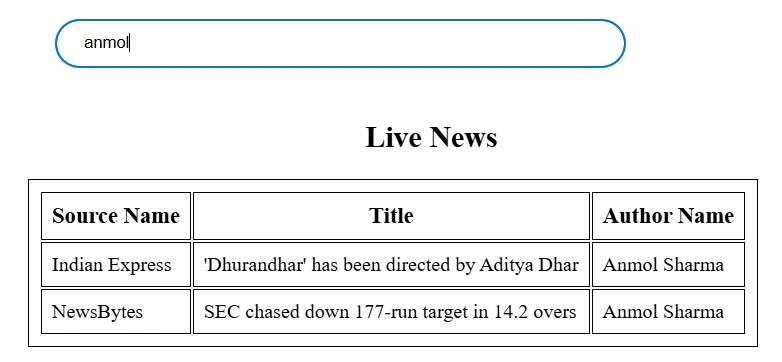
You can search articles by the source name / title / author name.
Search by author name
How the Code Works
API Call
getNews() fetches news articles using fetch().
Data is stored in the newsData state.
Filtering & Searching
Search input updates the search state.
Search checks source name , subtitle (title) and author name.
Sorting
Results are sorted alphabetically by author name.
Error Handling
Return a message "Record not found" when fields are missing.
This approach is perfect for dashboards, admin panels, or news portals.
Conclusion
In this article , React is a simple and effective way to display real-time news articles. We’ve covered fetching data from an API, implementing search and sort functionality.
I hope this helps you !
Join the conversation! Your thoughts help the community grow.