
The repeater control is use to show the collection of data at one place. It
is completely template based means that we need to provide a layout to a
repeater control by using templates. We can create grids, table and comma
separated lists in the repeater control to display the data in it. There are
various templates in it like Header Template, Item Template,
AlternatingItemTemplate, FooterTemplate etc. My WebApplication is based on the
repeater control which will display the customer name and address of the
customer and when i will click on the contact me button then it will display the
email id of the corresponding customer.
Lets have a look on the following steps:
Step 1
First Go to Visual Studio 2010.
Step 2
Then select the File->New->Web Site.
Step 3
Now Select the ASP.NET Web Site.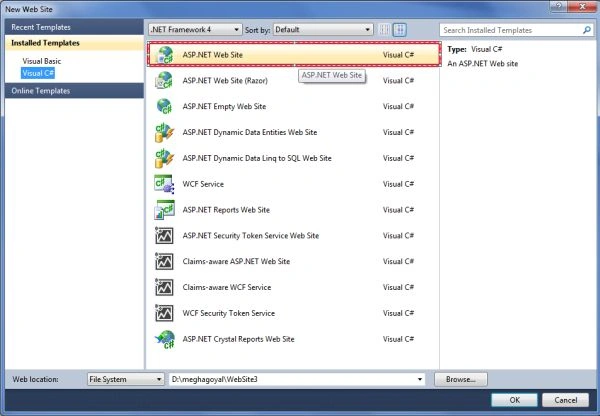
Step 4
Now give the name to your application and click on OK Button.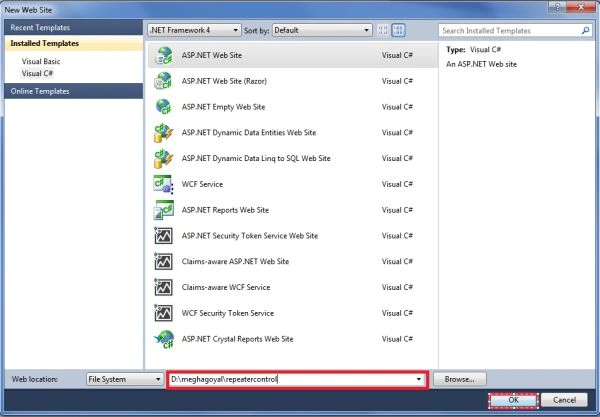
Step 5
Now drag and drop the repeater control and a label control on the web form
like this.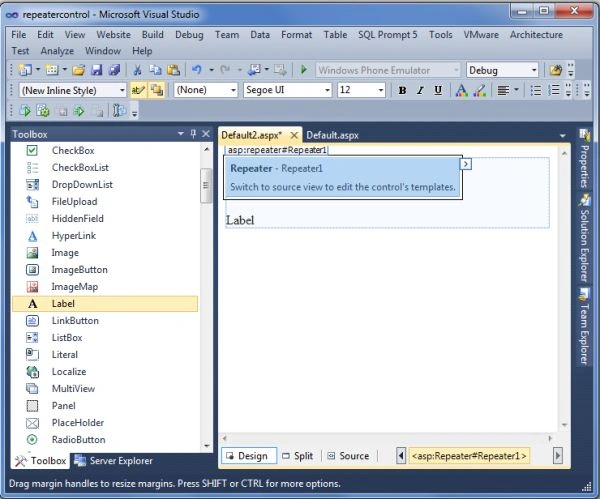
Step 6
<%@ Page Language="C#"
AutoEventWireup="true"
CodeFile="Default2.aspx.cs"
Inherits="Default2"
%>
<!DOCTYPE html PUBLIC "-//W3C//DTD XHTML 1.0 Transitional//EN" "http://www.w3.org/TR/xhtml1/DTD/xhtml1-transitional.dtd">
<html xmlns="http://www.w3.org/1999/xhtml">
<head runat="server">
<title></title>
</head>
<body>
<form id="form1" runat="server">
<div>
<asp:Repeater ID="Repeater1" runat="server"
onitemcreated="Repeater1_ItemCreated"
onitemcommand="Repeater1_ItemCommand">
<HeaderTemplate>
<table border="2">
<tr bgcolor="#10cccc">
<td>
<b>Customer Name</b>
</td>
<td>
<b>Address</b>
</td>
<td>
<b>Mail</b>
</td>
</tr>
</HeaderTemplate>
<ItemTemplate>
<tr bgcolor="#ffcccc">
<td>
<%# DataBinder.Eval(Container.DataItem,"CustomerName")%>
</td>
<td>
<%# DataBinder.Eval(Container.DataItem,"Address")%>
</td>
<td>
<asp:Button ID="email" runat="server" Text="Contact Me" CommandName="mail" />
</td>
</tr>
</ItemTemplate>
<AlternatingItemTemplate>
<tr bgcolor="#10cccc">
<td>
<%# DataBinder.Eval(Container.DataItem,"CustomerName") %>
</td>
<td>
<%# DataBinder.Eval(Container.DataItem,"Address")%>
</td>
<td>
<asp:Button ID="email" runat="server" Text="Contact Me" CommandName="mail"/>
</td>
</tr>
</AlternatingItemTemplate>
<FooterTemplate>
</table>
</FooterTemplate>
</asp:Repeater>
<br />
</div>
<asp:Label ID="Label1" runat="server" Text="Label" Font-Bold="True"
ForeColor="#669900"></asp:Label>
</form>
</body>
</html>
Step 7
Now select the repeater control and go to its property window and double
click on its item created event to generate its item_created even handler like
this.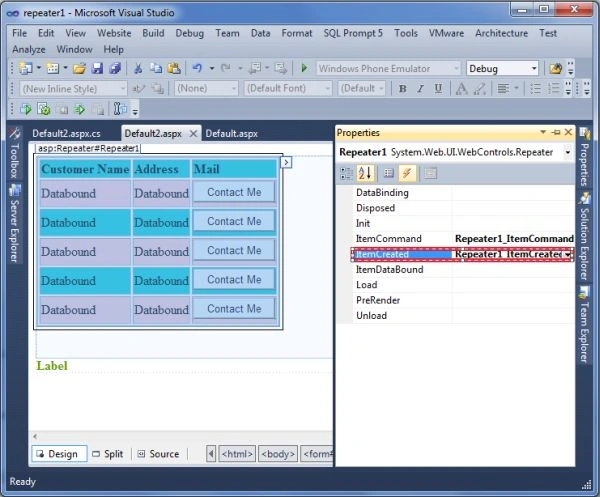
Step 8
Now again select the repeater control and go to its property window and
double click on its ItemCommand event to generate its eventhandler.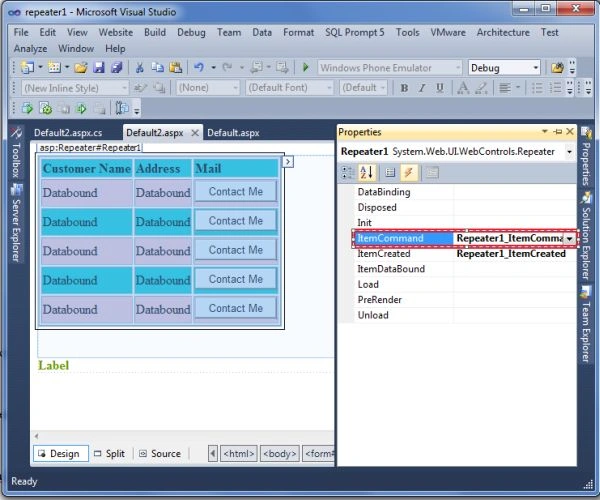
Step 9
Now add the following code in the .cs file like this.
using System;
using
System.Collections.Generic;
using System.Linq;
using System.Web;
using
System.Web.UI;
using
System.Web.UI.WebControls;
using
System.Data.SqlClient;
using System.Data;
public partial class Default2 : System.Web.UI.Page
{
protected void Page_Load(object
sender, EventArgs e)
{
if
(!IsPostBack)
{
loadData();
}
}
protected void Repeater1_ItemCreated(object
sender, RepeaterItemEventArgs e)
{
Label1.Text = "All
items have been created";
Label1.Visible = true;
}
protected void Repeater1_ItemCommand(object
source, RepeaterCommandEventArgs e)
{
if
(e.CommandName == "mail")
{
if
(e.Item.ItemIndex == 0)
{
Label1.Text = "The email id for the customer is
[email protected]";
}
if
(e.Item.ItemIndex == 1)
{
Label1.Text = "The email id for the customer id
[email protected]";
}
if
(e.Item.ItemIndex == 2)
{
Label1.Text = "The email id for the customer id [email protected]";
}
if
(e.Item.ItemIndex == 3)
{
Label1.Text = "The email id for the customer id
[email protected]";
}
}
}
public void loadData()
{
SqlConnection
con = new SqlConnection("server=.;initial
catalog=megha;uid=sa;pwd=wintellect");
DataSet
ds = new DataSet();
SqlDataAdapter
da = new SqlDataAdapter("select * from contact", con);
da.Fill(ds);
Repeater1.DataSource = ds.Tables[0];
Repeater1.DataBind();
}
}
Step 10
Now press F5 and click on start debugging under debug menu option like this.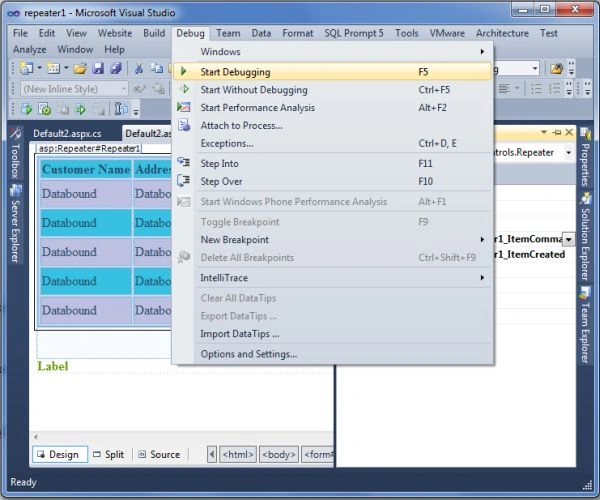
Step 11
The output will be like this.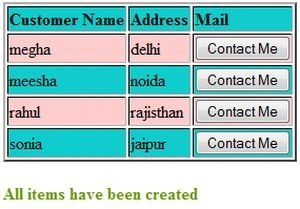
Step 12
In this when we will click on the ContactMe button it will show the email id
of the particular person like this.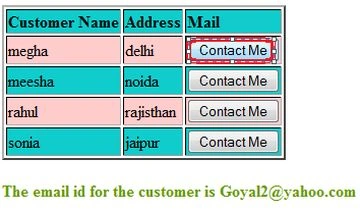
Join the conversation! Your thoughts help the community grow.