

Introduction
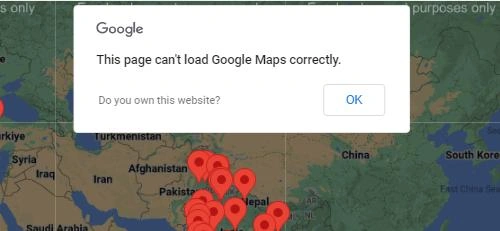
Google Maps has become essential for displaying interactive maps on websites and applications. However, encountering the error message "This page can't load Google Maps correctly" can be frustrating for both users and developers. This error typically arises due to misconfigurations, API issues, or billing-related problems. In this article, we will explore the common causes of this error and provide step-by-step solutions to fix itThis error is generally most common in Google Maps.
Common Issues and Solutions
If you are encountering the error message "This page can't load Google Maps correctly," there are a few potential reasons and solutions to consider.
- Check Your Internet Connection: Ensure you have a stable and active internet connection. Sometimes, a poor internet connection can prevent Google Maps from loading properly on your Application or website.
- Check Google Maps API Key: If you are using Google Maps API on your website or application, make sure you have a valid and active API key. You can check the API key in your Google Cloud Console. If the key is invalid or expired, you must generate a new one and update it in your application.
- Verify Domain Restrictions (API Key): If you have set up domain restrictions for your API key, ensure that the website or application where you are using Google Maps is allowed in the list of authorized domains. If not, add the domain to the list with Google Cloud Project and add it to your Application.
- Review Billing and Quotas (API Key): If you are using a free-tier Google Maps API key, make sure you haven't exceeded the usage limits. Google Maps API has some usage quotas, and if you reach the limit, the service may stop working. Consider upgrading to a higher tier if necessary for your website or Application.
- Check for Errors in Browser Console: Open the developer console in your web browser (usually by pressing F12 or right-clicking and selecting "Inspect" or "Inspect Element") and navigate to the "Console" tab. Look for any error messages related to Google Maps. These error messages can provide more specific information about the problem on your website.
- Review Content Security Policy (CSP): If your website or application has a Content Security Policy (CSP) in place, ensure that it allows the necessary resources for Google Maps to load correctly. You may need to add specific CSP directives to permit Google Maps content on your web pages.
- Disable Browser Extensions: Sometimes, browser extensions can interfere with loading Google Maps. Try disabling any extensions you have installed and see if the issue persists.
- Clear Browser Cache: Cached data can sometimes cause issues with loading Google Maps. Try clearing your browser's cache and then reload the page in your System.
- Check for Service Outages: It's possible that there might be a temporary service outage or issue on Google's end. You can check the Google Cloud Status Dashboard to see if there are any reported service disruptions.
My project solution
Setting Up Domain Restrictions
To set up domain restrictions for your Google Maps API key, follow these steps.
-
Log in to the Google Cloud Console using your Google account.
-
Select the project containing the API key you want to restrict or create a new project if needed.
-
Navigate to the "APIs & Services" > "Credentials" section.
-
Locate your Google Maps API key under the "API keys" section.
-
Click on the "Edit" (pencil) icon next to your API key to access the API key settings.
-
In the "Application restrictions" section, select the "HTTP referrers (web sites)" option.
-
Add the authorized domains to the list of referrers. For example, if you want the API key to work on "example.com," add entries to the list.
-
Save the changes to apply the domain restrictions to your API key.
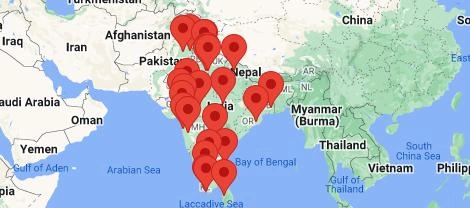
After that, run the code, and the output is given below.
Conclusion
Setting up domain restrictions for your Google Maps API key is a crucial step in securing your application and preventing unauthorized access. By limiting the usage of your API key to specific authorized domains, you can protect your usage quotas and ensure that your application functions smoothly without any abuse. Always remember to double-check the domain restrictions and periodically monitor API usage to identify any anomalies. With this added layer of security, you can confidently integrate Google Maps into your web application, knowing that your API key is safe and well-managed.
Join the conversation! Your thoughts help the community grow.