

In this article we will see how to programmatically get a particular user's properties using CSOM in SharePoint 2013.
Introduction
In SharePoint 2010 using the client-side object model we will be unable to retrieve the user profile properties whereas in SharePoint 2013 they have added a new assembly for user profile service. Using Microsoft.SharePoint.Client.UserProfiles.dll located in the 15 hive ISAPI folder we are able to retrieve the user profile properties using CSOM.
(Client-Side Object Model). In this article we will see how to programmatically get a particular user's properties using CSOM in SharePoint 2013.
Prerequisites
The following are the prerequisites:
- SharePoint 2013.
- Visual Studio 2012.
- User Profile Service application provisioned.
- User profiles should be created.
I have created a user profile whose account name is "Pai". In this article we will see how to retrieve the user properties (Account Name, Display Name and Work Email) for the user "Pai" using the Client-side Object Model.
Creating the application
Create a console application in Visual Studio 2012 using the following procedure:
- Open Visual Studio 2012 (Run as administrator).
- Go to "File" => "New" => "Project...".
- Select "Console Application" in the "Visual C#" node from the installed templates.
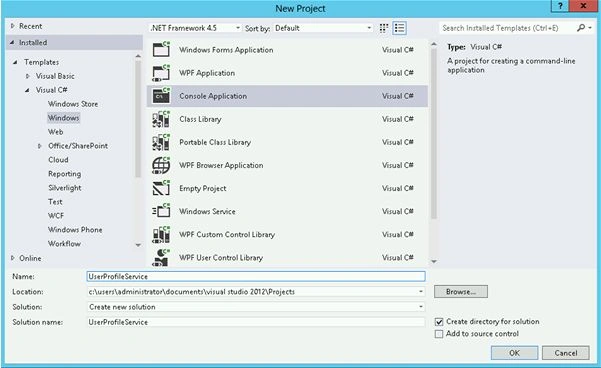
- Enter the Name and click on "Ok".
- In the Solution Explorer, right-click on the "References" folder and then click on "Add Reference".
- Add the following assemblies from the 15 hive (C:\Program Files\Common Files\microsoft shared\Web Server Extensions\15\ISAPI).
a. Microsoft.SharePoint.Client.dll
b. Microsoft.SharePoint.Client.Runtime.dll
c. Microsoft.SharePoint.Client.UserProfiles.dll
- Open Program.cs file and replace the code with the following:
using System;
using System.Collections.Generic;
using System.Linq;
using System.Text;
using System.Threading.Tasks;
using Microsoft.SharePoint.Client;
using Microsoft.SharePoint.Client.UserProfiles;
namespace UserProfileService
{
class Program
{
static void Main(string[] args)
{
//// String Variable to store the siteURL
string siteURL = "http://c4968397007:3695/";
//// String Variable to store the account name
string accountName ="Pai";
//// To get the context of the SharePoint site to access the data
ClientContext clientContext = new ClientContext(siteURL);
//// PeopleManager class provides the methods for operations related to people
PeopleManager peopleManager = new PeopleManager(clientContext);
//// PersonProperties class is used to represent the user properties
//// GetPropertiesFor method is used to get the user properties for a particular user
PersonProperties personProperties = peopleManager.GetPropertiesFor(accountName);
clientContext.Load(personProperties, p => p.AccountName, p => p.Email, p => p.DisplayName);
clientContext.ExecuteQuery();
//// Display the user profile properties - AccountName, Email, DisplayName
Console.WriteLine("Account Name: " + personProperties.AccountName);
Console.WriteLine("Email: " + personProperties.Email);
Console.WriteLine("Display Name: " + personProperties.DisplayName);
Console.ReadLine();
}
}
}
Note
In the code snippet the ExecuteQuery() method sends the request to the server until the ExecuteQuery() method is called; only the requests are registered by the application. The Load() method does not actually load anything; the loading occurs only when the ExecuteQuery() method is called, it specifies the property values that should be loaded for the object. In the Load() method lamda expressions are used to specify which property should be loaded instead of loading all the properties.
Run the console application
Hit F5. The output will be displayed as shown below :

Summary
Thus in this article we have seen programmatically how to get a particular user's properties using CSOM in SharePoint 2013.
Anillumar reddyPosted Jun 12, 2019, 8:41 AM
Hi, I want to retrieve account name based on the display name. can you help me with that
Humayun Kabir MamunPosted Mar 10, 2016, 4:56 AM
Nice
sriharibabu koppadiPosted Feb 18, 2016, 9:12 AM
hi, I want to create a link under site administration in site settings page using CSOM. Can you assist me in that
Ravivarma BalakrishnanPosted Sep 11, 2014, 3:14 PM
Hi...I am trying the same code and getting the below error...Could you please let me know, what is the issue? UserProfileApplicationNotAvailableException_Logging :: UserProfileApplicationProxy.ApplicationProperties ProfilePropertyCache does not have d4bc47c2-c27b-44ff-bbcd-1e16985d5c20