

In this article you will see how to get all the titles and URLs of all sites
within the current site collection using SharePoint 2010 web service in
Powershell.
All sites within the site collection
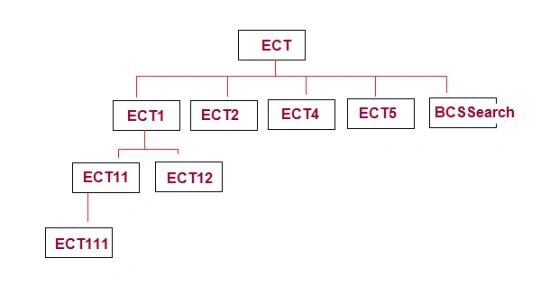
In this you will see how to get all the site's titles and URLs within the
current site using SharePoint 2010 web service in Powershell.
Steps Involved
- Open SharePoint 2010 Management Shell by going to Start | All Programs | SharePoint | Microsoft SharePoint 2010 Products | SharePoint 2010 Management Shell (Run as Administrator).
- Run the following script.
Powershell Script
##===================================================================================
## Automation : Get all the subsites using SharePoint 2010 Web Service in
Powershell
## Description : Returns the titles and URLs of all sites within the current
site collection
## Note:- Need to modify $webURL input parameter
## Author : Vijai Anand.R
## Date : 02-January-2012
##====================================================================================
#----------------------------------------------------- Input Parameters --------------
## $webURL is
a string that contains the root site url
$webURL="http://serverName:10736/sites/ECT"
#----------------------------------------------------- GetAllSubWebCollection function -----------------------------------------------------------
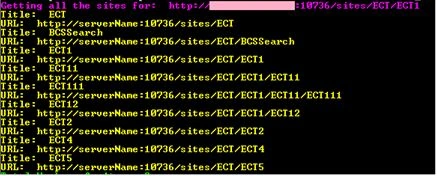
Adora KrausePosted Jan 4, 2012, 11:34 PM
Very nicely presented article.
Vijai Anand RamalingamPosted Jan 4, 2012, 11:15 PM
Thanks everyone:-)
Akash AhlawatPosted Jan 4, 2012, 11:34 AM
I have to tell you I really like this one
Jimmy UnderwoodPosted Jan 4, 2012, 11:08 AM
Really very nice
Akshay TeotiaPosted Jan 4, 2012, 11:03 AM
Nice work.
Arjun PanwarPosted Jan 4, 2012, 11:00 AM
Thanks Vijai