

Introduction
Now we use an example by which we get the map style in an Alert Box.
Step 1: For this, first we create a key in Bing maps, which is used as credentials in our program.
- <div id='myfirstMap' style="position:relative; width:500px; height:500px;"></div><div>
Step 3: After that, we take an Input Button and use an onclick event; when we click on it, it shows an alert box for showing the current map style.
- <input type="button" value="My Current Map Style" onclick="getMyMapStyle();" />
Step 4: We write a function ( onload() ) in the <body> tag.
- <body onload="getdatafromMap();">
- <div id='myfirstMap' style="position: relative; width: 500px; height: 500px;">
- </div>
- <div>
- <input type="button" value="My Current Map Style" onclick="getMyMapStyle();" />
- </div>
- </body>
Step 5: Now we write onload() function.
- function getMyMapStyle()
- {
- var x=myfirstmap.getImageryId();
- alert('My Current Map Style: ' + x);
- }
Here we use a Bing map key for credentials.
Step 6: Now we write another function which is called when the button is clicked.
- function getMyMapStyle()
- {
- var x=myfirstmap.getImageryId();
- alert('My Current Map Style: ' + x);
- }

When we click on the Button an alert box will appear.
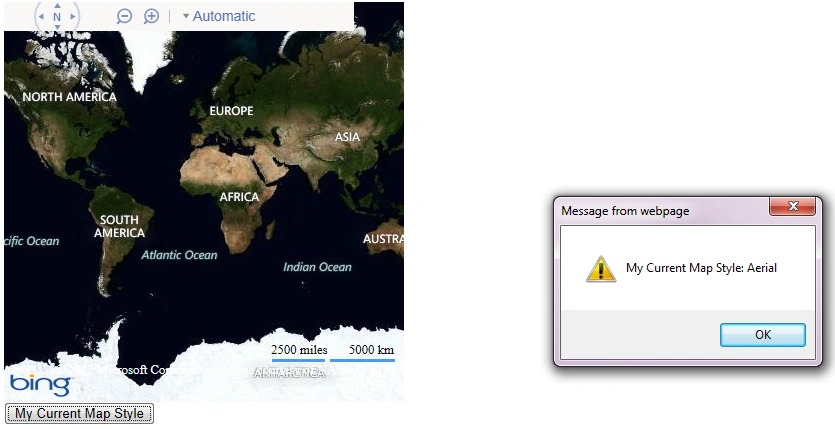
- <html>
- <head>
- <title>Current Map style</title>
- <meta http-equiv="Content-Type" content="text/html; charset=utf-8" />
- <script type="text/javascript" src="My.js"></script>
- <script type="text/javascript">
- var myfirstmap = null;
- function getdatafromMap() {
- myfirstmap = new Microsoft.Maps.Map(document.getElementById('myfirstMap'), { credentials: 'AjOB1Xgle3udoFVOVQB2-5Gfba7VETkypBPHd2RAfkKrkb29wX3e9frf3TwdSoU1' });
- }
- function getMyMapStyle() {
- var x = myfirstmap.getImageryId();
- alert('My Current Map Style: ' + x);
- }
- </script>
- </head>
- <body onload="getdatafromMap();">
- <div id='myfirstMap' style="position: relative; width: 500px; height: 500px;">
- </div>
- <div>
- <input type="button" value="My Current Map Style" onclick="getMyMapStyle();" />
- </div>
- </body>
- </html>
Join the conversation! Your thoughts help the community grow.