

Introduction
In this article, I will explain how to access the current user's details. We can get userip, usercountry, usercity, userregion, userlatitude, userlongitude and usertimezone about the user. The "smart-ip.net" JSON string is used to access all the information about the user.
Complete Program
User_Infromation.html
- <!DOCTYPE html>
- <html xmlns="http://www.w3.org/1999/xhtml">
- <head>
- <title></title>
- <script src="jquery-1.8.2.js"></script>
- <script type="text/javascript">
- var userip, usercountry, usercity, userregion, userlatitude, userlongitude, usertimezone
- function UserInfo(data)
- {
- userip = data.host;
- usercountry = data.countryName;
- usercity = data.city;
- userregion = data.region;
- userlatitude = data.latitude;
- userlongitude = data.longitude;
- usertimezone = data.timezone;
- }
- $(function ()
- {
- UserInfoDetail();
- })
- function UserInfoDetail() {
- document.getElementById('userip').innerHTML = userip;
- document.getElementById('city').innerHTML = usercity;
- document.getElementById('country').innerHTML = usercountry;
- document.getElementById('region').innerHTML = userregion;
- document.getElementById('timezone').innerHTML = usertimezone;
- document.getElementById('longitude').innerHTML = userlongitude;
- document.getElementById('latitude').innerHTML = userlatitude;
- }
- </script>
- <script type="text/javascript" src="http://smart-ip.net/geoip-json?callback=UserInfo"></script>
- </head>
- <body>
- <div>
- <table id="Details" cellpadding="2" cellspacing="2" style=" border:1px solid #000; font-family:'Segoe UI';" >
- <tr style="background-color:#666666; color:White; font-weight:bold">
- <td colspan="2" align="center">Current User Details in JavaScript</td>
- </tr>
- <tr style="border:solid 1px #000000">
- <td align="left"><b>IP Address :</b></td>
- <td><label id="userip"/></td>
- </tr>
- <tr>
- <td align="left"><b>City :</b></td>
- <td><label id="city"/></td>
- </tr>
- <tr>
- <td align="left"><b>Country :</b></td>
- <td><label id="country"/></td>
- </tr>
- <tr>
- <td align="left"><b>Region :</b></td>
- <td><label id="region"/></td>
- </tr>
- <tr>
- <td align="left"><b>Time Zone :</b></td>
- <td><label id="timezone"/></td>
- </tr>
- <tr>
- <td align="left"><b>Longitude :</b></td>
- <td><label id="longitude"/></td>
- </tr>
- <tr>
- <td align="left"><b>latitude :</b></td>
- <td><label id="latitude"/></td>
- </tr>
- </table>
- </div>
- </body>
- </html>
Output
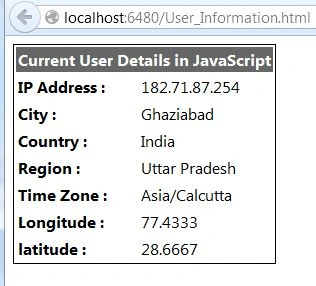
For more information, download the attached sample application.
Ethiraj ParthasarathiPosted Apr 1, 2016, 2:28 AM
This is jquery coding .try this... Try this code:<html xmlns="http://www.w3.org/1999/xhtml"><head runat="server"> <script src="Scripts/jquery-1.7.1.js"></script> <script src="Scripts/jquery-ui-1.8.20.js"></script> <script src="Scripts/jquery-ui-1.8.20.min.js"></script> <script src="Scripts/modernizr-2.5.3.js"></script> <script src="Scripts/_references.js"></script> <script language="JavaScript" src="http://www.geoplugin.net/javascript.gp" type="text/javascript"> </script> <script> jQuery(document).ready(function ($) { var country = geoplugin_countryName(); var zone = geoplugin_region(); var district = geoplugin_city(); $('#txtcountry').val(country); $('#txtstate').val(zone); $('#txtcity').val(district); alert("Welcome to our visitors from " + geoplugin_city() + ", " + geoplugin_countryName()); }); </script> </head> <body> <form id="form1" runat="server"> <div> <header style="background-color: whitesmoke;"> <center><h1><em>GEO Information</em></h1></center> </header> <table style="width: 1200px; text-align: center;"> <hr /> <tr> <td> <asp:TextBox ID="txtcountry" runat="server" BackColor="orange" ReadOnly="true"></asp:TextBox> </td> </tr> <tr> <td> <asp:TextBox ID="txtstate" runat="server" BackColor="white" ReadOnly="true"></asp:TextBox> </td> </tr> <tr> <td> <asp:TextBox ID="txtcity" runat="server" BackColor="green" ReadOnly="true"></asp:TextBox> </td> </tr> </table> <hr /> </div> </form> </body> </html>
Nitin BhardwajPosted Aug 4, 2015, 8:34 AM
Hello Manikanta, Can you show me code file?
Manikanta BongaralaPosted Jul 31, 2015, 1:31 AM
hello iam getting undefined what to do plz help me
Paras Mal MaliPosted Mar 7, 2014, 5:35 AM
Hello Sir, I want to get static IP address in my application from jquery and javascript xmlhttprequest so please suggest me suitable code with suitable example
Jaganathan BantheswaranPosted Jun 17, 2013, 6:27 AM
Nice one... It could be very nice if the title is something like this "How to get user Location Information using Javascript"
Sandeep Singh ShekhawateditedPosted May 10, 2013, 5:56 AMEdited May 10, 2013, 5:57 AM
I tried this code on my system and I am using class C IP address but it is giving class A ip address for my system. So it is not delivering correct information about user.