

Create a new Windows Phone project and add the install Microsoft Band SDK and select Manage NuGet Packages as shown in the following screen.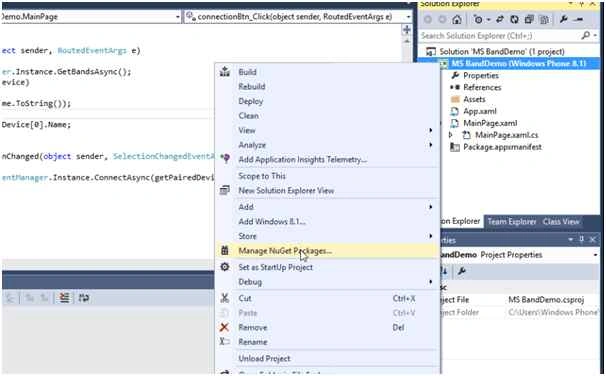
Now search for and install the Microsoft Band SDK as in the following screen.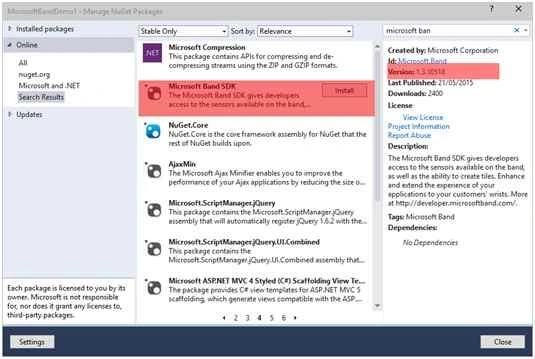
After installing the Microsoft SDK, check that the Proximity capability has been added to the manifest file as in the following: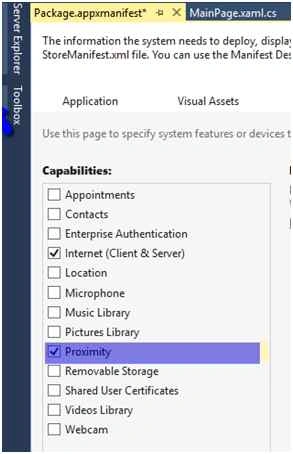
Enable Proximity
Add the following code to the Package.appmanifest file. Right-click the appmainfest file and select View Code to add the code.
- <DeviceCapability Name="bluetooth.rfcomm" xmlns="http://schemas.microsoft.com/appx/2013/manifest">
- <Device Id="any">
- <Function Type="serviceId:A502CA9A-2BA5-413C-A4E0-13804E47B38F" />
- <Function Type="serviceId:C742E1A2-6320-5ABC-9643-D206C677E580" />
- </Device>
- </DeviceCapability>
- Add the namespace.
- using Microsoft.Band;
- using Microsoft.Band.Sensors;
- Get the list of paired Bands using the following code.
- IBandInfo[] getPairedDevice=await BandClientManager.Instance.GetBandsAsync();
- Connect to the band.
- using(IBandClient client=await BandClientManager.Instance.ConnectAsync(getPairedDevice[0]))
- {
- }
- Ensure the user has consented before getting the heart beat rate from the Band.
Some sensor requires user consent.- if(client.SensorManager.HeartRate.GetCurrentUserConsent()!=UserConsent.Granted)
- {
- await client.SensorManager.HeartRate.RequestUserConsentAsync();
- }
You can request the permission status of the specific sensor.
The user gives permission once, the application would not need to request it again.
- Start the sensor to read the heart beat.
- await client.SensorManager.HeartRate.StartReadingsAsync();
- Stop the Sensor.
- await client.SensorManager.HeartRate.StopReadingsAsync();
Sibeesh VenuPosted Jun 22, 2015, 5:01 AM
Good One.
Gopi ChandPosted Jun 22, 2015, 1:31 AM
Great thing :)
Sibeesh VenuPosted Jun 21, 2015, 12:53 PM
Good one.
Santhakumar MunuswamyPosted Jun 21, 2015, 2:02 AM
Thanks for nice article:)