

Introduction
This article describes how to get the latitude and longitude of a location using the Google Map API in ASP.Net. Here I will describe how to communicate with the Google Map API.
Description
To use the Google Map API you need to add the following link to the Head section.- <script type="text/javascript" src="https://maps.googleapis.com/maps/api/js?sensor=false"></script>
Now add two TextBoxes, one Button, and one Label.
Design your screen as in the following screen.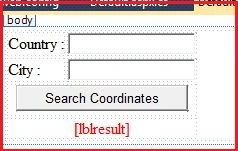
Or you can copy the following source code:
- <body>
- <form id="form1" runat="server">
- <div>
- <table>
- <tr>
- <td>
- Country :
- </td>
- <td>
- <asp:TextBox ID="txtCon" runat="server"></asp:TextBox>
- </td>
- </tr>
- <tr>
- <td>
- City :
- </td>
- <td>
- <asp:TextBox ID="txtCity" runat="server"></asp:TextBox>
- </td>
- </tr>
- <tr>
- <td colspan="2" align="center">
- <input id="btn" type="button" value="Search Coordinates" />
- </td>
- </tr>
- <tr>
- <td colspan="2" align="center">
- <asp:Label ID="lblresult" runat="server" ForeColor="Red"></asp:Label>
- </td>
- </tr>
- </table>
- </div>
- </form>
- </body>
- <script src="jquery-1.9.1.js" type="text/javascript"></script>
- <script type="text/javascript" src="https://maps.googleapis.com/maps/api/js?sensor=false"></script>
Jithin SunnyPosted Dec 21, 2018, 12:55 AM
This answer is now out-of-date. You are now required to have an API key to use google maps.
Nicola HannaPosted Jun 10, 2015, 3:12 AM
Why does the label display and then disappear again? and how do I stop it doing that?
Vithal WadjePosted Oct 7, 2013, 12:56 PM
good,keep it up
Preeti AgrawallaPosted Sep 7, 2013, 7:00 AM
nice .....