

In this Article you can learn how to get the values of selected row from a Gridview and display the values in textBoxes using C# code.
Selecting a Row in Gridview
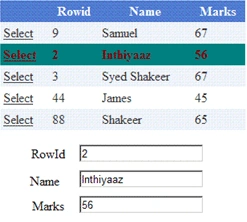
Add one Gridview and bind a Data using SqlDataSource.and Add three Textboxes to display a data in Textboxes when the GridviewRow is Selected.
Ste the Gridview AutoGenerateColumns property to 'False'.
You will need to set the Bound column in order to see the text in the cells of the grid view control.
- <asp:GridView runat ="Server" ID="Gridview1" AutoGenerateColumns="False" DataSourceID="SqlDataSource1"AutoGenerateSelectButton="True" OnSelectedIndexChanged="Gridview1_SelectedIndexChanged Width="306px" Height="137px">
- <Columns >
- <asp:BoundField HeaderText ="Rowid" DataField ="Rowid" />
- <asp:BoundField HeaderText ="Name" DataField ="Name" />
- <asp:BoundField HeaderText ="Marks" DataField ="marks" />
- </Columns>
- </asp:GridView>
- <asp:SqlDataSource ID="SqlDataSource1" runat="server" ConnectionString="<%$ ConnectionStrings:shakeerConnectionString %>" SelectCommand="SELECT * FROM [emp]">
- </asp:SqlDataSource>
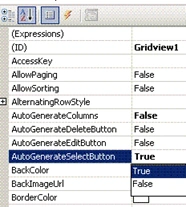
See the Desing view of your Gridview.you will find a Hyperlink with a text as 'Select'.
Selecting Row
Selecting row event is fired when you make a click on the select link. If you need any particular item in that row you can easily select it using the cells property:
In Gridview Events double Click on SelectedIndexChanged Event and write the below code,
- protected void Gridview1_SelectedIndexChanged(object sender, EventArgs e)
- {
- txtrowid.Text = Gridview1.SelectedRow.Cells[1].Text;
- txtname.Text = Gridview1.SelectedRow.Cells[2].Text;
- txtmarks.Text = Gridview1.SelectedRow.Cells[3].Text;
- }
Akhter HUssainPosted Jul 19, 2019, 10:01 AM
How to handle dropdownlist instead of textbox, if have cell is empty
Jose Manuel GomezPosted May 31, 2019, 1:20 AM
Thanks a lot mate, i have a question, how can i store the selected row value into a variable string , i tried something like this "string var = Gridview1.SelectedRow.Cells[2].Text; " into Gridview1_SelectedIndexChanged event, but is not working. When i print it, the string value is empty. Can you help me please?
Abumiyan MuqriPosted May 30, 2012, 8:26 AM
Hi Shakeer, I have a problem I have one gridview in that there are 4 columns namely "User ID","Description","Display Password","Change Password". I have put an Image Button in Change Password Column for each cell. Below the Gridview there are 3 text boxes. When I click on Change Password, the User ID of that particular row should be displayed in text box 1. How to do this in asp.net with C# and back end is MySql DB server.
Saravana KumarPosted Apr 28, 2011, 2:22 AM
Iam a beginner to ASP.net.Your coding is very useful to me. Thanks saravana
Asraf aliPosted Feb 3, 2011, 10:06 PM
if i make the auto generate column as true means, i got the answer, but i bound the field means i cant able to access the cell text. please send me the reason of mistake.. c# : ------- protected void Page_Load(object sender, EventArgs e) { con.Open(); da = new SqlDataAdapter("select sub,film from tnames where main='Sathyam Cinimas'", con); da.Fill(ds); GridView1.DataSource = ds; GridView1.DataBind(); con.Close(); } protected void GridView1_SelectedIndexChanged(object sender, EventArgs e) { TextBox1.Text = GridView1.SelectedRow.Cells[1].Text; } Design: ---------------- <asp:TextBox ID="TextBox1" runat="server"></asp:TextBox> <asp:GridView ID="GridView1" runat="server" AutoGenerateColumns="False" onselectedindexchanged="GridView1_SelectedIndexChanged" onselectedindexchanging="GridView1_SelectedIndexChanging" Width="437px"> <Columns> <asp:TemplateField ShowHeader="False"> <ItemTemplate> <asp:LinkButton ID="LinkButton1" runat="server" CausesValidation="False" CommandName="Select" Text="Select"></asp:LinkButton> </ItemTemplate> </asp:TemplateField> <asp:TemplateField HeaderText="Sub"> <ItemTemplate> <asp:Label ID="Label1" runat="server" Text='<%# Bind("sub") %>'></asp:Label> </ItemTemplate> <EditItemTemplate> <asp:TextBox ID="TextBox1" runat="server" Text='<%# Bind("sub") %>'></asp:TextBox> </EditItemTemplate> </asp:TemplateField> <asp:TemplateField HeaderText="film"> <ItemTemplate> <asp:Label ID="Label2" runat="server" Text='<%# Bind("film") %>'></asp:Label> </ItemTemplate> <EditItemTemplate> <asp:TextBox ID="TextBox2" runat="server" Text='<%# Bind("film") %>'></asp:TextBox> </EditItemTemplate> </asp:TemplateField> </Columns> </asp:GridView> ------------------------------------------- i cant get any error and o/p also...... Asraf ali L ([email protected]).
Asraf aliPosted Jan 28, 2011, 11:36 AM
can't able to access the cell text in grid view by using following coding ,please help me whats wrong this coding. i can't recive error and output also.... send the details of mistake. ----asraf ali l ([email protected]) ------------------------------------------------------------------------------------- protected void Gridview1_SelectedIndexChanged(object sender, EventArgs e) { txtrowid.Text = Gridview1.SelectedRow.Cells[1].Text; } protected void Page_Load(object sender, EventArgs e) { con.Open(); da = new SqlDataAdapter("select * from tnames where main='" + name + "'", con); da.Fill(ds); GridView1.DataSource = ds; GridView1.DataBind(); }
Deepak SharmaPosted Nov 29, 2010, 12:13 AM
thanks
SairamPosted Nov 25, 2010, 8:14 AM
Nice ..easy to understand better... can u provide this concept in the csharp web application...
Mahesh ChandPosted Jun 29, 2010, 10:36 PM
this article.