

Introduction
In this article, I am going to explain how to get unique records without using DISTINCT in SQL Server. This detailed article will cover the following topics as follows,
- Introduction
- What is DISTINCT in SQL Server?
- 9 ways to get unique records without using DISTINCT in SQL Server
- Conclusion
First, let's create a database with a table containing some dummy data. Here, I am providing you with the database along with a table containing the records, on which I am showing you the various examples. Let's see.
CREATE DATABASE OnkarSharma_GetUniqueRecords;
PRINT 'New Database ''OnkarSharma_GetUniqueRecords'' Created';
GO

USE [OnkarSharma_GetUniqueRecords];
GO

-->>----Employee Table ------------------->>--
CREATE TABLE [dbo].[Employee] (
    EmployeeID INT IDENTITY (31100, 1),
    EmployerID BIGINT NOT NULL DEFAULT 228866,
    FirstName VARCHAR(50) NOT NULL,
    LastName VARCHAR(50) NOT NULL,
    Email VARCHAR(255) NOT NULL,
    DepartmentID VARCHAR(100) NOT NULL,
    Age INT NOT NULL,
    GrossSalary BIGINT NOT NULL,
    PerformanceBonus BIGINT,
    ContactNo VARCHAR(25),
    PRIMARY KEY (EmployeeID)
);
Next, you can insert data to the tables using the SQL INSERT statement or by adding data directly to the tables in SSMS.
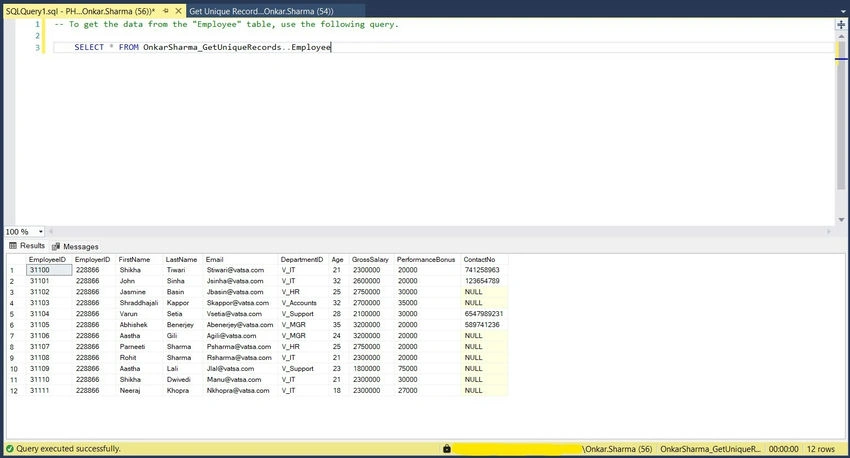
Let's check our table using the following query.
To get the data from the "Employee" table, use the following query.
SELECT * FROM OnkarSharma_GetUniqueRecords..Employee
What is DISTINCT in SQL Server?
In SQL Server, DISTINCT is a keyword used in a SELECT statement to remove duplicate rows from the result set. When you use DISTINCT, the query returns only unique rows based on the columns specified.
Key Points
- In the SELECT clause, DISTINCT is applied to every column. The combination of values in the columns you specify will be taken into account to determine uniqueness.
- Since SQL Server has to check each record to filter out duplicates, this can have an impact on performance, especially when working with a huge result set.
Syntax
SELECT DISTINCT <column1>, <column2>, ...
FROM <Table_Name>
WHERE <Condition_list>;
Example
SELECT DISTINCT Age, DepartmentID
FROM [dbo].[Employee]

9 ways to get unique records without using DISTINCT in SQL Server
Here are nine alternatives to achieve unique records in SQL Server without using the DISTINCT keyword:
Method 1. Using GROUP BY
The GROUP BY clause can be used to group rows that have the same values in specified columns so that duplicates can be filtered out.
Syntax
SELECT <column1>, <column2>, ...
FROM <Table_Name>
GROUP BY <column1>, <column2>, ...;
Example
SELECT Age, DepartmentID
FROM [dbo].[Employee]
GROUP BY Age, DepartmentID

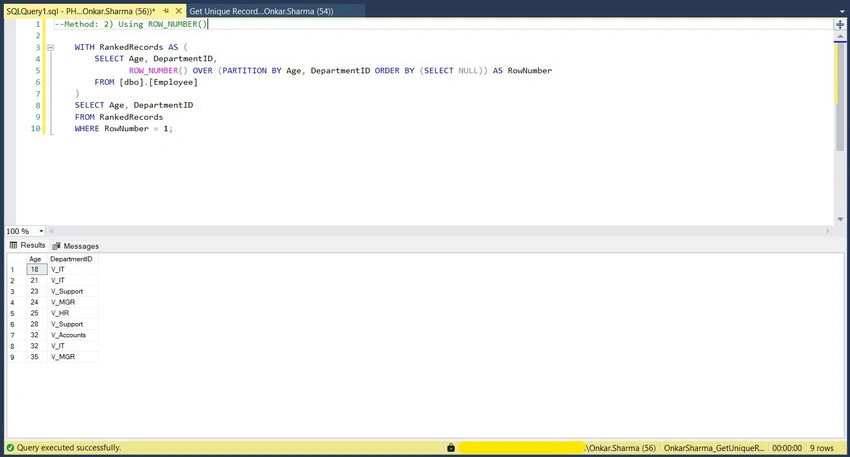
Method 2. Using ROW_NUMBER()
ROW_NUMBER() can be used to get UNIQUE/DISTINCT records in SQL Server.
Syntax
WITH RankedRecords AS (
    SELECT
        <column1>,
        <column2>,
        ROW_NUMBER() OVER (PARTITION BY <column1>, <column2> ORDER BY (SELECT NULL)) AS RowNumber
    FROM
        <Table_Name>
)
SELECT
    <column1>,
    <column2>,
    ...
FROM
    RankedRecords
WHERE
    RowNumber = 1;
Example
WITH RankedRecords AS (
    SELECT
        Age,
        DepartmentID,
        ROW_NUMBER() OVER (PARTITION BY Age, DepartmentID ORDER BY (SELECT NULL)) AS RowNumber
    FROM
        [dbo].[Employee]
)
SELECT
    Age,
    DepartmentID
FROM
    RankedRecords
WHERE
    RowNumber = 1;
Method 3. Using Aggregate Functions
Aggregation functions (such as MIN, MAX, COUNT, etc.) can be used to get unique records on the SQL Server.
Syntax
SELECT
    <column1>,
    <column2>,
    COUNT(*) AS Count
FROM
    <Table_Name>
GROUP BY
    <column1>,
    <column2;
Example
SELECT
    Age,
    DepartmentID,
    COUNT(*) AS Count
FROM
    [dbo].[Employee]
GROUP BY
    Age,
    DepartmentID;

Method 4. Using a Subquery
Subqueries can be used as an alternative to DISTINCT to get unique records in SQL Server.
Syntax
SELECT
    <column1>,
    <column2>
FROM (
    SELECT
        <column1>,
        <column2>
    FROM
        <Table_Name>
) AS subquery
GROUP BY
    <column1>,
    <column2>;



Join the conversation! Your thoughts help the community grow.