

This article shows how to get the heart beat rate from Microsoft Band in Windows Phone.
Create a new Windows Phone project and add the Microsoft Band SDK and select Manage NuGet Packages as in the following screen: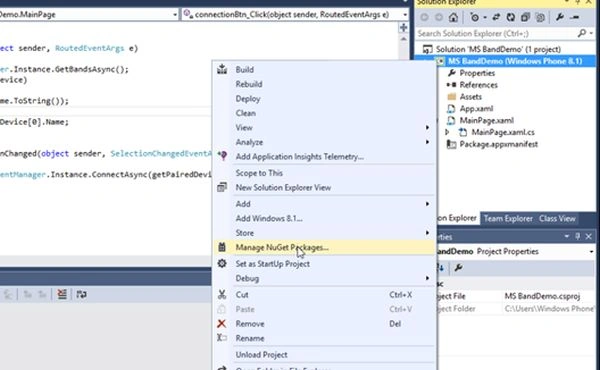
Now search for and install the Microsoft Band SDK as in the following image: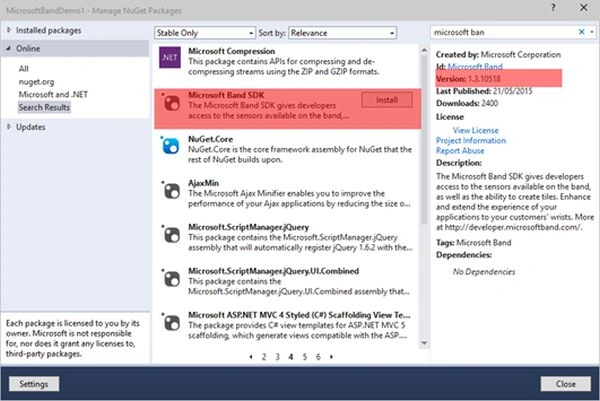
After installing the Microsoft SDK, ensure that the Proximity capability has been added to the manifest file as in the following image: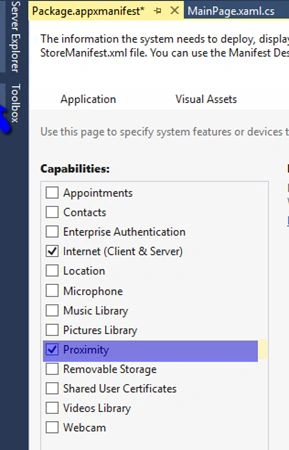
Enable Proximity
Add the following code to the Package.appmanifest file. Right-click the appmainfest file and select View Code to add the code.
- <DeviceCapability Name="bluetooth.rfcomm" xmlns="http://schemas.microsoft.com/appx/2013/manifest">
- <Device Id="any">
- <Function Type="serviceId:A502CA9A-2BA5-413C-A4E0-13804E47B38F" />
- <Function Type="serviceId:C742E1A2-6320-5ABC-9643-D206C677E580" />
- </Device>
- </DeviceCapability>
The first step is to connect to the Band. To make a connection, the band and the device must be paired with Bluetooth to each other. To get the paired Band and establish a connection use the Band Client Manager.
- Add the namespace.
- using Microsoft.Band;
- using Microsoft.Band.Sensors;
- Get the list of paired Bands using the following code.
- IBandInfo[] getPairedDevice=await BandClientManager.Instance.GetBandsAsync();
- Connect to the band.
- using(IBandClient client=await BandClientManager.Instance.ConnectAsync(getPairedDevice[0]))
- {
- }
- Ensure the user has consented before getting the heart beat rate from the Band.
- if (client.SensorManager.Accelerometer.GetCurrentUserConsent() != UserConsent.Granted)
- {
- }
- Start the sensor to read the device axis.
- await client.SensorManager.Accelerometer.StartReadingsAsync();
- Create an event handler to read each and every change of the Band axis.
- client.SensorManager.Accelerometer.ReadingChanged += Accelerometer_ReadingChanged;
- void Accelerometer_ReadingChanged(object sender, BandSensorReadingEventArgs<IBandAccelerometerReading> e)
- {
- }
- Write the following code to change the hand image axis.
- void Accelerometer_ReadingChanged(object sender, BandSensorReadingEventArgs < IBandAccelerometerReading > e)
- {
- var xAxis = e.SensorReading.AccelerationX;
- var yAxis = e.SensorReading.AccelerationY;
- var zAxis = e.SensorReading.AccelerationZ;
- var actionRotation = yAxis * 90;
- this.Dispatcher.RunAsync(Windows.UI.Core.CoreDispatcherPriority.Normal, () = > {
- myHand.Projection.SetValue(PlaneProjection.RotationYProperty, actionRotation);
- });
- }
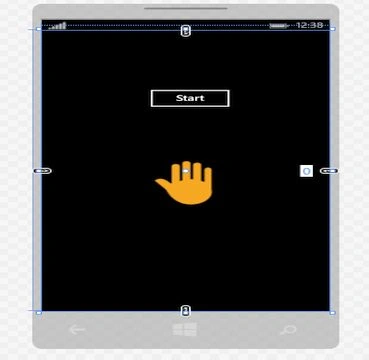
Now start the Windows Phone app and connect with your Microsoft band and click the Start button to get the band action.
Deepak JainPosted Jun 22, 2015, 3:08 PM
good article
Santhakumar MunuswamyPosted Jun 22, 2015, 2:23 PM
Thanks for nice article
Avirup BasuPosted Jun 22, 2015, 1:37 PM
Good article. Planning to work on this new device.
Suresh MPosted Jun 22, 2015, 5:27 AM
Thank you. Personally i like the design.Have lot of features made me comfortable to wear and easy to use. support in Android and Apple devices also.Very easy to get the data from sensors.
Sibeesh VenuPosted Jun 22, 2015, 4:59 AM
Good One.
Mahesh ChandPosted Jun 22, 2015, 3:52 AM
Very nice Suresh. How do you like Microsoft Band?