

Prevent Duplicates in a Table
Here we can use a primary key or unique Index on a table with appropriate fields to stop duplicate records.
Example
The following table contains no such index or primary key, so it would allow duplicate records for first_name and last_name.
Syntax
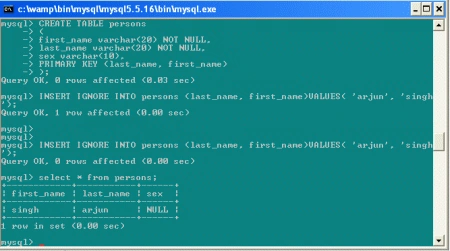
CREATE TABLE persons
(
first_name CHAR(20),
last_name CHAR(20),
sex CHAR(10)
);
Here we have to prevent multiple records with the same first and last name values from being created in this table, and add a primary key to its definition . When we do this, it's also necessary to declare the indexed columns to be not null, because a primary key does not allow NULL values.
Syntax
CREATE TABLE persons
(
first_name varchar(20) NOT NULL,
last_name varchar(20) NOT NULL,
sex varchar(10),
PRIMARY KEY (last_name, first_name)
);
mysql> INSERT IGNORE INTO persons (last_name, first_name)VALUES( 'arjun', 'singh');
mysql> INSERT IGNORE INTO persons (last_name, first_name)VALUES( 'arjun', 'singh');
mysql > select * from persons;
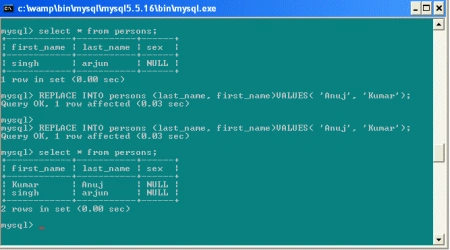
mysql> REPLACE INTO persons (last_name, first_name)VALUES( 'Anuj', 'Kumar');
mysql> REPLACE INTO persons (last_name, first_name)VALUES( 'Anuj', 'Kumar');
mysql> select * from persons ;
Counting and Identifying Duplicates
Syntax
CREATE TABLE students
(
last_name CHAR(20) NOT NULL,
first_name CHAR(20) NOT NULL,
street varchar(30) NOT NULL
);
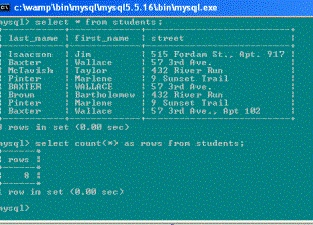
mysql > select * from students;
mysql> SELECT COUNT(*) AS rows FROM students;
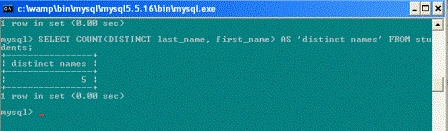
mysql> SELECT COUNT(DISTINCT last_name, first_name) AS 'distinct names' FROM students;
Removing Duplicates Using Table Replacement
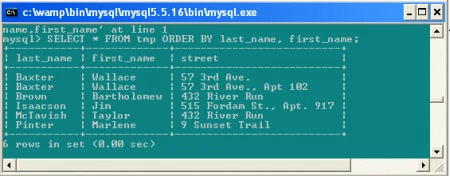
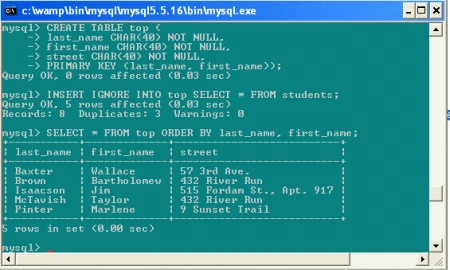
One way to eliminate duplicates from a table is to select its unique records into a new table that has the same structure. Then replace the original table with the new one. If a row is considered to duplicate another only if the entire row is the same, we can use SELECT DISTINCT to select the unique rows.


Join the conversation! Your thoughts help the community grow.