

Introduction
This article provides a step-by-step guide to help you find the owner of a form with a response link. For one of our clients, we needed to transfer all Microsoft Forms from individual users to a service account. There was one important form, and although we had the response URL, we didn’t know who created it. By following the steps below, we were able to identify the owner and successfully transfer the form to the service account.
Prerequisites
- Administrator Access: You must have admin access to use the Microsoft Entra Admin Center to search from the ownerid of the creator.
- Form URL: You should have the response URL of the form to proceed with identifying the owner.
Below are the steps to find the owner of a Microsoft Form.
Once you have the prerequisites in place, follow these steps to find the form creator.
Step 1. Open the Form response link in your browser
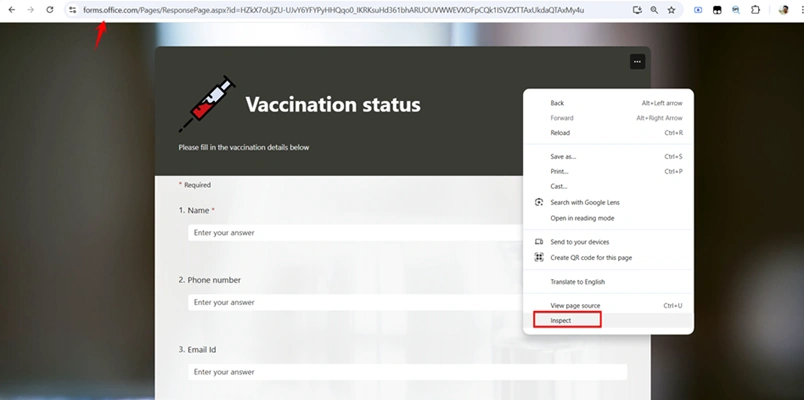
- Launch Google Chrome and paste the form URL into the address bar.
- Press F12 or Inspect to open Chrome’s Developer Tools.
Step 2. Use Chrome Developer Tools
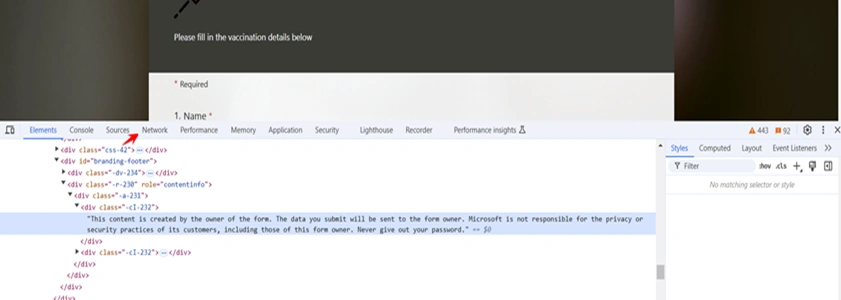
- Navigate to the Network tab and refresh the form page.
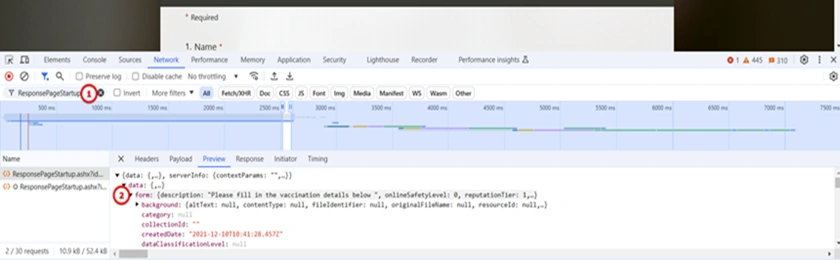
- Look for entries related to Forms, such as ResponsePageStartup.
- Expand the entry and find the form section.
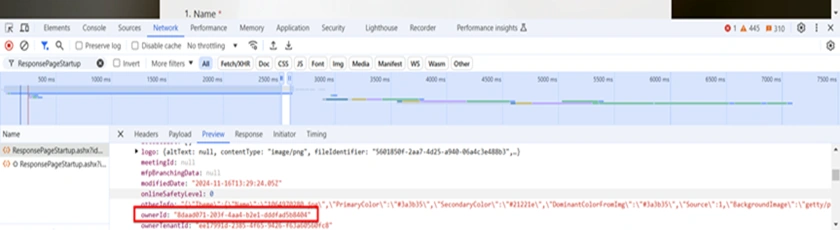
- Scroll down to locate the ownerID, which is the unique ID of the form creator.
Step 3. Use Microsoft Entra Admin Portal to Find the Owner's Details
- Go to the Microsoft Entra Admin Center (https://entra.microsoft.com).
- Search for the ownerID you retrieved using Developer Tools in the Users section.
- This will show the user account associated with the form.
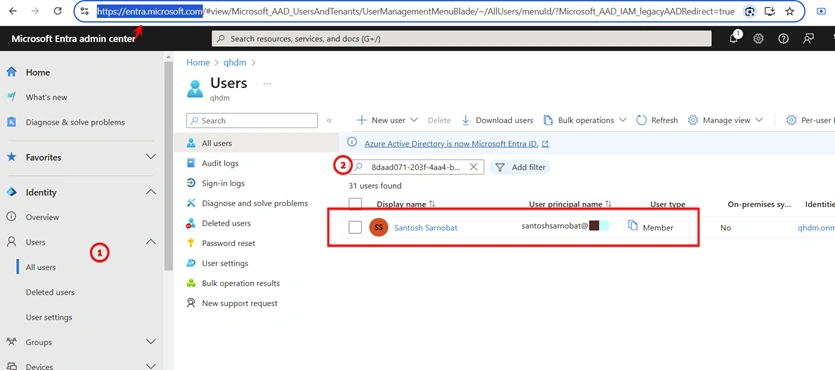
Once you’ve identified the owner in the Admin Portal, you can:
- Transfer the form ownership to another user or group.
- Validate and manage the configurations.
Things to Remember
- Group Forms: If the form is associated with a group, the owner will appear as the Office 365 Group ID. All the steps will be the same for group forms, but instead of searching for the owner ID under "Users" in the Microsoft Entra Admin Center, you'll need to look under the "Groups" section.
- Admin Access: You must have Global Admin permissions to search for users in the Admin Portal.
Conclusion
This approach ensures that you can quickly identify the form creator with the browser developer tool and admin portal. By following the steps provided, you can effectively manage form ownership and resolve any related issues, ensuring smooth operations and access within your organization.
Join the conversation! Your thoughts help the community grow.